


ESA S875 Box Bending is a practical and widely used forming method for producing box-shaped sheet metal parts on a press brake. If you are looking for a clear explanation of how to perform ESA S875 Box Bending, this article provides a structured and easy-to-follow guide. It explains the basic logic behind box bending, the key setup conditions in the ESA S875 control system, and the correct bending sequence required to achieve accurate and repeatable results. By understanding the ESA S875 Box Bending process, operators can reduce setup errors, avoid collisions, and improve overall bending efficiency when manufacturing box-type components.
Understanding the Logic of ESA S875 Box Bending
The ESA S875 numeric control does not allow the direct definition of a flat development for a box-shaped part. This limitation means that box bending cannot be completed within a single bending section. Instead, ESA S875 Box Bending must be programmed by dividing the box into multiple bend sections, each corresponding to a specific bending direction.
To successfully bend a box, at least two bending sections are required:
- One section for the horizontal bends
- One section for the vertical bends
These sections can be created using either numeric programmes or graphic programmes, depending on the operator’s preference and the complexity of the part. The ESA S875 control executes these sections sequentially, allowing the box to be formed step by step.
Creating Multiple Bend Sections for Box Bending
Step 1: Setting Up the First Bend Section
When programming ESA S875 Box Bending, the first step is to create the initial bend section. This section should include all bends related to one primary direction of the box, typically the side with the smallest sheet metal width.
ESA S875 automatically follows the rule that program execution always starts from the section with the smallest sheet width. This approach improves part stability during bending and reduces the risk of interference between the sheet and machine components.
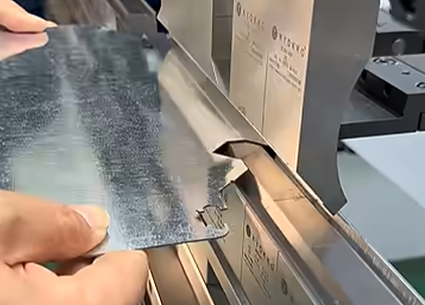
In this section, the operator should:
- Define the required punch and die
- Set the bend angles and bend lengths
- Confirm material thickness and properties
- Verify that the bend sequence is feasible without collisions
Step 2: Creating the Second Bend Section
After completing the first section, a second bend section must be created for the remaining box bends. These bends are usually perpendicular to those in the first section and complete the box geometry.
Both sections are stored within the same programme but treated as independent bend sections by the ESA S875 control. During production, the press brake will complete the first section entirely before moving to the next one.
This sectional approach is the core principle behind reliable ESA S875 Box Bending.
How to Add a Section in ESA S875 Box Bending
During programming, it may be necessary to add additional sections to refine the bending process or adjust the part geometry.
To add a section in either a graphic or numeric programme:
- Naciśnij [Zmień sekcję] klawisz funkcyjny.
- A new section will be created within the programme.
- Define the bends, tools, and parameters specific to that section.
Adding sections provides greater flexibility when handling complex box shapes or parts with varying flange heights.
How to Delete a Section Safely
If a section is no longer required or was created by mistake, ESA S875 allows it to be removed easily.
To delete a section:
- Move the cursor to the section you want to remove.
- Press the menu key to open the options.
- Wybierać Delete section (4).
- The section will be deleted, and the programme will automatically return to bend 1.
Proper section management is essential to keep ESA S875 Box Bending programmes clean, efficient, and easy to modify.
Managing Bend Order and Stability
One of the most important factors in ESA S875 Box Bending is bend order. Since box-shaped parts tend to become unstable as more sides are formed, starting from the smallest width ensures better control of the sheet during bending.
By separating bends into logical sections and following the correct execution order, operators can:
- Improve part positioning
- Reduce manual repositioning
- Minimize collision risks
- Achieve consistent box dimensions
Best Practices for ESA S875 Box Bending
To ensure reliable results, consider the following best practices:
- Always verify tool compatibility before programming
- Keep bend sections logically grouped by direction
- Use simulation whenever available to check feasibility
- Avoid excessive flange heights in early sections
- Review section order when changing material or thickness
Applying these practices helps maximize the accuracy and repeatability of ESA S875 Box Bending in daily production.
Często zadawane pytania (FAQ)
How many bend sections are required for ESA S875 Box Bending?
At least two bend sections are required for ESA S875 Box Bending. One section is used for bends in one direction, and the other section handles bends in the perpendicular direction. More sections can be added if the box geometry is complex or if additional control is needed during bending.
Can ESA S875 Box Bending be programmed in both graphic and numeric modes?
Yes, ESA S875 Box Bending can be programmed using either graphic programmes or numeric programmes. The bending logic remains the same in both cases. The choice depends on operator preference, part complexity, and whether visual verification is required during setup.
How can sections be modified during ESA S875 Box Bending setup?
Sections can be easily managed within the programme. To add a section, press the [Zmień sekcję] function key. To delete a section, move to the target section, open the menu, and select Delete section (4). Proper section management is essential for efficient ESA S875 Box Bending programming.
Wniosek
ESA S875 Box Bending provides a structured and reliable solution for forming box-shaped parts, even though flat development cannot be defined directly in the control system. By dividing the bending process into multiple sections—typically horizontal and vertical bends—and executing them sequentially, operators can accurately and safely complete box bending operations.
Understanding how to organize bend sections, manage programme execution order, and modify sections when necessary is essential for achieving consistent results. When used correctly, ESA S875 Box Bending not only improves bending accuracy but also enhances production efficiency, making it a practical choice for complex box-forming applications in sheet metal fabrication.


