


The ESA S650 Bending Coefficients settings play an important role in improving bending accuracy for Dutch Folding and Coining operations. Properly configuring these coefficients helps operators optimize L.D.C. calculations, achieve more consistent bending results, and reduce correction time during production.
In this guide, you will learn how to properly configure ESA S650 Bending Coefficients, including accessing the coefficient correction page, modifying parameters, saving settings, and restoring default values when needed. Understanding these settings can help improve machine performance and bending precision in different production applications.
How to Access ESA S650 Bending Coefficients Settings
Step 1: Opening the Corrections Page
To begin configuring the ESA S650 Bending Coefficients, operators first need to access the corrections menu in the control system. Press the correction button on the interface to open the Corrections page.
This section contains multiple adjustment options related to bending accuracy and machine calibration.
Step 2: Entering the Coefficients Corrections Page
Inside the Corrections page, press the [Corrections de coefficient] key to open the Coefficients Corrections interface.
This page contains the configuration parameters for:
- Dutch Folding coefficients
- Coining coefficients
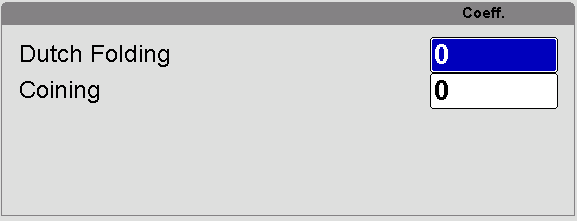
These parameters are used to optimize bending calculations for specific bending methods.
How to Configure ESA S650 Bending Coefficients Properly
Step 3: Entering Dutch Folding and Coining Parameters
After opening the Coefficients Corrections page, enter the required values for Dutch Folding and Coining operations. These coefficients are applied to the L.D.C. calculations used during bending.
The configured values are algebraically added to the standard calculated L.D.C., helping improve bending precision for specialized forming processes.
Step 4: Rebooting the NC System
Once the new coefficient values have been entered, the NC system must be restarted for the changes to take effect.
Without rebooting the control system, the updated ESA S650 Bending Coefficients will not be fully applied to production calculations.
Saving and Managing ESA S650 Bending Coefficients
Step 5: Automatic Saving of Coefficients
The ESA S650 system automatically saves coefficient values whenever the operator exits the Coefficients Corrections page.
This feature simplifies setup and prevents accidental loss of parameter changes.
Step 6: Understanding Where Coefficients Are Stored
It is important to note that the coefficient settings are not saved within individual work programs. Instead, they remain linked directly to the machine itself.
This means the configured coefficients will continue to apply across different programs until modified again.
How to Reset ESA S650 Bending Coefficients
Step 7: Restoring Previous Coefficient Values
If incorrect settings are entered, operators can easily restore the original values by pressing the [Undo Correct.] clé.
This function reloads the coefficient values that were present when the page was initially opened, allowing operators to quickly recover from setup mistakes.
Best Practices for ESA S650 Bending Coefficients Configuration
Keeping a Record of Coefficient Changes
Maintaining a written record of coefficient adjustments can help operators track machine performance over time. Recording previous values, material types, and bending results makes troubleshooting easier and supports faster optimization in future jobs.
Coordinating Coefficients with Tooling Setup
Bending coefficients should always be considered together with punch and die setup. Even correctly configured coefficients may not deliver accurate results if the tooling dimensions or installation are incorrect.
For the best performance:
- Verify tooling alignment
- Confirm material thickness settings
- Inspect punch and die condition regularly
- Recalibrate when changing tooling types
Combining proper tooling setup with optimized ESA S650 Bending Coefficients helps achieve maximum bending precision and long-term production stability.
Foire aux questions (FAQ)
Are the coefficient settings saved automatically?
Yes, the ESA S650 automatically saves coefficient changes when exiting the Coefficients Corrections page.
How can I restore the original coefficient settings?
You can restore the previous values by pressing the [Undo Correct.] key, which reloads the settings present before changes were made.
Why do I need to reboot the NC after changing coefficients?
The NC system must be restarted so the new coefficient values can be fully applied to bending calculations and machine operations.
Conclusion
Proper configuration of ESA S650 Bending Coefficients is essential for achieving accurate and consistent Dutch Folding and Coining operations. By correctly accessing the coefficient correction page, entering suitable parameter values, rebooting the NC system, and verifying results carefully, operators can significantly improve bending precision and production efficiency.
Understanding how these coefficients interact with L.D.C. calculations also helps reduce setup errors and maintain stable machine performance over time. Regular verification and gradual adjustments are recommended to achieve the best results for different materials and bending applications.
For more technical support, detailed documentation, or advanced setup guidance, feel free to contact HARSLE or explore additional resources on our website to further optimize your press brake operations.


