


ESA S929 Parameter Management is an essential function for configuring and maintaining the operating parameters of the ESA S929 controller. Proper parameter settings ensure stable machine performance, accurate bending results, and reliable communication between the controller and the press brake. If you want to learn how to view, modify, save, and manage controller parameters safely, this guide will walk you through the key operations step by step. Whether you are commissioning a new machine, optimizing production settings, or troubleshooting system behavior, understanding ESA S929 Parameter Management will help you configure your controller more efficiently and reduce the risk of incorrect parameter adjustments.
Understanding ESA S929 Parameter Management
ESA S929 Parameter Management provides a centralized interface for configuring and maintaining machine parameters within the controller. These parameters determine how the CNC system communicates with the presse plieuse, controls machine functions, and stores configuration data.
Proper parameter management is essential for ensuring stable machine operation, maintaining bending accuracy, and simplifying machine maintenance.
The controller stores its configuration data internally and also supports saving parameter files to an external USB memory device formatted with the fat 32 file system.
How to Access ESA S929 Parameter Management
To configure machine parameters, open the Configuration menu from the controller interface.

After entering the configuration page, several parameter categories are available, including:
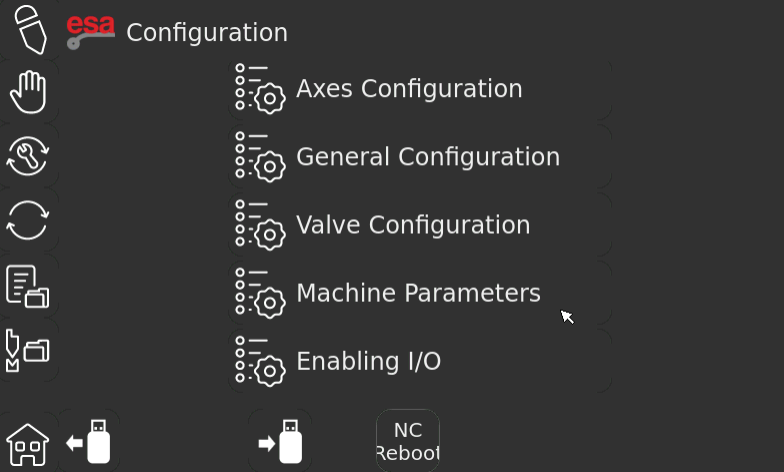
- Axes Configuration
- General Configuration
- Valve Configuration
- Machine Parameters
- Enabling I/O
Each category contains settings related to a specific part of the machine control system.
Before modifying any values, it is recommended to create a complete parameter backup to prevent accidental data loss.
Memory Devices Used for ESA S929 Parameter Management
The ESA S929 controller supports both internal storage and external USB devices for parameter management.
Internal CNC Storage
All operating parameters are stored inside the controller memory during normal operation. These values remain available after restarting the machine unless they are intentionally modified or overwritten.
USB Memory Backup
For maintenance purposes, parameter files can be saved to a USB memory key.
To ensure compatibility, the USB device should be formatted using the FAT32 file system before use.
Creating regular backups allows operators to restore machine settings quickly if necessary.
How to Save Machine Parameters to a USB Drive
Backing up configuration data is an important part of ESA S929 Parameter Management.
Step 1: Open the Configuration Menu
Press the Home button and enter the Configuration interface.

Step 2: Connect a USB Memory Device
Insert a FAT32-formatted USB memory key into the controller’s USB port.
Step 3: Save Parameters
Press the Save to USB function.

The controller will begin exporting all machine parameters to the connected USB device.
During this process, a progress message may appear on the screen indicating that the save operation is in progress.

Step 4: Wait for Completion
When the progress message disappears, the export procedure has finished successfully.
At this point, the parameter backup has been stored on the USB memory device and can be used for future restoration if required.
How to Load Machine Parameters from a USB Drive
ESA S929 Parameter Management also allows previously saved configuration files to be restored from external storage.
Step 1: Insert the Backup USB Device
Connect the USB memory key containing the saved parameter file.
Step 2: Open the Configuration Page
Navigate to the Configuration interface through the controller menu.
Step 3: Import Parameters
Press the Load from USB function.
The controller will automatically read the stored configuration data and load all parameters into the CNC system.
Once the process is complete, the imported settings become active and can be used for machine operation.
Configuration Categories Available in ESA S929 Parameter Management
The configuration interface organizes machine settings into several dedicated sections.
Axes Configuration
This section contains parameters related to axis movement and positioning. It defines how each machine axis operates during bending cycles.
General Configuration
General Configuration stores overall controller settings that affect system behavior and operational preferences.
Valve Configuration
Valve Configuration manages parameters associated with hydraulic valve operation and machine response.
Correct valve settings help ensure stable and repeatable machine performance.
Machine Parameters
The Machine Parameters section includes values directly related to machine characteristics and operating limits.
These settings should only be modified by qualified personnel or according to manufacturer recommendations.
Enabling I/O
This section controls input and output assignments used for communication between the controller and external machine components.
Proper I/O configuration is essential for reliable system operation.
Best Practices for ESA S929 Parameter Management
Before changing any controller settings, always create a complete USB backup of the existing parameters. This provides a recovery point if incorrect values are entered during maintenance or commissioning.
Only modify parameters when their purpose is fully understood, and document any changes made to the system configuration. In addition, keep backup copies in a secure location and update them whenever significant machine adjustments are performed.
By following these practices, users can make full use of ESA S929 Parameter Management while maintaining machine stability, reducing downtime, and protecting important configuration data.
Foire aux questions (FAQ)
Can incorrect parameter settings affect machine performance?
Yes. Incorrect parameter values may cause positioning errors, unstable machine operation, improper hydraulic response, or communication issues between the controller and machine components. Parameter changes should be performed carefully.
When should machine parameters be restored from a backup?
Parameter restoration is commonly performed after controller replacement, software reinstallation, machine commissioning, parameter corruption, or when returning the machine to a previously verified configuration.
What type of USB device should be used for parameter backup?
ESA recommends using a USB memory device formatted with the FAT32 file system. This format ensures compatibility with the controller during save and load operations.
Conclusion
ESA S929 Parameter Management plays a critical role in maintaining stable controller operation and protecting important machine configuration data. By understanding how to access the configuration menu, save parameters to a USB device, restore backups, and manage various configuration categories, operators can ensure reliable machine performance and simplify future maintenance tasks.
Regular parameter backups are highly recommended, especially before software updates, machine commissioning, or major configuration changes. Maintaining up-to-date backup files can help minimize downtime and provide a quick recovery solution when needed.
If you need additional support with ESA S929 Parameter Management, machine configuration, or controller maintenance, feel free to contact the HARSLE technical support team. You can also explore more HARSLE documentation and training resources to learn about advanced controller functions, troubleshooting procedures, and machine optimization techniques.


