


CybTouch 8 Error Codes help operators identify machine faults, configuration problems, and operational issues during press brake operation. When an error occurs, the CybTouch 8 controller displays an error number and a detailed message, allowing users or technicians to locate the cause more quickly. Understanding CybTouch 8 Error Codes is essential for minimizing machine downtime, improving troubleshooting efficiency, and ensuring safe operation. In this guide, I will explain how to identify common error codes, understand their meanings, and apply the appropriate troubleshooting methods before contacting technical support.
Understanding CybTouch 8 Error Codes
Le CybTouch 8 Error Codes system is designed to provide clear diagnostic information whenever the controller detects an abnormal condition. Instead of displaying a generic fault message, the controller assigns a unique error code that corresponds to a specific machine, software, safety, or configuration issue.
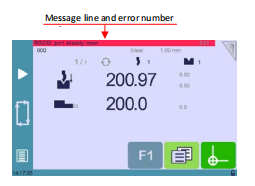
Error messages are typically displayed on a fond rouge, indicating that the controller has detected a condition requiring operator attention or technical intervention. In contrast, warning messages usually appear on a green background and provide operational information rather than reporting a fault.
When an error message appears, the controller displays both the message text and the associated error number. If technical assistance is required, operators should record the complete message exactly as it appears, including any values or numbers shown in brackets. This information helps technicians diagnose the problem more accurately and reduces unnecessary troubleshooting time.
Although some CybTouch 8 Error Codes can be resolved by checking machine settings or correcting operator actions, others may indicate hardware failures or configuration problems that require qualified service personnel.
Common Types of CybTouch 8 Error Codes
La plupart CybTouch 8 Error Codes fall into several common categories. Understanding these categories helps operators quickly determine where to begin troubleshooting.
Material Configuration Errors
Some errors occur because the material information has not been configured correctly.
Par exemple:
- E21 – No material defined
- E41 – Thickness smaller than minimum
- E42 – Thickness greater than maximum
These messages indicate that the selected material parameters do not match the controller’s configured limits. Before starting production, verify that the correct material type and thickness have been selected and that the material database has been configured properly.
Safety and Input Errors
Safety-related errors protect both the operator and the machine.
Exemples :
- E22 – Safety speed input activated
- E28 – I/O overload
- E43 – Configuration error
These errors may appear if safety circuits, protective devices, or machine inputs are not operating correctly. Operators should verify emergency stop circuits, protective guards, safety switches, and machine wiring before attempting to continue operation.
If the error remains after restarting the machine, technical inspection is recommended.
Configuration and Software Errors
Configuration problems generally occur after incorrect parameter settings, software changes, or damaged program files.
Typical examples include:
- E31 – Crowning analog input not configured
- E32 – Crowning analog output not configured
- E33 – Syntax error in XML file
- E34 – Memory allocation problem
These CybTouch 8 Error Codes usually require checking machine parameters or verifying controller configuration. If an imported file is corrupted or incompatible, replacing it with a valid backup may resolve the issue.
Hardware and Communication Errors
Some error codes indicate communication failures between the controller and connected hardware.
Exemples :
- E29 – Radio link error
- E30 – Touchscreen error
- E88 – RS232 port already open
These faults may be caused by communication interruptions, hardware malfunctions, or connection problems. Operators should inspect cables, communication interfaces, and peripheral devices before restarting the controller.
How to Troubleshoot CybTouch 8 Error Codes
Lors du dépannage CybTouch 8 Error Codes, following a structured process can significantly reduce downtime and prevent unnecessary machine adjustments.
Step 1 – Read the Complete Error Message
Always read the entire message instead of only the error number.
Many error messages include additional information that helps identify the affected component or operating condition.
Record:
- Error number
- Complete message
- Values shown in brackets
- Machine operating condition
This information is valuable if technical support is required.
Step 2 – Check Recent Machine Operations
Determine what happened immediately before the error appeared.
Ask questions such as:
- Was a new program loaded?
- Were machine parameters modified?
- Was tooling replaced?
- Was a USB device connected?
- Was maintenance recently performed?
Understanding the sequence of events often helps identify the root cause more quickly.
Step 3 – Verify Machine Configuration
Many CybTouch 8 Error Codes are caused by incorrect configuration rather than hardware failure.
Check:
- Material settings
- Sélection d'outils
- Machine parameters
- Axis configuration
- Couronnement settings
- Safety inputs
Correcting an incorrect parameter may immediately clear the error without further repairs.
Step 4 – Inspect Hardware Components
If configuration settings are correct, inspect the physical machine.
Pay particular attention to:
- Electrical wiring
- Safety switches
- Sensors
- Communication cables
- Hydraulic system status
- Back-gauge movement
- Servo drives and motors
Visible damage or loose connections often explain communication or hardware-related error codes.
Frequently Asked Questions(FAQ)
Can I continue operating the machine after an error appears?
It depends on the type of error. Some CybTouch 8 Error Codes are related to configuration or programming issues that can be corrected by the operator. Others involve safety systems, communication failures, or hardware faults that should be resolved before continuing production to avoid equipment damage or unsafe operation.
What causes material-related error codes?
Material-related errors are usually caused by incorrect material settings, undefined materials, or thickness values outside the configured range. Always verify the selected material type and thickness before starting a bending operation.
Should I restart the controller after an error occurs?
Restarting the controller may clear temporary software or communication issues. However, if the same CybTouch 8 Error Code reappears after restarting, further inspection is required to identify the underlying cause rather than repeatedly resetting the machine.
Conclusion
Understanding CybTouch 8 Error Codes is essential for maintaining reliable press brake operation and reducing unnecessary downtime. The controller’s diagnostic system provides valuable information about machine status, configuration issues, communication failures, and safety-related faults, enabling operators to identify problems more quickly.
By following a structured troubleshooting process—reading the complete error message, checking recent machine operations, verifying configuration settings, and inspecting hardware components—many common issues can be resolved efficiently without unnecessary machine adjustments.
For persistent faults or critical hardware errors, operators should record the complete CybTouch 8 Error Codes information and consult qualified technical support. Proper troubleshooting not only improves maintenance efficiency but also helps ensure safe, stable, and productive operation of the CybTouch 8 controller.


