


مكبس هيدروليكي PLC Problems can affect machine operation, production efficiency, and overall equipment reliability. When a hydraulic press stops unexpectedly, displays abnormal signals, or fails to execute programmed commands, the PLC system is often one of the key areas that requires inspection. In this guide, I will explain how to identify common PLC issues, check related components, and apply effective troubleshooting methods to restore stable hydraulic press operation.
ما هي الأسباب مكبس هيدروليكي PLC Problems?
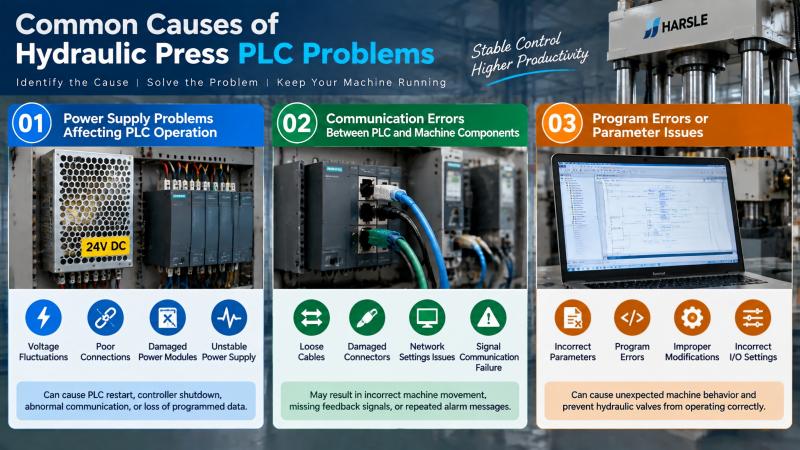
The PLC (Programmable Logic Controller) is the core control unit of a modern hydraulic press. It receives signals from sensors, processes machine data, and controls hydraulic valves, motors, and other electrical components. When the PLC system experiences faults, the hydraulic press may show alarm messages, incorrect movements, or complete operation failure.
Understanding the root causes of PLC problems helps operators quickly locate faults and reduce unnecessary downtime.
Power Supply Problems Affecting PLC Operation
An unstable power supply is one of the common causes of PLC failures. Voltage fluctuations, poor connections, or damaged power modules may prevent the PLC from working correctly.
Typical symptoms include PLC restart, controller shutdown, abnormal communication, or loss of programmed data. I recommend checking the PLC power indicator, input voltage, and power supply connections before performing further troubleshooting.
Communication Errors Between PLC and Machine Components
Modern hydraulic presses rely on communication between the PLC, sensors, drives, touch screens, and other control devices. If communication cables become loose or damaged, the PLC may not receive accurate signals.
Communication failures can cause problems such as incorrect machine movement, missing feedback signals, or repeated alarm messages. Checking communication cables, connectors, and network settings is an important step when troubleshooting hydraulic press PLC problems.
Program Errors or Parameter Issues
PLC programs control the working sequence and operation logic of hydraulic presses. Incorrect parameters, damaged programs, or improper modifications may cause unexpected machine behavior.
For example, incorrect input/output settings may prevent hydraulic valves from operating correctly. Reviewing PLC parameters and comparing them with the original machine settings can help identify software-related issues.
How to Troubleshoot Hydraulic Press PLC Problems Step by Step
Step 1: Check PLC Alarm Messages and Diagnostic Information
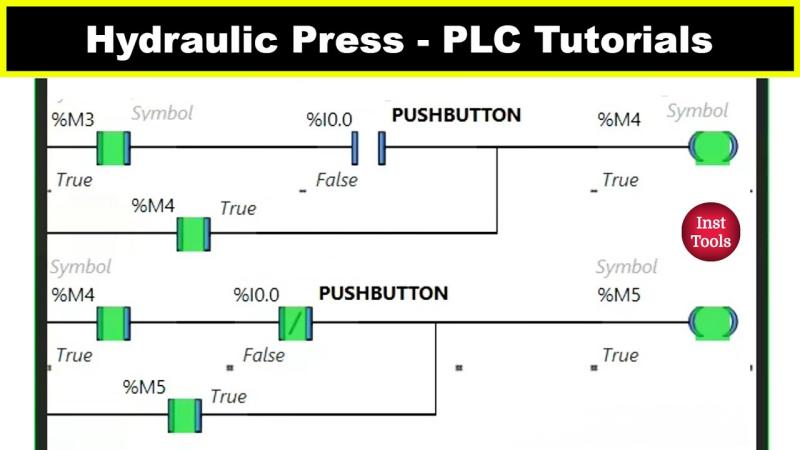
The first step in troubleshooting hydraulic press PLC problems is reviewing the alarm information displayed on the control panel. Many modern hydraulic presses provide diagnostic messages that help operators locate the problem area.
Before resetting the machine, record the alarm code, operating condition, and time when the fault occurred. Check whether the problem happens during startup, automatic operation, or a specific working cycle.
This information helps determine whether the issue is related to sensors, communication, electrical components, or PLC programming.
Step 2: Inspect PLC Power Supply and Electrical Connections
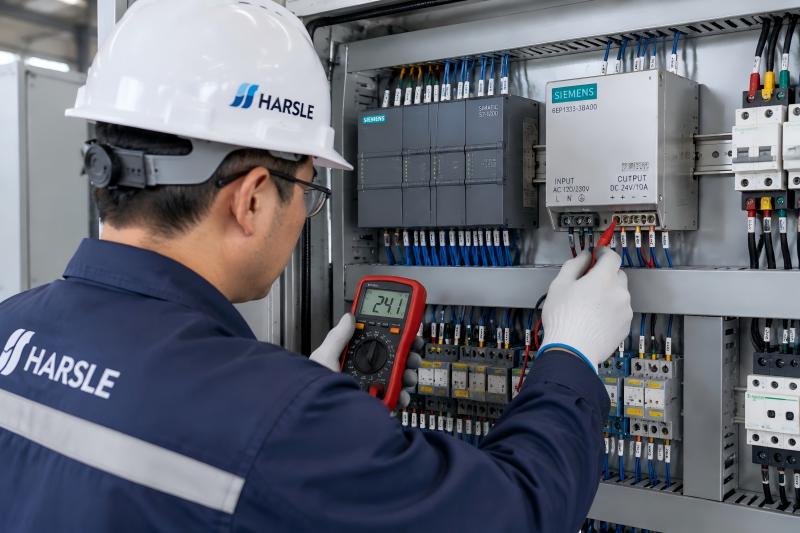
After confirming the alarm information, check the PLC power supply system. Make sure the power module is working normally and that all terminals are properly connected.
Inspect wiring terminals, circuit breakers, fuses, and connectors for signs of looseness, overheating, or damage. Poor electrical connections may cause intermittent PLC failures that are difficult to identify.
Keeping the electrical cabinet clean and properly ventilated also helps prevent overheating and extends the service life of PLC components.
Step 3: Check PLC Input and Output Signals
The PLC controls hydraulic press operation by receiving input signals and sending output commands. If input or output signals are abnormal, the machine may not perform correctly.
Use the PLC monitoring function to check whether sensors, switches, and control signals are being detected correctly. If an input signal is missing, inspect the related sensor or wiring. If an output signal is incorrect, check the corresponding valve, relay, or actuator.
This method helps operators determine whether the problem comes from the PLC itself or from external components.
Step 4: Verify PLC Program and Machine Parameters
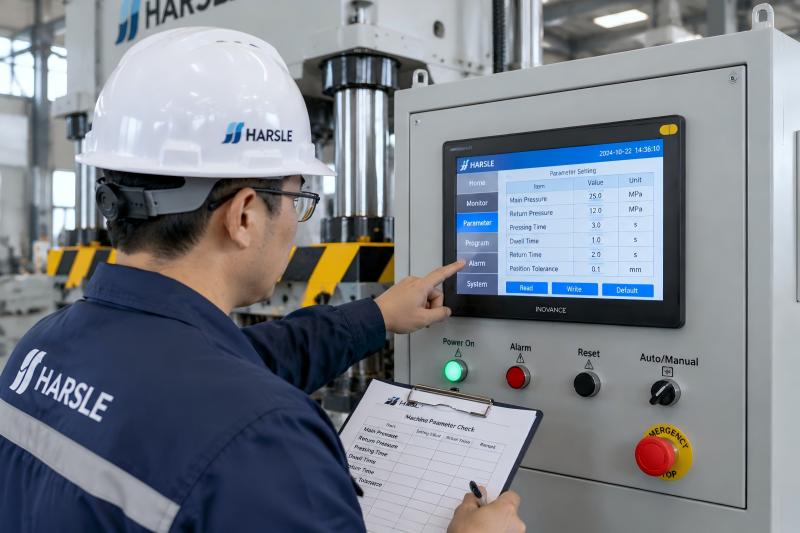
If hardware components are functioning normally, the next step is checking the PLC program and operating parameters.
Confirm that the program has not been modified incorrectly and that machine parameters match the manufacturer’s recommended settings. Unauthorized program changes may cause incorrect operation sequences or control errors.
Before making any changes, I recommend saving the original PLC settings to prevent data loss and allow easy recovery if needed.
How to Prevent Hydraulic Press PLC Problems?
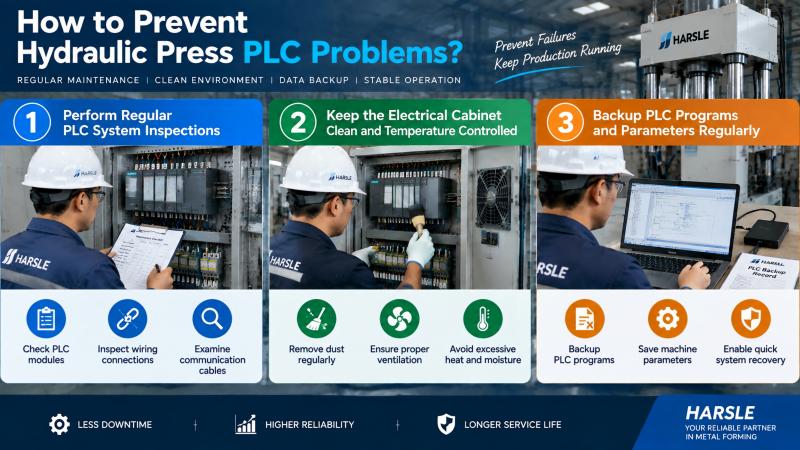
Perform Regular PLC System Inspections
Preventive inspections help identify potential PLC issues before they interrupt production. I recommend regularly checking PLC modules, wiring connections, communication cables, and electrical cabinet conditions.
Maintaining inspection records makes it easier to track repeated failures and develop effective maintenance plans.
Keep the Electrical Cabinet Clean and Temperature Controlled
Dust, moisture, and excessive heat can negatively affect PLC performance. Regular cleaning of the electrical cabinet and checking cooling systems can reduce the risk of electronic failures.
A stable operating environment helps PLC components maintain accurate signal processing and reliable communication.
Backup PLC Programs and Parameters Regularly
PLC programs and machine parameters are important for hydraulic press operation. Regular backups protect against data loss caused by component failure or accidental changes.
Keeping updated backup files allows technicians to restore the system faster and reduce production downtime.
Common Hydraulic Press PLC Problems and Solutions
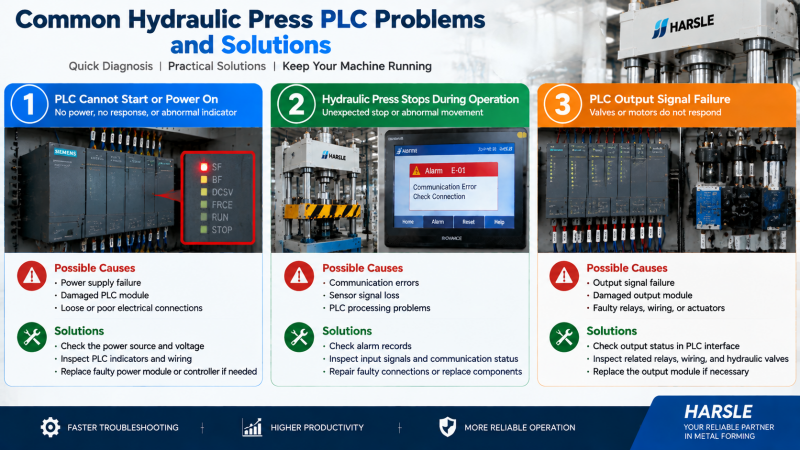
PLC Cannot Start or Power On
A PLC that cannot start may be caused by power supply failure, damaged modules, or electrical connection problems.
Check the power source, PLC indicators, and related wiring. If the power supply is normal but the PLC remains inactive, the power module or controller may require further inspection.
Hydraulic Press Stops During Operation
Unexpected machine stops may occur due to communication errors, sensor signal loss, or PLC processing problems.
Check alarm records, input signals, and communication status to identify the source of the interruption. Repairing faulty connections or replacing damaged components can restore normal operation.
PLC Output Signal Failure
When PLC output signals fail, hydraulic valves or motors may not respond correctly.
Check the output status through the PLC monitoring interface and inspect related relays, wiring, and actuators. If the PLC output module is damaged, replacement may be required.
الأسئلة الشائعة
What are the most common causes of hydraulic press PLC problems?
Common causes include unstable power supply, communication failures, incorrect PLC parameters, damaged modules, and faulty input or output signals.
How can I check if my hydraulic press PLC is working correctly?
Check PLC indicators, alarm messages, input/output signals, and communication status through the control panel or PLC monitoring software.
Can electrical problems cause PLC failures?
Yes. Loose wiring, voltage instability, overheating, and poor electrical cabinet conditions can affect PLC operation and cause machine failures.
خاتمة
استكشاف الأخطاء وإصلاحها Hydraulic Press PLC Problems requires a systematic approach that includes checking alarm information, inspecting power supplies, verifying communication signals, and reviewing PLC programs. Proper preventive maintenance can reduce unexpected failures and improve hydraulic press reliability.
At HARSLE, we provide professional hydraulic press solutions and technical support to help customers maintain stable production. For more troubleshooting information or detailed machine documentation, contact our engineering team or explore additional maintenance guides.


