


Accessing CybTouch 8 System Settings
To control CybTouch 8 System Settings efficiently, operators must first understand where these settings are located and how they affect machine operation. The System Settings page contains various configuration options that influence controller behavior, machine calibration, data management, and user experience.
Most of these settings apply globally to the controller rather than to individual bending programs. Therefore, changes should be made carefully and only after understanding their functions.
The System Settings page is commonly used during:
- Machine commissioning
- Controller setup
- Maintenance procedures
- Troubleshooting operations
- Production optimization
How to Control BDC Correction
BDC (Bottom Dead Center) Correction is one of the most important CybTouch 8 System Settings because it directly affects bending accuracy.
BDC Correction applies a permanent adjustment to the calculated Bottom Dead Center position.
Unlike temporary bend corrections, this value remains active for all programs until it is modified again.
BDC Correction is useful when:
- Consistent angle deviations occur
- The machine produces identical errors across different programs
- Minor calibration adjustments are required
However, excessive correction values may indicate underlying machine problems that should be investigated.
Best Practice
Before adjusting BDC Correction:
- Verify tooling dimensions.
- Check material settings.
- Confirm machine calibration.
- Review indexing accuracy.
Only apply BDC Correction after other potential causes have been eliminated.
How to Control RFLink Communication
RFLink is a service-related communication function available within CybTouch 8 System Settings.
Purpose of RFLink
RFLink allows the controller to communicate with a laptop equipped with a Cybelec RFLink dongle.
This function is primarily used for:
- Technical support
- Machine diagnostics
- Software maintenance
- Commissioning procedures
For security reasons, RFLink automatically returns to the OFF state after a controller restart.
Most operators will never need to activate this function during normal production.
How to Control Machine Indexation
Proper indexing is essential for accurate machine positioning.
Using Clear Indexation
The Clear Indexation function removes the current indexing data and starts a new indexing procedure without requiring a complete controller restart.
This feature can be useful when:
- Axis positions become inconsistent
- Maintenance work has been completed
- Position references need to be refreshed
Performing a new indexing cycle can help:
- Restore positioning accuracy
- Resolve synchronization issues
- Improve machine stability
How to Control USB File Management
USB Explorer provides a convenient method for transferring files between the controller and external USB storage devices.
Using USB Explorer
The USB Explorer function allows operators to:
- Browse USB folders
- Import part programs
- Export backup files
- Transfer tooling data
Recommended File Management Practices
To avoid compatibility issues:
- Use properly formatted USB devices.
- Keep exported files inside their original folders.
- Create regular backups of important programs.
- Verify file integrity after transfers.
Good file management practices help prevent accidental data loss.
How to Control Default Retraction Settings
Retraction settings determine how the backgauge moves during certain bending operations.
Default Retraction defines the standard retraction distance applied during programming.
The controller can automatically calculate retraction values in graphical programming mode, but operators may manually adjust them when necessary.
Correct retraction values help:
- Prevent workpiece collisions
- Improve part handling
- Increase production efficiency
- Reduce operator intervention
How to Control Date and Time Settings
Accurate date and time information is important for machine records and production traceability.
The Set Clock function allows users to adjust:
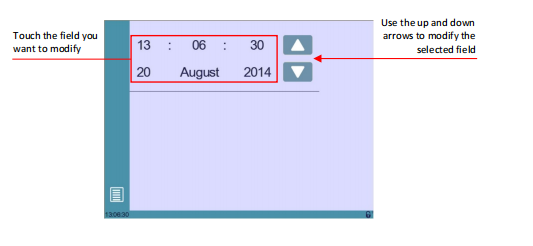
- ساعات
- دقائق
- Seconds
- Day
- Month
- Year
Why Time Settings Matter
Correct clock settings improve:
- Maintenance tracking
- Production records
- Error logging
- Operational reporting
For machines connected to production management systems, accurate timestamps are especially important.
How to Control Touchscreen Performance
The touchscreen is the primary interface used for operating the CybTouch controller.
Performing Touchscreen Calibration
If touch accuracy decreases, calibration can restore proper operation.
To perform calibration:
- Open the Touchscreen Calibration page.
- Follow the on-screen instructions.
- Touch the displayed targets accurately.
- Save the calibration results.
Touchscreen Care Recommendations
Always use:
- Clean fingers
- Plastic styluses designed for touchscreens
Never use:
- Metal tools
- مفكات البراغي
- Sharp objects
- Excessive force
Proper touchscreen care helps maintain long-term reliability.
How to Control Display Settings
Several CybTouch 8 System Settings influence screen visibility and operator comfort.
Adjusting Brightness
Brightness settings allow operators to optimize screen visibility according to ambient lighting conditions.
Proper brightness levels improve:
- Readability
- Operator comfort
- Interface visibility
Using Eco Mode
Eco Mode automatically reduces display brightness to lower power consumption.
Benefits include:
- Reduced energy usage
- Extended screen lifespan
- Lower operating costs
Many operators enable Eco Mode during long production shifts.
How to Control Production Tracking
The Program Counter Mode helps monitor production quantities.
Counting Up Mode
The counter increases after each completed part.
Counting Down Mode
The counter decreases from a predefined target quantity until reaching zero.
Production Advantages
Using Program Counter Mode helps:
- Track production goals
- Monitor completed quantities
- Improve workflow planning
- Reduce counting errors
The counter value is automatically saved, even after power shutdown.
How to Control Advanced System Options
Several advanced settings provide additional flexibility for experienced users.
عرض L أولاً
This option determines how flange dimensions are displayed and entered.
Operators can choose between:
- External dimensions
- Actual backgauge positions

Disable Recalculation at Product Load
This setting controls whether the controller recalculates axis positions when loading existing programs.
Disabling recalculation may be useful when preserving previously validated production data.
مساعدات الفهرسة
Indexation Aids provide warning messages and guidance when indexing problems occur.
This feature helps operators identify and resolve positioning issues more efficiently.
Beam Stops During Retraction
This setting controls whether the beam pauses while the backgauge retracts.
Proper configuration can improve:
- Machine safety
- Cycle efficiency
- Workpiece handling
Best Practices for Controlling CybTouch 8 System Settings
To control CybTouch 8 System Settings effectively, operators should make adjustments only after understanding the purpose of each parameter. Routine settings such as brightness, clock configuration, and USB management can typically be modified by machine operators, while calibration and indexing-related parameters should be handled more carefully.
Documenting important changes and maintaining regular backups can further improve machine reliability. By learning how to control CybTouch 8 System Settings properly, operators can enhance machine performance, simplify maintenance tasks, and create a more efficient production environment.
الأسئلة الشائعة
What is BDC Correction used for?
BDC (Bottom Dead Center) Correction applies a permanent adjustment to the calculated ram bottom position. It is commonly used to compensate for small systematic angle deviations that occur across multiple bending programs.
When should I use the Clear Indexation function?
Clear Indexation should be used when machine positioning data needs to be refreshed, after maintenance work, or when indexing-related positioning inconsistencies are detected. The controller will perform a new indexing sequence without requiring a complete restart.
What is Program Counter Mode used for?
Program Counter Mode tracks production quantities. It can either count upward as parts are completed or count downward from a predefined target quantity. This helps operators monitor production progress more effectively.
Understanding how to control CybTouch 8 System Settings is essential for maintaining reliable machine performance and optimizing daily operation. Features such as BDC Correction, touchscreen calibration, USB management, indexing functions, brightness adjustment, and production counters provide valuable tools that help operators customize the controller according to their production needs.
While many settings are designed to improve usability and efficiency, some parameters directly influence machine positioning and operational behavior. Therefore, changes should be made carefully, especially when modifying calibration or indexing-related functions.
By properly managing CybTouch 8 System Settings, operators can improve machine stability, simplify maintenance procedures, enhance productivity, and create a more efficient working environment. For additional support with CybTouch 8 configuration, troubleshooting, or advanced controller functions, feel free to contact the HARSLE technical support team or explore more HARSLE documentation resources.


