


The CybTouch 8 Service Menu provides access to advanced controller functions used for machine maintenance, diagnostics, system configuration, and software management. Whether you need to calibrate machine axes, perform internal backups, check controller information, or manage system options, understanding the CybTouch 8 Service Menu is essential for maintaining stable and reliable press brake performance. In this guide, I will explain how to navigate the service menu, introduce its key functions, and outline the recommended practices for using service-level features safely. By becoming familiar with the CybTouch 8 Service Menu, you can simplify maintenance tasks, improve troubleshooting efficiency, and keep your press brake operating at its best.
Accessing the CybTouch 8 Service Menu
The CybTouch 8 Service Menu provides access to advanced controller functions used for machine configuration, maintenance, diagnostics, and system management. Unlike the standard operating pages, the Service Menu contains settings that directly affect machine behavior and should be used with caution.
لفتح CybTouch 8 Service Menu, navigate through:
Menu Button → Other Menus → Service → Service
From this page, operators and authorized technicians can access several maintenance-related functions, including:
- تعيين المحور
- صيانة
- معلومة
- Configuration Options
- Service functions
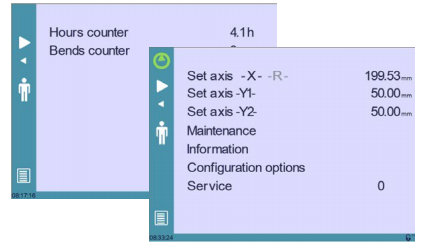
Most of these features are intended for machine commissioning, troubleshooting, and servicing rather than daily production.
Understanding the Set Axis Function
ال تعيين المحور function allows technicians to manually modify the reference positions of the machine axes.
Supported axes include:
- X backgauge axis
- R backgauge axis
- Y1 beam axis
- Y2 beam axis
These parameters directly influence the positioning accuracy of the مكابح الضغط.
When Should Set Axis Be Used?
The Set Axis function is typically required during:
- Initial machine installation
- Machine commissioning
- Encoder replacement
- Hydraulic system maintenance
- Axis recalibration
- Major mechanical repairs
For normal production, these settings should remain unchanged.
Important Safety Notice
أ Level 2 password is required to access the Set Axis page.
Because incorrect axis values can cause positioning errors or mechanical collisions, this function should only be used by experienced technicians.
After machine re-indexing, manually entered axis settings will be cleared and replaced by newly calculated reference positions.
Using the Maintenance Page
ال صيانة page displays important controller and hardware information while providing access to several maintenance utilities.
To open this page:
Menu Button → Other Menus → Service → Service → Maintenance
The Maintenance page allows technicians to monitor controller status and perform service-related operations.
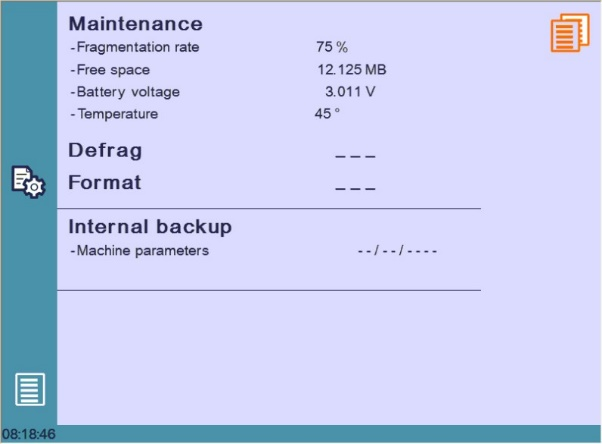
Some maintenance functions require authorization codes and should only be performed under the guidance of qualified service personnel.
Managing Memory with Defrag
ال إلغاء التجزئة function reorganizes the controller’s internal memory to improve storage efficiency.
Why Defrag Is Useful
After long periods of operation, memory fragmentation may occur as programs are repeatedly created, edited, and deleted.
Running Defrag helps:
- Optimize memory organization
- Improve storage efficiency
- Maintain controller performance
- Reduce unnecessary memory fragmentation
During the process, simply follow the instructions displayed by the controller.
Understanding the Format Function
ال شكل function completely erases all stored data inside the CybTouch controller.
Because formatting removes programs, parameters, and other stored information, it should only be performed when absolutely necessary.
Before Formatting
Before using the Format function, always ensure that:
- All part programs have been backed up.
- Tool libraries have been exported.
- Machine parameters have been saved externally.
- Required production files are stored on a USB device or another secure location.
Formatting should generally be performed only under technical guidance or during controller recovery procedures.
Restoring Data with Internal Backup
ال النسخ الاحتياطي الداخلي function is designed primarily for OEM manufacturers and service technicians.
Purpose of Internal Backup
Machine manufacturers normally create a backup of the original machine parameters before delivery.
This backup allows technicians to restore factory settings if controller parameters become damaged or corrupted.
When Should Internal Backup Be Used?
Internal Backup may be required after:
- Controller replacement
- Parameter corruption
- Major maintenance
- System recovery
Because restoring parameters may overwrite existing machine settings, operators should avoid using this function unless instructed by qualified technical personnel.
Viewing Controller Information
ال معلومة page displays software and hardware details for the CybTouch controller.
To access this page:
Menu Button → Other Menus → Service → Service → Information
Typical information displayed includes:
- Hardware version
- Boot version
- CybTouch software version
- RFLink status
- Installed controller firmware
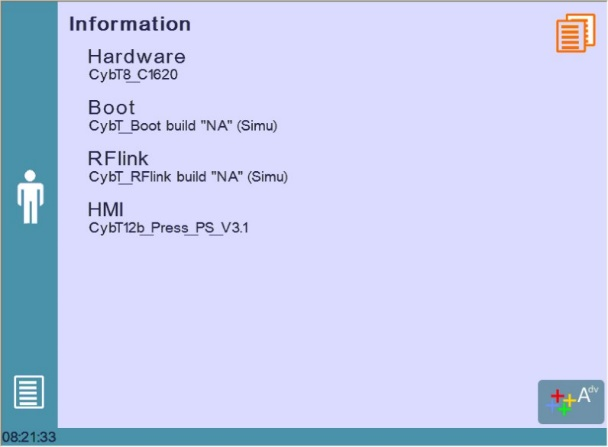
اختيار متقدم button provides additional technical information that can be useful during diagnostics and technical support.
Managing Configuration Options
ال Configuration Options page provides access to identification information and installed software options.
To open this page:
Menu Button → Other Menus → Service → Service → Configuration Options
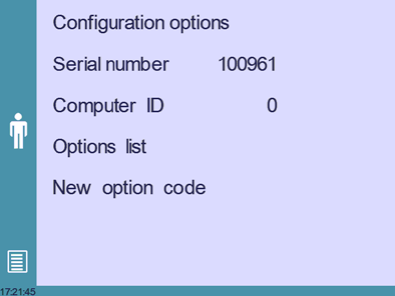
This section is commonly used during controller activation, software upgrades, and option management.
رقم سري
The Serial Number uniquely identifies the controller.
It is assigned during factory production and is associated with the controller’s licensed software options.
Because software licenses are linked to this number, it should never be modified.
Changing the serial number may cause licensed options to become unavailable.
معرف الكمبيوتر
The Computer ID is another unique identifier used together with the Serial Number to verify the controller.
This information is often requested when:
- Contacting technical support
- Purchasing software options
- Registering controller licenses
قائمة الخيارات
The Option List displays every software feature currently activated on the controller.
Examples may include:
- إضافي axis support
- وظائف البرمجة المتقدمة
- Specialized bending options
- Premium software features
Reviewing the Option List allows technicians to confirm whether a required function has already been installed.
رمز الخيار الجديد
When additional software features are purchased, the supplier provides a new option code.
Entering this code enables the purchased functions without replacing the controller hardware.
Because option codes are license-specific, they should only be obtained from the machine manufacturer or an authorized service provider.
Best Practices for Using the CybTouch 8 Service Menu
The CybTouch 8 Service Menu contains powerful maintenance and configuration tools that directly affect controller operation. While functions such as viewing system information are safe for most users, configuration, axis adjustment, formatting, and parameter restoration should only be performed by trained personnel.
Before making any changes, create a complete backup of important programs and machine parameters. Keeping accurate records of configuration changes and following manufacturer recommendations can significantly reduce troubleshooting time and help maintain long-term machine reliability.
By understanding how to navigate the CybTouch 8 Service Menu, operators and technicians can perform maintenance more efficiently, diagnose controller issues more accurately, and ensure the press brake continues operating safely and reliably.
الأسئلة الشائعة
What is the purpose of the Set Axis function?
ال تعيين المحور function allows technicians to manually adjust the reference positions of the X, R, Y1, and Y2 axes. It is commonly used during machine installation, encoder replacement, maintenance, or mechanical repairs. Incorrect settings may affect machine accuracy and should only be modified by qualified personnel.
When should I use the Defrag function?
Defrag reorganizes the controller’s internal memory to improve storage efficiency. It may be useful after frequent program creation, editing, or deletion. Simply follow the on-screen instructions when performing this operation.
خاتمة
The CybTouch 8 Service Menu provides a comprehensive set of maintenance and configuration tools that help technicians keep the controller operating reliably and efficiently. Functions such as تعيين المحور, صيانة, معلومة، و Configuration Options allow users to diagnose machine conditions, manage controller settings, and perform advanced service operations when required.
Because many Service Menu functions directly affect machine calibration and controller configuration, they should always be used with caution. Creating regular backups, protecting machine parameters, and following the recommended maintenance procedures can greatly reduce downtime and help maintain long-term machine performance.
By understanding how to navigate the CybTouch 8 Service Menu, users can improve troubleshooting efficiency, simplify maintenance tasks, and ensure stable press brake operation. If you require further assistance with controller configuration, software options, or service-related functions, the HARSLE technical support team is available to provide professional guidance and additional documentation.


