


ET18 Machine Status provides a centralized diagnostic interface for monitoring input signals, output signals, axis feedback, and historical alarms on electro-hydraulic press brakes. By reviewing these operating conditions, operators and maintenance personnel can identify abnormal machine behavior and investigate potential problems more efficiently.
Unlike programming interfaces, the machine status page focuses on system feedback and equipment diagnostics.
This guide explains how to access the status interface, interpret operating data, understand debugging functions, and review historical alarm records.
What Is ET18 Machine Status?
ET18 Machine Status is a dedicated monitoring interface within the EASYCAT ET18 hydraulic bending control system.
According to the operating manual, operators can observe system input and output signals on this page to analyze potential machine problems.
To access the interface, select the Status icon from the main navigation menu.
The machine status interface contains several functional areas:
- Input signal monitoring
- Output signal monitoring
- Equipment feedback
- Debugging functions
- Auxiliary axis information
- Historical alarm records
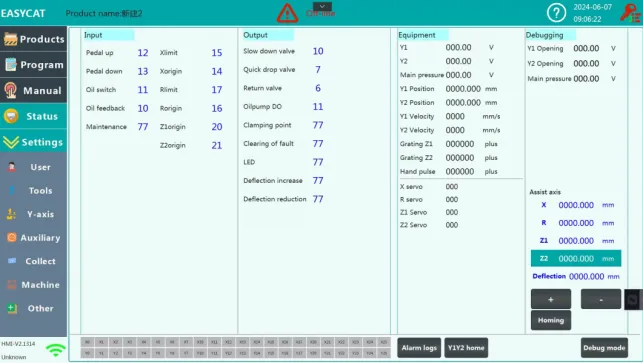
These areas provide different types of diagnostic information and help maintenance personnel understand the machine’s operating conditions.
Monitoring Input Signals
The Input section of the ET18 Machine Status interface displays signals associated with external switches, operating commands, and axis reference positions.
The manual screenshot includes the following input signals:
| Input Signal | Opis |
|---|---|
| Pedal Up | Foot pedal upward command |
| Pedal Down | Foot pedal downward command |
| Oil Switch | Oil pump switch signal |
| Oil Feedback | Oil system feedback signal |
| Konserwacja | Maintenance-related signal |
| X Limit | X-axis limit signal |
| X Origin | X-axis reference origin signal |
| R Limit | R-axis limit signal |
| R Origin | R-axis reference origin signal |
| Z1 Origin | Z1-axis reference origin signal |
| Z2 Origin | Z2-axis reference origin signal |
When investigating an operating problem, maintenance personnel can review the relevant input signal and determine whether the controller is receiving the expected feedback.
For example, if the machine does not respond to a foot pedal command, the corresponding input status can provide useful diagnostic information.
However, the displayed port number alone does not establish whether a signal is active.
Understanding Output Signal Monitoring
The Output section displays signals associated with hydraulic valves and other machine functions.
The ET18 Machine Status interface includes the following output items:
| Output Signal | Opis |
|---|---|
| Slow Down Valve | Slow downward movement valve |
| Quick Drop Valve | Rapid downward movement valve |
| Return Valve | Ram return valve |
| Oil Pump DO | Oil pump digital output |
| Punkt zaciskowy | Clamping-point-related output |
| Clearing of Fault | Fault reset output |
| LED | Lighting output |
| Deflection Increase | Crowning compensation increase |
| Deflection Reduction | Crowning compensation reduction |
Monitoring these outputs helps maintenance personnel determine whether the controller is issuing the relevant commands.
An active output does not necessarily confirm that the corresponding physical component is functioning correctly. Electrical connections, hydraulic components, and mechanical conditions may require further inspection.
Reviewing Equipment Feedback
The Equipment section provides additional operating data associated with the hydraulic system and machine axes.
The displayed information includes:
- Y1 and Y2 voltage values
- Main pressure control voltage
- Y1 and Y2 position feedback
- Y1 and Y2 movement velocity
- Z1 and Z2 grating feedback
- Hand pulse feedback
- X, R, Z1, and Z2 servo information
Position feedback is displayed in millimeters, while movement velocity is displayed in millimeters per second.
These values help maintenance personnel compare machine behavior with the expected operating conditions.
For example, differences between Y1 and Y2 position feedback may require further investigation when abnormal ram synchronization is suspected.
The displayed main pressure voltage should not be confused with an actual hydraulic pressure reading in MPa or bar.
Understanding ET18 Debug Mode
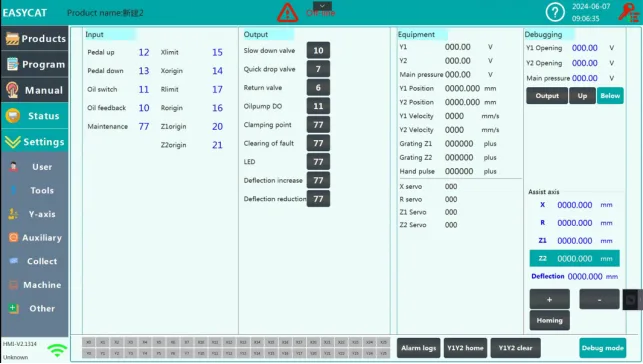
The ET18 Machine Status page also provides a dedicated Debug Mode for technical commissioning and troubleshooting.
According to the manual, the debugging interface supports output control, proportional valve calibration, and manual ram movement.
Selecting Output in the debugging area displays the control status of the corresponding output ports.
The interface also contains settings associated with Y1 Opening, Y2 Opening, and Main Pressure.
Additional functions include:
Y1Y2 Clear: Clears the current Y1 and Y2 position feedback.
Y1Y2 Home: Provides a function for returning Y1 and Y2 to their reference origins.
Debugging functions can directly affect hydraulic outputs and ram movement. They should only be used by qualified technical personnel following the machine manufacturer’s approved commissioning procedures.
Operators should not activate forced outputs or clear position feedback during normal production.
How to Review Historical Alarm Records
Historical alarm records are another important feature of ET18 Machine Status.
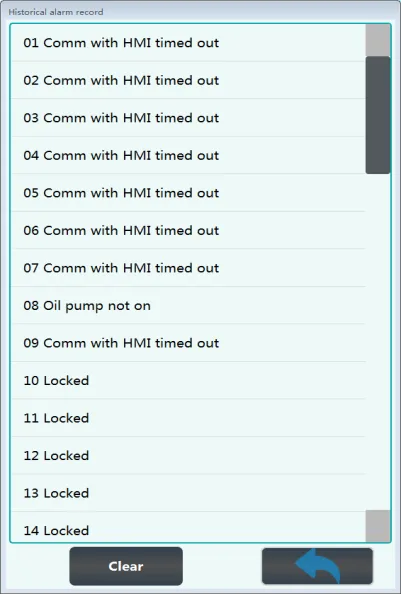
To access the alarm history, select the Alarm Logs button at the bottom of the status interface.
The controller opens a historical alarm record window containing previously recorded alarm messages.
The manual provides examples of the following alarms:
Comm with HMI timed out: Indicates a communication timeout involving the human-machine interface.
Oil pump not on: Indicates that the oil pump is not in the required operating state.
Locked: Indicates a locked condition requiring further investigation.
These messages provide a starting point for troubleshooting but do not necessarily identify the underlying cause.
The alarm history window also contains a Clear button. Before clearing historical records, maintenance personnel should save relevant alarm information for further analysis.
Practical Troubleshooting Recommendations
When using ET18 Machine Status for troubleshooting, follow a structured diagnostic approach.
First, identify the abnormal machine behavior and review any available alarm records.
Next, check the relevant input signals to determine whether the expected commands or feedback are present.
Then, review the corresponding output signals and equipment feedback.
If the controller indicates an expected output but the machine does not respond, further electrical, hydraulic, or mechanical inspection may be necessary.
Record the relevant status information before contacting technical support.
This approach helps narrow down potential problems without making unnecessary parameter adjustments.
Frequently Asked Questions(FAQ)
Can ET18 Machine Status Help Diagnose Foot Pedal Problems?
Yes. The input monitoring area displays Pedal Up and Pedal Down signals. Reviewing these signals can help determine whether the controller receives the corresponding foot pedal commands.
What Does “Comm with HMI Timed Out” Mean?
This alarm indicates a communication timeout involving the controller’s human-machine interface. The exact cause requires further diagnostic inspection.
Does Clearing Alarm Records Resolve Machine Faults?
No. Clearing historical alarm records does not eliminate the underlying machine fault. The cause must be identified and corrected separately.
Wniosek
ET18 Machine Status provides valuable diagnostic information for monitoring electro-hydraulic press brake operation. Its input and output monitoring functions, equipment feedback, debugging interface, and historical alarm records help maintenance personnel investigate potential machine problems.
Understanding the relationship between controller commands and actual machine behavior is essential for effective troubleshooting.
Operators should use the monitoring functions to collect accurate diagnostic information, while advanced debugging and calibration should remain the responsibility of qualified technical personnel.
By using ET18 Machine Status appropriately, manufacturers can improve troubleshooting efficiency, reduce unnecessary adjustments, and support reliable press brake operation.


