


CybTouch 8 Manual Movement allows operators to manually control machine axes for setup, maintenance, tooling changes, and troubleshooting operations. By understanding how to move the ram, backgauge axes, crowning system, and other machine components safely, users can improve setup efficiency and reduce the risk of positioning errors. In this guide, I will explain how to use CybTouch 8 Manual Movement functions correctly, including manual axis positioning, synchronization considerations, safety precautions, and practical operating recommendations. Whether you are preparing a new bending job or performing maintenance procedures, mastering CybTouch 8 Manual Movement will help you work more efficiently and safely.
Accessing CybTouch 8 Manual Movement
CybTouch 8 Manual Movement is designed to help operators manually position machine axes during setup, tooling replacement, maintenance, and troubleshooting. Unlike automatic operation, manual movement provides direct control over individual axes, allowing precise adjustments before production begins.
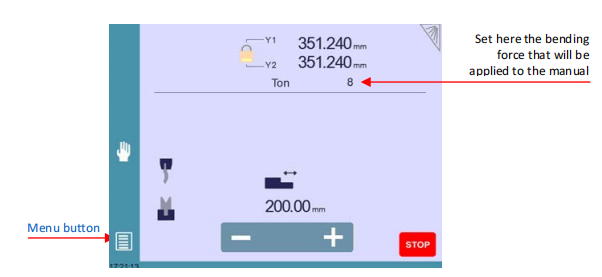
To access the CybTouch 8 Manual Movement page, open the Кнопка меню и выберите Ручное движение. Once the page opens, the controller displays the available machine axes together with the manual movement controls.
Manual operation is particularly useful when changing punches and dies, verifying backgauge positions, or preparing the press brake for a new production job.
Understanding the CybTouch 8 Manual Movement Interface
Сайт CybTouch 8 Manual Movement screen provides a simple interface that allows operators to move each axis independently while monitoring its position in real time.
Several important elements are displayed on the page, including:
- Axis selection buttons
- Current axis positions
- Manual movement controls
- Bending force setting
- Beam movement controls
- Кнопка «Стоп»
Before moving any axis, always verify that the work area is clear and that no tooling or workpieces can interfere with machine movement.
How to Select an Axis for Manual Movement
Before an axis can be moved, it must first be selected.
Depending on the machine configuration, CybTouch 8 Manual Movement supports several controlled axes, including:
- X backgauge axis
- R backgauge axis
- Z1 backgauge axis (available on supported models)
- Z2 backgauge axis (available on supported models)
- Crowning axis
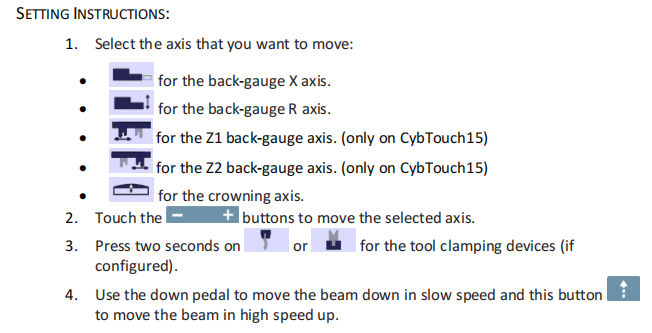
Touch the corresponding axis icon to activate manual control. The selected axis becomes ready for movement using the on-screen control buttons.
Selecting the correct axis before moving it helps prevent positioning mistakes and unnecessary machine adjustments.
Moving Machine Axes Manually
Once an axis has been selected, operators can move it using the manual movement buttons displayed on the screen.
Moving the X Axis
The X axis controls the forward and backward position of the backgauge.
Manual X-axis movement is commonly used when:
- Setting flange dimensions
- Positioning workpieces
- Verifying programmed locations
- Preparing for first-piece inspection
Accurate X-axis positioning improves repeatability and bending accuracy.
Moving the R Axis
The R axis controls the vertical position of the backgauge fingers.
Operators typically adjust the R axis when producing parts with different heights or when supporting large workpieces.
Proper R-axis positioning helps stabilize the material during bending and improves production consistency.
Moving the Z1 and Z2 Axes
Machines equipped with Z-axis backgauges allow independent positioning of the left and right gauge fingers.
Manual adjustment of the Z1 and Z2 axes is useful when:
- Producing asymmetrical parts
- Aligning multiple bends
- Supporting long workpieces
- Changing backgauge spacing
Independent movement increases flexibility when handling complex bending applications.
Adjusting the Crowning Axis
If the machine is equipped with a crowning system, the crowning axis can also be adjusted through the CybTouch 8 Manual Movement page.
Correct crowning compensation helps distribute bending force evenly along the entire workpiece, reducing angle variations caused by machine deflection.
Setting Manual Bending Force
The Manual Movement page also allows operators to specify the bending force used during manual operations.
Selecting an appropriate force ensures that the beam moves smoothly while protecting the tooling and machine components from unnecessary stress.
If the beam moves slowly or does not move as expected, verify that sufficient tonnage has been programmed before attempting manual operation.
Operating the Beam Manually
The beam can also be controlled directly from the CybTouch 8 Manual Movement interface.
Low-Speed Beam Movement
During manual operation, the beam normally moves downward at low speed to provide maximum control and improve operator safety.
Low-speed movement is recommended during:
- Настройка инструмента
- Machine inspection
- Trial positioning
- Maintenance procedures
High-Speed Beam Movement
Where supported by the machine configuration, operators can activate high-speed beam movement using the dedicated control button.
High-speed movement should only be used when the working area is clear and the operator has confirmed that no collision risks exist.
Using the Foot Pedal During Manual Movement
The foot pedal remains an important control device during manual operation.
After selecting the required axis and configuring the appropriate settings, operators can use the foot pedal to lower the beam gradually.
The combination of touchscreen controls and foot pedal operation allows both hands to remain available for monitoring tooling and workpiece positioning when necessary.
Always maintain a safe distance from the tooling area while operating the foot pedal.
Understanding the Desynchronized Beam Function
Сайт Desynchronized Beam function provides additional flexibility when correcting beam alignment.
When the padlock icon is unlocked, operators can independently move either the Y1 or Y2 axis at low speed.
When to Use Desynchronized Beam
Desynchronized Beam is commonly used when:
- Correcting beam parallelism
- Returning an unsynchronized beam to its reference position
- Performing maintenance adjustments
- Recovering from positioning errors
Once the required adjustment has been completed, locking the function automatically selects the higher Y axis, allowing the operator to synchronize both sides of the beam by lowering it with the foot pedal.
Because this function directly affects beam alignment, it should be used carefully and only when necessary.
Safety Guidelines for CybTouch 8 Manual Movement
Although CybTouch 8 Manual Movement is designed for safe machine setup, operators should always follow standard safety procedures.
Recommended practices include:
- Ensure the work area is free from obstacles before moving any axis.
- Verify that the correct axis is selected before activating manual movement.
- Use low-speed beam movement whenever possible during setup.
- Keep hands away from punches and dies while operating the foot pedal.
- Stop machine movement immediately if unexpected behavior occurs.
- Confirm sufficient programmed tonnage before attempting manual beam movement.
Following these precautions helps protect both the operator and the machine while improving setup efficiency.
Best Practices for Using CybTouch 8 Manual Movement
To make the most of CybTouch 8 Manual Movement, operators should use manual controls primarily for machine preparation rather than production. Manual positioning is ideal for changing tooling, checking backgauge alignment, verifying axis movement, and performing maintenance inspections before switching to automatic operation.
Developing a consistent setup routine—such as checking axis positions, confirming crowning settings, verifying beam movement, and testing the foot pedal—can reduce setup time and minimize programming errors. By understanding and applying the functions available in CybTouch 8 Manual Movement, operators can improve machine safety, enhance positioning accuracy, and ensure smoother production starts for every bending job.
Часто задаваемые вопросы (FAQ)
Can I manually move the beam using CybTouch 8?
Yes. The beam can be moved manually through the Manual Movement page. During manual operation, the beam normally moves at low speed to provide better control and improve operator safety. High-speed movement is available on supported machine configurations.
Why is the beam moving slowly during Manual Movement?
This is normal behavior. Low-speed beam movement provides greater precision and improves safety during setup and maintenance. If the beam does not move or moves unusually slowly, verify that sufficient tonnage has been programmed.
Can I use the foot pedal during CybTouch 8 Manual Movement?
Yes. The foot pedal is used to control beam movement after the desired axis has been selected. It allows operators to lower the beam safely while monitoring tooling and workpiece positioning.
Заключение
Understanding how to use CybTouch 8 Manual Movement safely is essential for efficient machine setup, accurate axis positioning, and reliable press brake operation. By learning how to manually control the X, R, Z, crowning, and beam axes, operators can perform tooling changes, maintenance tasks, and production preparation with greater precision and confidence.
Features such as low-speed beam movement, manual axis adjustment, foot pedal control, and the Desynchronized Beam function provide the flexibility needed to handle a wide range of setup and troubleshooting tasks. Following proper operating procedures and safety guidelines not only protects the machine and tooling but also helps reduce downtime and improve production efficiency.
If you need further assistance with CybTouch 8 Manual Movement, controller configuration, or press brake operation, contact the HARSLE technical support team. You can also explore additional HARSLE documentation for more tutorials on CybTouch controllers, programming, maintenance, and advanced machine functions.


