


The CybTouch 8 Numerical Mode allows operators to create bending programs by entering numerical values instead of drawing the workpiece profile. By specifying bend angles, flange lengths, material properties, tooling, and other bending parameters, users can quickly build accurate programs for both simple and complex sheet metal parts. Compared with graphical programming, Numerical Mode offers greater flexibility for experienced operators and is ideal when part dimensions are already available on engineering drawings. In this guide, I will explain how to use CybTouch 8 Numerical Mode, enter bending parameters, edit bending steps, and prepare programs for efficient production.
Understanding CybTouch 8 Numerical Mode
Сайт CybTouch 8 Numerical Mode allows operators to create a complete bending program by entering numerical values directly instead of drawing the workpiece profile. It is particularly useful when the dimensions of a part are already available on an engineering drawing or production sheet, enabling experienced operators to program quickly and accurately.
Unlike Режим TouchProfile, which creates a program by drawing the workpiece graphically, CybTouch 8 Numerical Mode builds the program bend by bend. Each bending step contains its own angle, flange length, tooling information, and bending parameters, giving operators precise control over every operation.
This programming method is ideal for standard production parts, repeat jobs, and situations where dimensional data is already defined.
Creating a New Numerical Program
A new program can be created directly from the Изгиб числовой страницы.
To begin programming, select the program number and create a Новая программа, then choose Числовой режим as the programming method. Before entering any bending data, configure the basic production settings to ensure the controller uses the correct
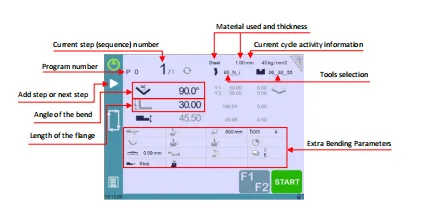
calculation parameters.
The initial setup typically includes:
- Номер программы
- Тип материала
- Толщина материала
- Punch selection
- Die selection
Selecting the proper material and tooling at the beginning allows CybTouch 8 to calculate the required bending force and machine movements more accurately throughout the programming process.
Entering Bending Parameters
Once the program has been created, operators can begin entering the data for each bending step.
Each step is programmed individually by entering the required numerical values. The controller provides dedicated fields for the most important bending parameters, allowing users to build the complete program in a logical sequence.
Typical parameters include:
- Сгибать Угол – Enter the required bending angle for the current step.
- Flange Length – Specify the flange dimension associated with the bend.
- Тип материала – Select the material used for the workpiece.
- Толщина материала – Define the sheet thickness for force calculation.
- Выбор инструмента – Choose the appropriate punch and die combination.
- Дополнительные параметры изгиба – Configure additional settings such as bending length, opening (TDC), slow speed return, and other sequence-related parameters when required.
After entering the values for the first bend, simply add the next bending step and continue entering the corresponding parameters until the entire workpiece has been programmed.
This structured workflow makes CybTouch 8 Numerical Mode particularly efficient for programming multi-bend parts with clearly defined dimensions.
Managing Multiple Bending Steps
Most sheet metal components require more than one bend, and CybTouch 8 Numerical Mode provides convenient tools for managing multiple bending operations.
Operators can:
- Add a new bending step.
- Move to the next programmed step.
- Return to a previous step.
- Review the current sequence number.
- Modify any existing bend without recreating the program.
Each bend is stored independently, making it easy to update individual dimensions or angles if design changes occur during production.
This flexibility reduces programming time, especially when producing similar parts with only minor dimensional differences.
Verifying the Program Before Bending
Before starting production, it is important to review the entered program carefully.
Check that:
- Every bend angle has been entered correctly.
- Flange lengths match the engineering drawing.
- The correct material and thickness have been selected.
- The installed punch and die correspond to the programmed tooling.
- Extra Bending Parameters are appropriate for the application.
Taking a few moments to verify the program can prevent setup errors, reduce material waste, and improve first-part accuracy.
Starting the Bending Process
After the numerical program has been completed and verified, the machine is ready for production.
Start the hydraulic pump if required by the machine configuration. Next, press the НАЧИНАТЬ button to position the machine according to the programmed data.
Once the controller indicates that the machine is ready, the ХОРОШО status is displayed, confirming that the programmed step can be executed safely.
The operator can then press the foot pedal to perform the bend. After completing the operation, the controller automatically advances to the next programmed step, allowing production to continue efficiently until all bends have been completed.
If dimensional or angular adjustments are required during production, operators can switch to the appropriate correction functions or Semi-Automatic Mode before continuing.
Best Practices for Using CybTouch 8 Numerical Mode
To achieve reliable programming results, operators should follow several recommended practices when using CybTouch 8 Numerical Mode.
- Select the correct material and tooling before entering bending data.
- Verify every bend angle and flange length against the engineering drawing.
- Review Extra Bending Parameters before production.
- Check the programmed sequence before starting the hydraulic system.
- Test the first workpiece and make any necessary corrections before full production.
- Save the completed program after verification for future reuse.
By following these practices, operators can improve programming efficiency, minimize setup errors, and achieve consistent bending quality across a wide range of sheet metal applications.
Часто задаваемые вопросы (FAQ)
When should I use Numerical Mode?
CybTouch 8 Numerical Mode is ideal when the dimensions of the workpiece are already available on engineering drawings or production documents. It is particularly suitable for standard production parts, repeat orders, and experienced operators who prefer entering numerical data directly.
What parameters are entered for each bending step?
Each bending step can include several important values, such as the bend angle, flange length, material properties, tooling selection, bending length, opening (TDC), and other Extra Bending Parameters depending on the application.
Can I make corrections during production?
Yes. If the first workpiece requires dimensional or angle adjustments, operators can apply the necessary corrections or switch to Semi-Automatic Mode before continuing production. This helps ensure consistent bending quality for the remaining parts.
Заключение
Сайт CybTouch 8 Numerical Mode provides a straightforward and efficient way to program press brake operations by entering numerical values directly. By defining each bending step individually, operators gain precise control over bend angles, flange lengths, material settings, tooling, and other essential production parameters.
This programming method is especially well suited for repeat production, standard sheet metal components, and applications where complete part dimensions are already available. Combined with the ability to edit individual bends, verify parameters before production, and apply corrections when necessary, CybTouch 8 Numerical Mode helps improve programming efficiency, reduce setup time, and achieve consistent bending accuracy.
After mastering Numerical Mode, operators can further enhance their programming capabilities by learning CybTouch 8 L-Alpha Mode, which provides another efficient approach to creating bending programs based on flange length and bend angle calculations.


