


Learn how to use a press brake barcode scanner for automatic program loading. Improve efficiency, reduce errors, and simplify CNC press brake operation with barcode technology.
Введение
In modern sheet metal fabrication, efficiency and accuracy are critical factors for maintaining productivity. One common challenge in daily operation is program selection on CNC press brakes. Operators often need to manually search and load programs, which can be time-consuming and prone to errors.
To solve this problem, the press brake barcode scanner has become an increasingly popular solution. By using barcode technology, operators can quickly load the correct bending program without manual input, significantly improving workflow efficiency.
This article explains how a press brake barcode scanner works, what components are required, and how to use it for automatic program loading in practical production environments.
What Is a Press Brake Barcode Scanner System?
A press brake barcode scanner system is an integrated solution that allows operators to load bending programs automatically by scanning a barcode.
The working principle is simple: each workpiece or drawing is assigned a barcode that corresponds to a specific bending program stored in the system. When the barcode is scanned, the press brake barcode scanner transmits the information to the control system, which then identifies and loads the correct program.
Compared with traditional manual selection, this method reduces human error and ensures that the correct program is always used. For factories handling multiple parts and frequent program changes, the press brake barcode scanner provides a more efficient and reliable solution.
Hardware Components of the Barcode Scanner System
To implement a press brake barcode scanner, several hardware components are required. Each component plays a specific role in ensuring stable communication and accurate program loading.
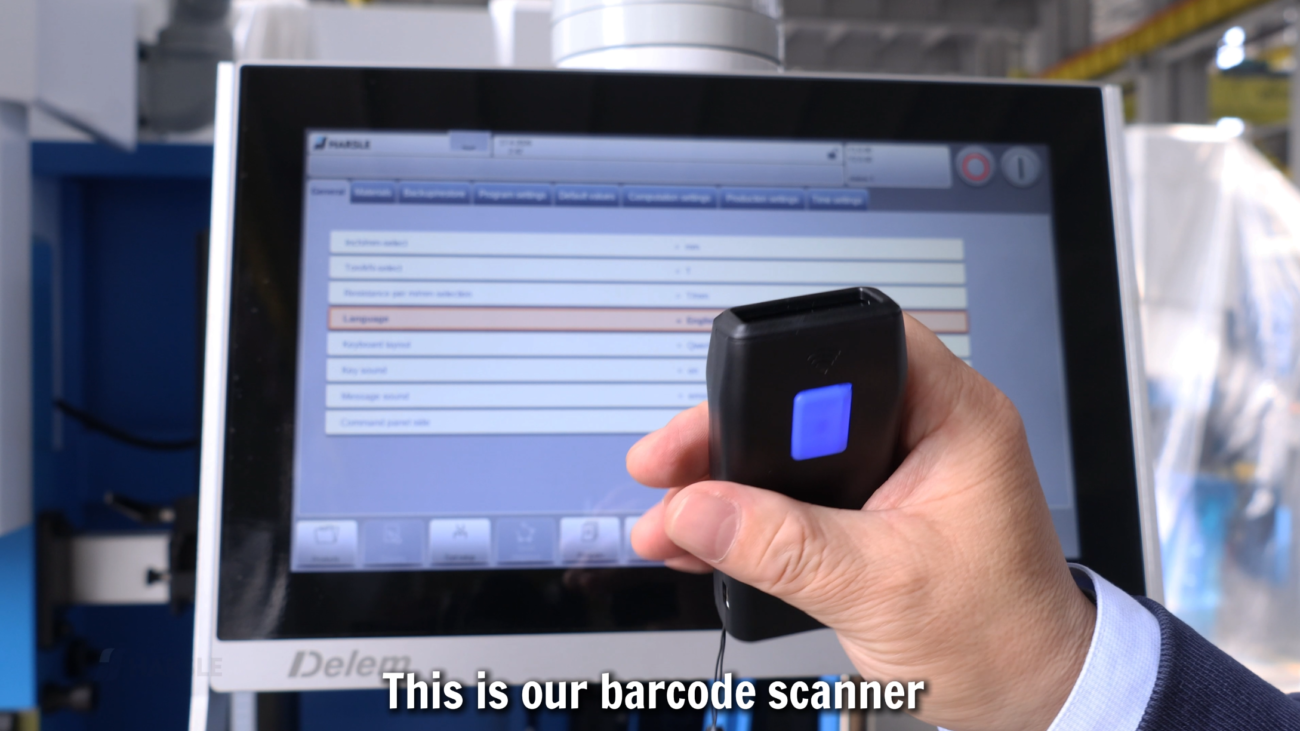
BLE Barcode Scanner
The BLE barcode scanner is responsible for reading the barcode. It uses Bluetooth Low Energy technology, allowing wireless operation and flexible movement around the machine.
This eliminates the need for cables and makes it easier for operators to scan barcodes directly from drawings or labels.
Serial Bluetooth Module
The serial Bluetooth module acts as a communication bridge between the barcode scanner and the control system.
After scanning, the data is transmitted wirelessly to this module, which converts it into a signal that can be processed by the PLC or CNC system.
PLC System
The PLC processes the incoming data and executes the control logic required for program selection.
In a press brake barcode scanner system, the PLC ensures that the scanned information is correctly interpreted and forwarded to the CNC controller.
Контроллер DELEM
The DELEM system is the core component responsible for program management and execution.
Once the barcode data is received, the DELEM controller matches the scanned code with the corresponding bending program and loads it automatically. This is the key step that enables automatic program loading using a press brake barcode scanner.
Software Requirements and System Compatibility
In addition to hardware, proper software support is required to ensure that the press brake barcode scanner functions correctly.
DELEM System Requirements
Different DELEM models have different capabilities.
For example, systems such as DA66T and above can support barcode scanning functions after enabling the required authorization. Models like DA53T and DA58T can also support wireless barcode scanning for program selection through Bluetooth communication.
Ensuring system compatibility is an important part of implementing a press brake barcode scanner.
Customized Software
Customized software is required to link barcodes with specific bending programs.
Each barcode must correspond to a unique program stored in the system. When the press brake barcode scanner reads the code, the software ensures accurate matching and program loading.
Bluetooth Pairing Tool
A Bluetooth pairing tool is used to establish a stable connection between the scanner and the control system.
Proper pairing ensures reliable data transmission and prevents communication errors during operation.
How the Press Brake Barcode Scanner Works
The operation of a press brake barcode scanner follows a clear logical sequence:
scan barcode
→ transmit signal via Bluetooth
→ PLC receives data
→ DELEM system matches program
→ program loads automatically
This process eliminates manual input and ensures that the correct program is selected every time.
By automating program selection, the press brake barcode scanner reduces setup time and improves production consistency.
Step-by-Step Guide to Using the Barcode Scanner
Using a press brake barcode scanner is straightforward when the system is properly configured.
Step 1: Prepare the Barcode and Program
Ensure that each workpiece or drawing has a corresponding barcode linked to a stored program.
Step 2: Connect the Barcode Scanner
Turn on the scanner and confirm that it is properly paired with the Bluetooth module.
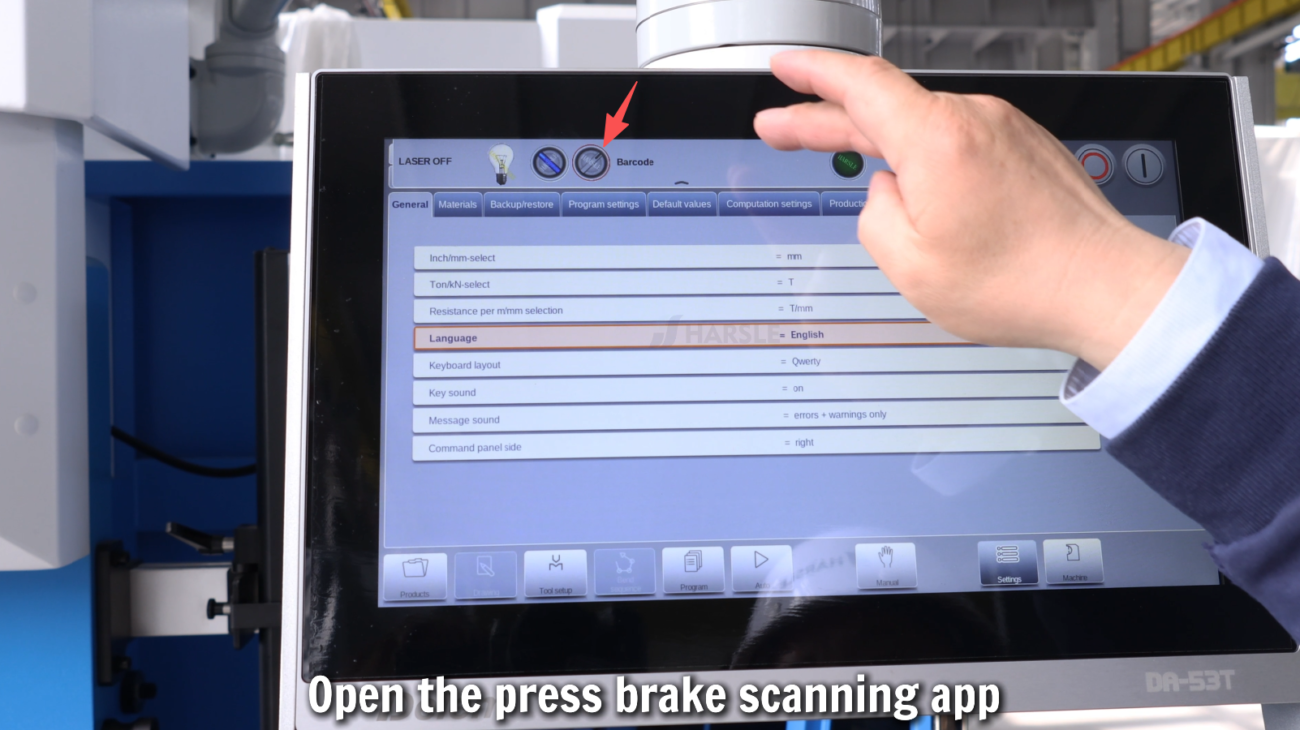
Step 3: Scan the Barcode
Scan the barcode using the press brake barcode scanner. The data will be transmitted automatically to the system.

Step 4: Automatic Program Loading
After receiving the data, the DELEM controller identifies the program and loads it without manual intervention.

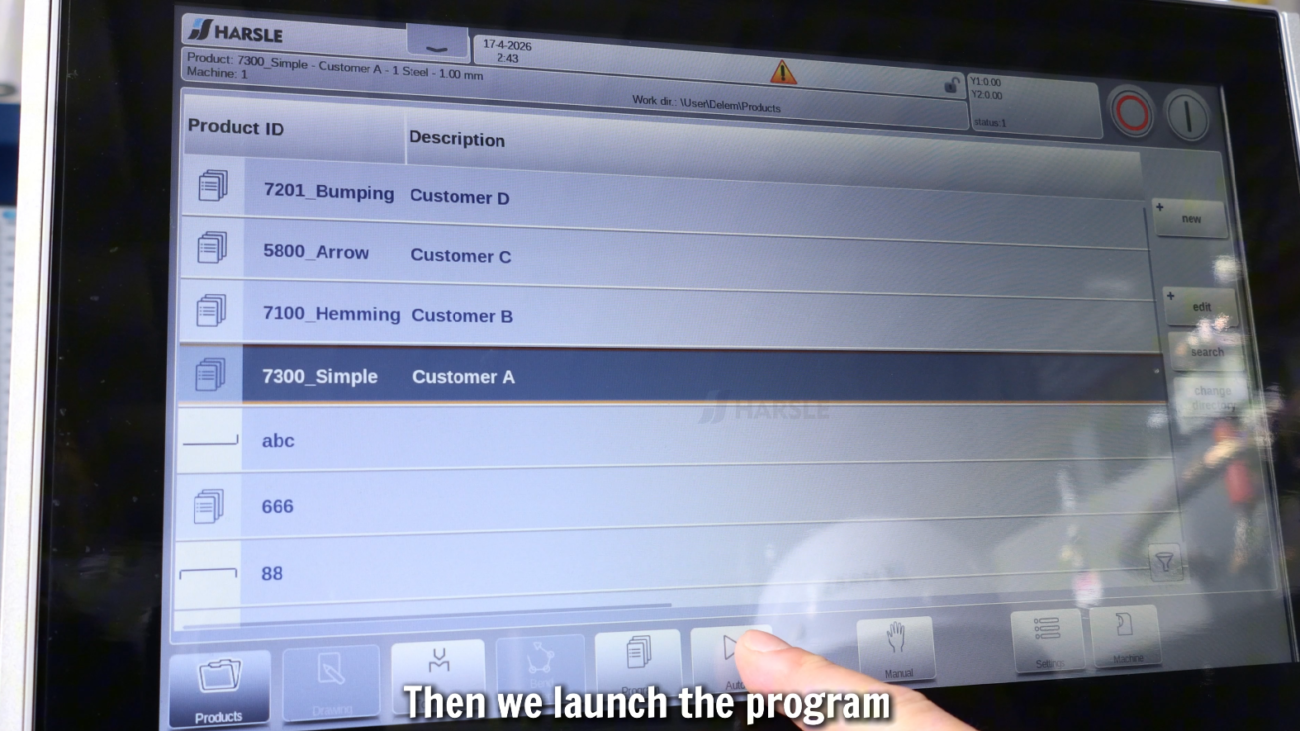
Step 5: Verify and Start Operation
Check the loaded program briefly to confirm accuracy, then begin the bending process.

Advantages of Using a Press Brake Barcode Scanner
The press brake barcode scanner offers several important advantages in production environments.
First, it significantly reduces the time required for program selection. Operators no longer need to search through program lists manually.
Second, it minimizes human error. Since the correct program is linked directly to the barcode, the risk of selecting the wrong program is greatly reduced.
Third, it improves overall production efficiency. Faster setup times and accurate program loading lead to smoother workflows and higher output.
Finally, it simplifies operation for workers, especially in environments with multiple products and frequent program changes.
Советы по обслуживанию
To ensure stable operation of the press brake barcode scanner system, regular maintenance is recommended.
- Check the Bluetooth connection regularly
- Ensure barcodes are clear and readable
- Keep the scanner clean and properly charged
- Verify software synchronization between programs and barcodes
- Avoid interference from other wireless devices
Proper maintenance helps maintain the reliability of the press brake barcode scanner and ensures consistent performance.
Заключение
The press brake barcode scanner is an effective solution for improving efficiency and accuracy in CNC press brake operations. By enabling automatic program loading, it reduces manual work, minimizes errors, and enhances production consistency.
With the right combination of hardware, software, and system configuration, a press brake barcode scanner can significantly streamline workflow and support modern automated manufacturing processes.


