


The ESA S650 DIN Formula Selection allows operators to choose the standard DIN formula for calculating bending stretch, ensuring more consistent and standardized results during production. Knowing how to apply ESA S650 DIN Formula Selection helps improve calculation accuracy, especially when working with different materials and bending conditions.
In this guide, you will learn how to enable the DIN formula, verify program settings, and use the self-teach cycle when standard calculations are not sufficient. Proper application of ESA S650 DIN Formula Selection ensures better control over bending depth and overall production precision.
How to Enable ESA S650 DIN Formula Selection in the System
Step 1: Activating the Stretching Formula Parameter
To apply the ESA S650 DIN Formula Selection, operators need to access the system parameters and set the stretching formula option.
- Установите Stretching Formula parameter to 1
- This enables the standard DIN formula for bending stretch calculation
- The setting can also be adjusted in the User Parameters (4>> page)
Once activated, the system will use the DIN standard formula for all relevant bending calculations.
How to Apply ESA S650 DIN Formula Selection in Production
Step 2: Checking Program Accuracy After Selection
After enabling the DIN formula, press НАЧИНАТЬ to position the axes. The system will automatically check the program.

If any errors are detected, the ESA S650 will display a message and enter semiautomatic ОСТАНАВЛИВАТЬСЯ status. This ensures that all bending parameters are validated before production begins.
Step 3: Running the Program Safely
Once the program is verified, operators can proceed with execution. The system will:
- Automatically position back-gauge axes
- Execute bending steps in sequence
- Monitor program accuracy during operation
This ensures stable performance after applying ESA S650 DIN Formula Selection.
ESA S650 Self-Teach Cycle for Stretch Adjustment
Step 4: When to Use the Self-Teach Cycle
In some cases, the standard DIN formula cannot accurately calculate bending stretch. This occurs in special operations such as:
- Rounded punches
- Coining bends
- Bends outside the V-die
In these situations, the self-learning cycle helps determine the correct L.D.C. (end-of-bend point).
Step 5: Performing Self-Teach Adjustment
To activate the self-teach cycle:
- Входить SEMIAUTOMATIC mode
- Position back-gauge axes using START
- Perform the bend using the down pedal
- Adjust the bend depth manually until the correct point is reached
- Нажмите [Самообучение] to store the value
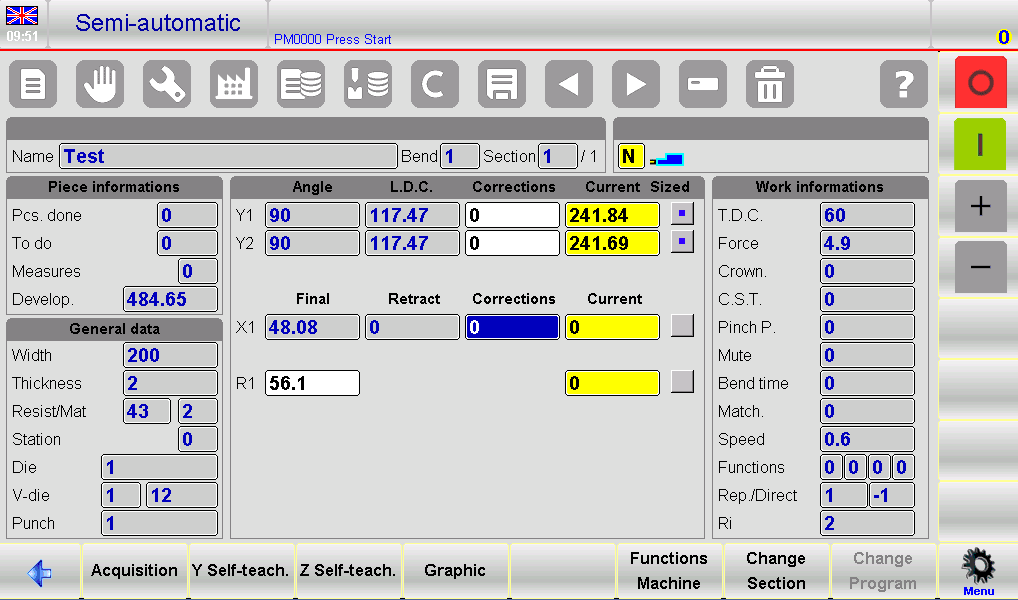
The system will learn and apply the corrected bend value automatically for future steps.
Step 6: Adjusting Bend Position Accurately
Operators can fine-tune the bend position using:
- Up pedal for increasing bend height
- Start button or control input for fine downward adjustments
This allows precise control when standard DIN calculation is not sufficient.
Completing ESA S650 DIN Formula Selection Setup
Step 7: Finalizing All Bend Steps
After completing self-teach adjustments for all bends:
- Exit the setup process
- Restart the program execution
- Run from the first сгибать again for validation

This ensures that all corrected values are applied consistently throughout production.
Часто задаваемые вопросы (FAQ)
How do I activate the DIN formula in ESA S650?
Установите Stretching Formula parameter to 1 in the system or adjust it from the User Parameters page.
Does ESA S650 save self-teach values automatically?
Yes, once confirmed using Y self-teach, the system stores the learned values for future bends in the program.
When should I use the self-teach cycle?
Use it when standard calculations are not accurate, such as coining, rounded punches, or special bending conditions.
Заключение
Applying ESA S650 DIN Formula Selection ensures standardized and reliable bending stretch calculations, improving overall production accuracy. By enabling the DIN formula parameter and verifying program execution, operators can maintain consistent bending results across different jobs.
When special bending conditions occur, the self-teach cycle provides a flexible solution for fine-tuning L.D.C. values and improving precision. Proper use of both functions helps maximize machine efficiency and reduce production errors.
For best results, always verify settings before production and use self-learning adjustments when necessary to achieve optimal bending performance.


