


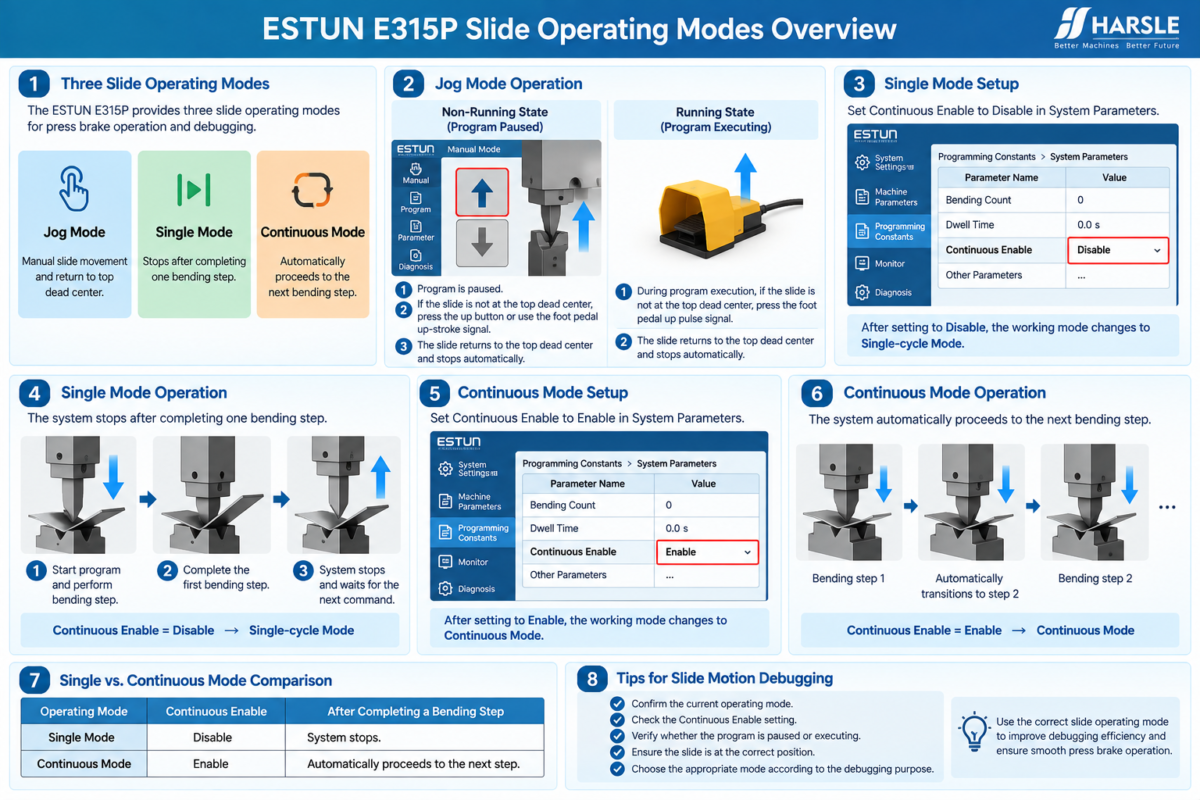
Сайт ESTUN E315P Slide Operating Modes provide different ways to control slide movement during machine commissioning and bending operations. According to the commissioning guide, the E315P provides three operational modes for slide motion: Jog Mode, Single Mode, and Continuous Mode.
Each mode has a different operating logic. Jog Mode can be used to return the slide to the top dead center under specific operating conditions. Single Mode stops the program after completing one bending step, while Continuous Mode automatically proceeds to the next bending step.
Understanding these differences helps technicians select and verify the appropriate operating mode when debugging slide motion on an E315P-controlled листогибочный пресс.
What Are the Three ESTUN E315P Slide Operating Modes?
The E315P controller provides three modes for slide operation:
- Режим бега трусцой
- Single Mode
- Непрерывный режим
These ESTUN E315P Slide Operating Modes should be configured and checked separately because their control logic is different.
Jog Mode focuses on manual slide operation and returning the slide to the top dead center. Single Mode and Continuous Mode are related to how the controller handles bending steps during single-step or multi-step program operation.
Before debugging, technicians should identify which mode is currently being used and understand the expected slide response.
How Does Jog Mode Control Slide Movement?
Jog Mode provides direct control over slide movement during commissioning and adjustment.
The E315P commissioning guide distinguishes between two operating conditions in Jog Mode:
Non-Running State — Program Paused и Running State — Program Executing
The method used to return the slide to the top dead center depends on which of these conditions is active.
This distinction is important when checking the ESTUN E315P Slide Operating Modes, because the same slide position can require different operating actions depending on whether the program is paused or executing.
Jog Mode in the Non-Running State
When the program is paused, the controller is considered to be in the non-running state.
If the slide is not currently at the top dead center, use the corresponding screen button or the foot pedal up-stroke signal.
The slide will then return to the top dead center and stop automatically.
The operating sequence can be summarized as:
Program Paused → Slide Not at Top Dead Center → Up Command → Slide Returns to Top Dead Center → Automatic Stop
This provides a controlled method for restoring the slide to its upper reference position when the program is not executing.
Jog Mode in the Running State
The operating logic changes when the program is executing.
If the slide is not at the top dead center during a single-step or multi-step operation, activate the foot pedal up pulse signal.
The slide then returns to the top dead center and stops automatically.
Although both Jog Mode conditions can result in the slide returning to the same upper position, technicians should distinguish between the non-running and running states when performing slide motion debugging.
This helps ensure that the correct command is used for the current controller state.
What Is Single Mode?
Single Mode is one of the main ESTUN E315P Slide Operating Modes used during single-step or multi-step program operation.
To configure Single Mode, enter the System Settings interface.
Then access:
Programming Constants → System Parameters
using Level 1 permission.
Find the Continuous Enable parameter and set it to:
Запрещать
After this parameter is disabled, the working mode changes from Непрерывный к Single-cycle.
This setting determines how the controller behaves after completing an individual bending step.
How Does Single Mode Work During Bending?
When a single-step or multi-step program is operated in Single-cycle Mode, the controller completes the current bending step and then stops.
It does not automatically continue to the next bending step.
The sequence can be understood as:
Start Program → Perform Bending Step → Complete First Bending Step → Stop
This behavior makes Single Mode clearly different from Continuous Mode.
During commissioning, technicians can observe the machine response after each bending step before proceeding further.
The key setting controlling this behavior is Continuous Enable = Disable.
What Is Continuous Mode?
Continuous Mode allows the E315P to automatically transition between bending steps during program operation.
To activate this mode, enter:
System Settings → Programming Constants → System Parameters
using Level 1 permission.
Set:
Continuous Enable = Enable
Once enabled, the operating mode changes from Single-cycle к Непрерывный.
This changes what happens after the controller completes an individual bending step.
How Does Continuous Mode Work?
During single-step or multi-step program operation in Continuous Mode, the system automatically transitions after completing one bending step and proceeds to the next bending step.
The basic operating sequence is:
Start Program → Complete Bending Step → Automatic Transition → Next Bending Step
The controller therefore does not stop after the first completed step in the same way that it does in Single Mode.
This automatic transition is the defining characteristic of Continuous Mode among the ESTUN E315P Slide Operating Modes.
What Is the Difference Between Single and Continuous Mode?
Single and Continuous Mode use the same Continuous Enable parameter, but the parameter state determines how the program proceeds.
| Режим работы | Continuous Enable | After Completing a Bending Step |
|---|---|---|
| Single Mode | Запрещать | System stops |
| Непрерывный режим | Давать возможность | System automatically proceeds to the next step |
This distinction should be checked whenever the machine does not proceed through a bending program as expected.
If the machine stops after a bending step, first verify whether Continuous Enable is set to Disable before treating the behavior as a malfunction.
Similarly, if the system proceeds automatically to the next step, confirm that Continuous Enable is intentionally set to Enable.
How to Select the Appropriate Slide Operating Mode
The appropriate mode depends on the required operating condition.
Используйте Режим бега трусцой when direct slide movement or return to the top dead center is required during the relevant commissioning condition.
Используйте Single Mode when the controller should stop after completing a bending step.
Используйте Непрерывный режим when the system should automatically transition from one completed bending step to the next.
When checking the ESTUN E315P Slide Operating Modes, technicians should therefore consider both the selected mode and the current program state.
A machine response that appears abnormal in one mode may be the expected behavior in another.
What Should Be Checked During Slide Motion Debugging?
Before deciding that slide movement is incorrect, confirm the operating mode and the relevant controller setting.
For Jog Mode, determine whether the program is paused or currently executing and verify whether the slide is at the top dead center.
For Single and Continuous Modes, check the Continuous Enable parameter under System Parameters.
Then observe what happens after a bending step is completed.
The actual machine behavior should correspond with the selected ESTUN E315P Slide Operating Modes. Single Mode should stop after the bending step, while Continuous Mode should automatically proceed to the next step.
By checking the operating mode, program state, slide position, and Continuous Enable setting together, technicians can evaluate slide motion more systematically during E315P commissioning.
Frequently Asked Questions(FAQ)
What Should I Check If the Slide Does Not Return to Top Dead Center?
First determine whether the program is paused or currently executing. The return operation differs between these states. Also confirm that the slide is actually below the top dead center before checking the corresponding up command or foot pedal signal.
Can Continuous Mode Be Used With Multi-Step Programs?
Yes. According to the commissioning guide, Continuous Mode can be used during single-step or multi-step program operation. With Continuous Enable set to Enable, the system automatically transitions to the next bending step after completing the current one.
What If Changing Continuous Enable Does Not Produce the Expected Behavior?
Confirm that the parameter change has been made in the correct System Parameters interface using the required permission level. Then verify the current program and observe the slide behavior again. If the result remains abnormal, further inspection of the relevant machine control conditions may be required.
Заключение
The ESTUN E315P Slide Operating Modes define how the press brake slide responds under different commissioning and program conditions. Jog Mode provides specific control for returning the slide to the top dead center, while Single and Continuous Modes determine whether the program stops or proceeds after completing a bending step.
The key parameter for switching between Single and Continuous operation is Continuous Enable. Setting it to Disable selects Single-cycle behavior, while Enable allows automatic transition to the next bending step.
By confirming the current program state, slide position, operating mode, and Continuous Enable setting, technicians can distinguish normal controller behavior from an actual motion problem and perform slide motion debugging more efficiently.


