


The CybTouch 8 Tool Settings page allows operators to configure advanced tooling options that improve programming accuracy and machine performance. In addition to selecting punches and dies, users can customize tool naming conventions and define the back gauge cycle used during bending operations. Properly configuring these settings helps simplify tool identification, optimize machine movements, and improve production consistency. In this guide, I will explain how to configure CybTouch 8 Tool Settings, including naming tools and managing back gauge cycle options, so you can create a more efficient and organized press brake workflow.
Understanding CybTouch 8 Tool Settings
The CybTouch 8 Tool Settings page provides additional configuration options that improve tooling management beyond simply selecting or creating punches and dies. These settings allow operators to customize how tools are identified and how the back gauge behaves during the bending cycle.
Unlike the Tool Library, which stores the physical dimensions of punches and dies, CybTouch 8 Tool Settings focuses on improving workflow efficiency, tool organization, and machine operation. Proper configuration helps operators locate tools more quickly, reduces programming errors, and ensures consistent machine movements during production.
Understanding these settings is particularly beneficial for workshops with a large tooling inventory or those that frequently switch between different bending applications.
Configuring Tool Naming
As the tooling database grows, organizing punches and dies becomes increasingly important. The Herramientas de nombres function allows operators to assign clear and meaningful names to every tool stored in the controller.
Instead of relying only on tool numbers, descriptive names make it much easier to identify the correct tooling during program creation and machine setup.
Typical naming methods include:
- Tool model numbers
- Punch or die type
- Tool angle
- V-opening size
- Internal company naming standards
A consistent naming system helps operators quickly locate the correct tooling while reducing the risk of selecting the wrong punch or die.
Choosing an Effective Tool Naming Convention
An organized naming convention improves both programming speed and production efficiency.
For example, operators may include important information such as:
- Tool angle
- Tool height
- V-opening
- Tool series
- Special application
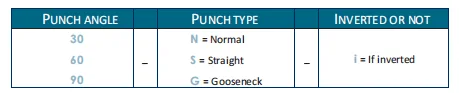
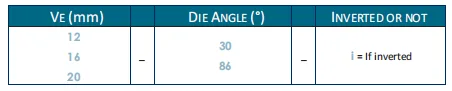
Rather than creating random names, using standardized naming rules ensures that every operator understands the tooling library regardless of who created the records.
For companies operating multiple press brakes, maintaining identical tool names across all controllers further simplifies program sharing and operator training.
Managing Tool Information
The Tool Settings page also allows operators to review and update tool information whenever necessary.
If a punch or die is replaced, modified, or remeasured, its corresponding tool record should also be updated to maintain calculation accuracy.
Keeping tooling information current provides several benefits:
- More reliable bend calculations
- Better first-part accuracy
- Reduced programming corrections
- Improved production consistency
Periodic review of the tooling database helps eliminate outdated or duplicate tool records.
Entendiendo el Calibre trasero Cycle
El Back Gauge Cycle setting determines how the back gauge moves during different stages of the bending process.
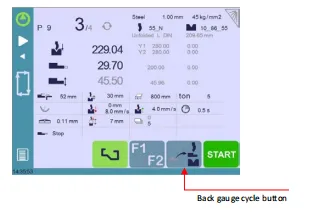
Proper configuration improves material positioning while helping prevent unnecessary movements that may reduce production efficiency.
Depending on the selected operating mode, the back gauge may automatically:
- Move to the programmed position
- Retract during bending
- Return after bending
- Prepare for the next bend
These movements are coordinated automatically by the controller according to the selected bending program.
Configuring Back Gauge Cycle Options
The available Back Gauge Cycle options allow operators to optimize machine behavior for different workpieces.
Proper adjustment can help:
- Improve workpiece handling
- Reducir el tiempo del ciclo
- Prevent collisions
- Increase positioning accuracy
- Simplify loading and unloading
The most suitable configuration depends on part geometry, material size, and production requirements.
For standard bending operations, the default cycle usually provides reliable performance. More complex parts may require customized back gauge movements to improve handling.
Optimizing Production with Proper Tool Settings
Correctly configured CybTouch 8 Tool Settings contribute directly to more efficient production.
Combining standardized tool names with appropriate back gauge behavior offers several advantages:
- Faster tool selection
- Reduced operator mistakes
- Shorter machine setup time
- Improved production repeatability
- Better organization of tooling libraries
As production volume increases, these small improvements can significantly reduce overall programming and setup time.
Best Practices for CybTouch 8 Tool Settings
To achieve the best results, operators should regularly review their CybTouch 8 Tool Settings and maintain a well-organized tooling database.
Recommended practices include:
- Use clear and consistent naming conventions for all punches and dies.
- Avoid duplicate tool names whenever possible.
- Update tool records after modifying or replacing tooling.
- Verify Back Gauge Cycle settings before running a new production job.
- Standardize tool names across multiple machines.
- Test new back gauge configurations using a sample workpiece before full production.
By following these recommendations, operators can improve programming efficiency, simplify tooling management, and ensure smoother press brake operation across a wide range of bending applications.
Preguntas frecuentes (FAQ)
What is the Back Gauge Cycle?
El Back Gauge Cycle controls how the back gauge moves before, during, and after each bending operation. Proper configuration improves material positioning, reduces unnecessary movement, and helps prevent interference between the workpiece and the back gauge.
Can incorrect Tool Settings affect bending quality?
Yes. Poorly organized tooling information or inappropriate back gauge settings may increase setup time, cause incorrect tool selection, or reduce positioning efficiency. While these settings do not directly change bend calculations, they contribute significantly to smooth and reliable production.
Are Tool Settings shared between different programs?
Yes. Tool Settings are stored in the controller’s tooling database and are available whenever compatible punches and dies are selected. This allows operators to reuse standardized tooling information across multiple bending programs.
Conclusión
Properly configuring CybTouch 8 Tool Settings helps create a more organized, efficient, and reliable programming environment. By applying consistent naming conventions and optimizing the Back Gauge Cycle, operators can locate tools more quickly, reduce setup errors, and improve overall production efficiency.
Although these settings may seem secondary to bend programming, they play an important role in maintaining a well-structured tooling database and ensuring smooth machine operation. Regularly reviewing Tool Settings and keeping tooling information up to date allows the controller to work more efficiently while simplifying daily programming tasks.
With this guide, together with the previous articles on CybTouch 8 Punches and Dies y Creating CybTouch 8 Punches and Dies, you now have a complete understanding of how to select, create, and configure tooling within the CybTouch 8 controller. For additional assistance with CybTouch 8 programming or press brake operation, the HARSLE technical support team is always available to help.


