


The CybTouch 8 Status Page provides real-time information about the controller, machine axes, inputs, outputs, and operating conditions, making it an essential tool for monitoring machine performance and diagnosing potential issues. Whether you are commissioning a new press brake, troubleshooting an unexpected alarm, or verifying axis movement during production, the CybTouch 8 Status Page helps you quickly understand the current machine status. In this guide, I will explain how to access the Status Page, interpret the displayed information, monitor axis activity, and use the available status indicators to improve maintenance efficiency and ensure reliable machine operation.
Accessing the CybTouch 8 Status Page
The CybTouch 8 Status Page is designed to display real-time information about the machine, controller signals, axis positions, and current operating condition of the press brake. It is especially useful during machine setup, troubleshooting, service inspection, and production monitoring.
To access the CybTouch 8 Status Page, touch the Zona della pagina di stato from any controller page. This shortcut allows operators to open the status screen quickly without searching through multiple menus.
To exit the page, press the arrow on the left side of the screen.
Understanding the CybTouch 8 Status Page Layout
IL CybTouch 8 Status Page gathers several types of machine information into one diagnostic interface. Instead of checking each function separately, operators can review the current machine state from a single screen.
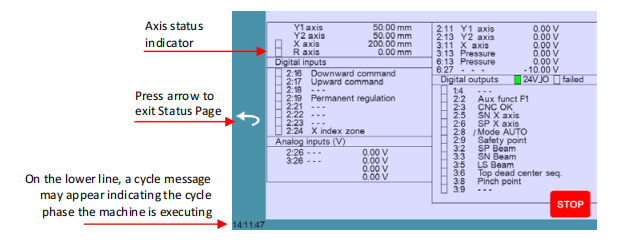
The page usually includes information such as:
- Asse status
- Posizioni degli assi
- Digital inputs
- Digital outputs
- Analog inputs
- Active commands
- Current cycle message
- Machine stop condition
This makes the Status Page an important reference when checking whether the controller and machine components are responding correctly.
Monitoring Axis Status on CybTouch 8
One of the most important functions of the CybTouch 8 Status Page is axis monitoring. The page displays the current position and condition of each controlled axis, helping users verify whether the machine is moving correctly.
Depending on the machine configuration, the displayed axes may include:
- Y1 axis
- Y2 axis
- asse X
- R axis
- Z axis
- Crowning axis
Axis Status Indicators
Each axis has a specific status indicator. The color of this indicator shows the current condition of the axis in relation to its tolerance range.
Common status conditions include:
- White indicator: device not active
- Green indicator: device moving
This allows operators to quickly identify whether an axis is idle, active, or moving during operation.
Why Axis Monitoring Matters
Axis monitoring is useful when checking:
- Backgauge positioning
- Beam movement
- Manual movement response
- Automatic cycle behavior
- Axis synchronization
- Precisione di posizionamento
If an axis does not move when expected, or if its displayed position does not match the programmed value, the Status Page can help identify the issue before further troubleshooting.
Checking Inputs and Outputs
The CybTouch 8 Status Page displays the condition of machine inputs and outputs. These signals show how the controller communicates with external devices, safety components, and machine actuators.
Digital Inputs
Digital inputs may include signals from:
- Foot pedal
- Safety devices
- Limit switches
- Reference sensors
- Emergency stop circuits
- Machine-ready signals
When troubleshooting, checking input signals helps confirm whether the controller is receiving the correct command from the machine.
For example, if pressing the foot pedal does not start movement, the Status Page can help determine whether the foot pedal input is being received.
Digital Outputs
Digital outputs show commands sent from the controller to machine components.
These may include:
- Valve commands
- Motor commands
- Pump control
- Backgauge movement commands
- Safety-related outputs
If a function does not activate, checking the output status helps identify whether the controller is sending the expected command.
Reading Current Cycle Messages
The lower area of the CybTouch 8 Status Page may display cycle messages related to the current machine operation.
These messages can indicate:
- The current phase of the bending cycle
- Waiting conditions
- Active commands
- Stop status
- Interruzioni del processo
Cycle messages are useful because they help operators understand what the machine is currently doing and why it may not proceed to the next step.
For example, if the machine is waiting for a specific input or safety confirmation, the cycle message can provide useful guidance.
Using the Status Page During Manual Movement
The CybTouch 8 Status Page is especially helpful when using manual movement functions.
During manual operation, operators can verify whether the selected axis is responding properly and whether the controller detects the movement command.
This is useful when:
- Adjusting backgauge positions
- Testing axis movement
- Checking beam response
- Verifying reference positions
- Diagnosing slow or inactive movement
By comparing the manual command with the displayed axis activity, operators can determine whether the issue is related to command input, axis drive response, or mechanical movement.
Using the Status Page During Automatic Operation
During automatic bending operation, the Status Page can help monitor the machine sequence in real time.
Operators can use it to verify:
- Whether the backgauge reaches its target position
- Whether the beam is moving as expected
- Whether the controller receives the foot pedal signal
- Whether safety inputs are active
- Whether machine outputs are being triggered correctly
This is especially useful during first-piece testing or when an automatic cycle does not continue as expected.
Troubleshooting with CybTouch 8 Status Page
The CybTouch 8 Status Page is not only a monitoring screen but also a practical troubleshooting tool.
When the Machine Does Not Move
If the machine does not move, operators can check:
- Whether the related axis indicator becomes active
- Whether the required input signal is present
- Whether the output command is being sent
- Whether a stop or safety signal is active
This helps narrow down whether the issue is electrical, hydraulic, mechanical, or related to controller logic.
When the Backgauge Does Not Reach Position
If the backgauge does not reach its programmed position, check the axis position value and movement indicator.
Possible causes may include:
- Incorrect axis command
- Drive or motor issue
- Ostruzione meccanica
- Axis reference problem
- Parameter mismatch
The Status Page provides the first-level information needed before deeper inspection.
When the Cycle Stops Unexpectedly
If the bending cycle stops during operation, review the cycle message shown on the lower part of the screen.
The message may help identify whether the controller is waiting for a signal, detecting an error, or holding the cycle for safety reasons.
Best Practices for Monitoring CybTouch 8 Status Page
To use the CybTouch 8 Status Page effectively, operators should become familiar with normal machine behavior before troubleshooting abnormal conditions. This makes it easier to recognize unusual signals or missing movements.
Recommended practices include:
- Check the Status Page during machine commissioning.
- Use it when testing manual axis movement.
- Monitor it during first-piece bending.
- Compare input and output status when troubleshooting.
- Record abnormal messages before contacting technical support.
- Avoid modifying service parameters based only on one status reading.
The Status Page should be used as a diagnostic reference, not as a replacement for proper mechanical and electrical inspection.
Why the CybTouch 8 Status Page Is Important
The CybTouch 8 Status Page gives operators a clear view of what the controller and machine are doing in real time. By showing axis positions, signal states, movement indicators, and cycle messages, it helps reduce troubleshooting time and improves confidence during machine operation.
For daily production, it supports faster issue identification. For service work, it provides valuable information for technicians. For operators, it helps explain why the machine is waiting, moving, or stopped.
By learning how to monitor the CybTouch 8 Status Page effectively, users can improve machine reliability, simplify troubleshooting, and maintain smoother press brake operation.
Domande frequenti (FAQ)
Can the CybTouch 8 Status Page help troubleshoot machine problems?
Yes. The CybTouch 8 Status Page is one of the most useful diagnostic tools available on the controller. By checking axis activity, input signals, output commands, and cycle messages, operators can quickly identify whether a problem is related to sensors, machine commands, or controller logic before performing more detailed inspections.
Why should I monitor digital inputs and outputs?
Monitoring digital inputs and outputs allows you to verify communication between the controller and machine components. For example, you can confirm whether the foot pedal signal is detected, whether safety devices are active, or whether the controller is sending commands to valves and motors.
Conclusione
The CybTouch 8 Status Page is an essential diagnostic tool that provides real-time visibility into machine operation, controller signals, and axis activity. By monitoring axis positions, input and output signals, and cycle messages, operators can quickly understand the current operating condition of the press brake and identify potential problems before they affect production.
Whether you are commissioning a new machine, troubleshooting an unexpected alarm, or simply verifying normal operation, the CybTouch 8 Status Page offers valuable information that supports faster diagnostics and more efficient maintenance. Developing the habit of checking the Status Page during setup, testing, and service can significantly reduce downtime and improve overall machine reliability.
If you need additional guidance on the CybTouch 8 Status Page, controller diagnostics, or other CybTouch 8 functions, feel free to contact the HARSLE technical support team. You can also explore our complete CybTouch documentation series for more tutorials on programming, maintenance, and advanced controller operation.


