


CybTouch 8 EasyBend Page provides a simple and convenient interface for operators who need to perform quick bending operations without creating a complete bending program. This function allows users to temporarily interrupt the current production program and execute a single bending operation by entering basic parameters directly on the controller. With functions such as material selection, tooling configuration, angle setting, flange length input, and bending execution, the CybTouch 8 EasyBend Page helps operators complete simple bending tasks faster and more conveniently. In this guide, I will explain how to use the EasyBend Page, configure the required parameters, and perform a bend correctly with the CybTouch 8 controller.
Understanding CybTouch 8 EasyBend Page
IL CybTouch 8 EasyBend Page is designed for quick and temporary bending operations. Unlike a standard bending program that needs to be created, saved, and managed for repeated production, EasyBend allows operators to directly enter the required bending information and execute a single bend.
This function is useful when:
- A quick bending operation is required.
- The workpiece does not need a complete saved program.
- The operator needs to make a temporary adjustment during production.
- Only a simple bending step is needed.
When switching to the EasyBend Page, the current production program is only temporarily interrupted. There is no need to save the current program. After leaving the EasyBend Page, the operator can return to the previous program and continue production.
This makes the CybTouch 8 EasyBend Page a practical solution for flexible production environments where occasional adjustments or individual bending operations are required.
When Should You Use CybTouch 8 EasyBend Page?
The EasyBend function is mainly intended for simple bending requirements rather than complex multi-step production.
For example, it is suitable for:
- Producing a single test piece.
- Performing a quick additional bend.
- Checking tooling or material behavior.
- Making temporary production adjustments.
For parts that require multiple bending steps, repeated production, or complex sequences, creating a complete bending program is recommended. Programs can store all bending information and can be reused for future production.
The EasyBend Page is therefore best considered as a quick operation tool, while normal programs are used for structured and repeatable manufacturing.
Setting Up a Bend on CybTouch 8 Pagina EasyBend
Before performing a bend, the operator needs to enter the necessary bending parameters on the EasyBend interface.
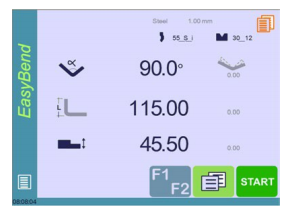
The setup process includes several important steps.
Selecting Material Information
First, select the required material information.
The operator needs to confirm:
- Tipo di materiale
- Spessore del materiale
Correct material settings allow the controller to calculate bending parameters more accurately.
For example, different materials may require different bending forces and compensation values. Therefore, selecting the correct material before bending is important for achieving accurate results.
Selecting Punch and Die
After confirming the material, select the appropriate tooling.
The operator should configure:
- Punch type
- Die type
Correct tooling selection ensures that the machine calculates the correct bending position and prevents potential interference between the workpiece and tools.
Entering Bend Angle
The next step is to enter the required bending angle.
The operator can directly input the desired angle value on the EasyBend Page. This value determines the final bending position of the machine.
Before executing the bend, always confirm that the entered angle matches the required workpiece specification.
Entering Flange Length
After setting the bending angle, enter the required flange length.
The flange length defines the position of the back gauge and helps the controller determine the correct sheet positioning before bending.
Accurate flange length input is important for achieving the correct final dimensions.
Using Extra Bending Parameters
IL CybTouch 8 EasyBend Page also allows operators to access additional bending parameters when necessary.
Depending on the application, operators may adjust extra settings related to the bending operation.
These parameters provide additional flexibility for different workpiece requirements and production conditions.
However, for simple bending operations, the default values are usually sufficient unless specific adjustments are required.
Executing a Bend from CybTouch 8 EasyBend Page
After all bending parameters have been entered, follow the normal machine operation procedure.
The basic workflow is:
- Start the hydraulic pump if available.
- Press the positioning button to move the machine according to the entered data.
- Wait until the machine reaches the correct position.
- Confirm that the controller displays the OK stato.
- Press the foot switch to execute the bend.
Once the bending operation is completed, the operator can exit the EasyBend Page and return to the previous program if required.
Difference Between EasyBend Page and Standard Programs
Although both functions are used for bending operations, the working methods are different.
CybTouch 8 EasyBend Page
- Designed for quick operations.
- Does not require creating a complete program.
- Suitable for temporary or single bending tasks.
- Parameters are entered directly.
Standard Bending Programs
- Designed for repeated production.
- Can be saved and recalled.
- Suitable for complex workpieces.
- Contains multiple bending steps and production information.
Choosing the correct method helps operators improve efficiency and avoid unnecessary programming work.
Best Practices for Using CybTouch 8 EasyBend Page
To achieve better bending results, operators should follow these recommendations:
- Confirm material type and thickness before operation.
- Select the correct punch and die.
- Verify the bending angle and flange length carefully.
- Use EasyBend only for suitable simple bending tasks.
- Create a standard program when the part will be produced repeatedly.
- Check machine positioning before executing the bend.
- Confirm the final workpiece result before continuing production.
By following these practices, operators can use the CybTouch 8 EasyBend Page efficiently while maintaining accurate and reliable bending performance.
Frequently Asked Questions(FAQ)
Can EasyBend be used for multi-step bending parts?
The EasyBend Page is mainly designed for simple single bending operations. For workpieces requiring multiple bends, repeated production, or complex sequences, it is better to create and save a complete bending program.
What happens after completing the EasyBend operation?
After the bend is completed, the operator can leave the EasyBend Page and return to the previous production program if needed. The interrupted program remains available because EasyBend does not replace or overwrite it.
What are the best practices for using CybTouch 8 EasyBend Page?
Operators should use EasyBend for suitable simple operations, verify all bending parameters before execution, select the correct tooling, and create a standard program when the same part needs to be produced repeatedly.
Conclusione
IL CybTouch 8 EasyBend Page provides operators with a fast and convenient method for performing simple bending operations without creating a complete bending program. By allowing direct input of material information, tooling selection, bend angle, and flange length, it simplifies temporary production tasks and improves operational flexibility.
For occasional bending requirements, testing operations, or single-piece production, EasyBend can significantly reduce programming time. However, for repeated manufacturing or complex workpieces, creating a complete bending program remains the better solution.
By understanding when and how to use the CybTouch 8 EasyBend Page, operators can improve workflow efficiency, reduce unnecessary setup steps, and achieve reliable bending results during daily press brake operations.


