


The ESA S650 User Parameters page provides operators with quick access to important machine adjustment settings without requiring access to protected machine parameters. Understanding how to use ESA S650 User Parameters helps improve machine accuracy, simplify calibration adjustments, and maintain stable press brake performance during long-term operation.
In this guide, you will learn how to access the ESA S650 User Parameters page, modify axis reference corrections, save parameter data, and reset correction values when necessary. Proper use of these settings can help compensate for mechanical wear, improve bending precision, and ensure reliable machine calibration over time.
What Is the ESA S650 User Parameters Page?
Understanding the Function of User Parameters
The ESA S650 User Parameters page is designed to provide operators with access to useful machine adjustment settings while protecting critical factory machine parameters from unauthorized modification.
Unlike machine parameter pages that require passwords, the User Parameters page can be accessed directly by operators for routine adjustments and calibration management.
This page is especially useful for:
- Correcting axis reference values
- Compensating for mechanical wear
- Improving ram calibration accuracy
- Saving custom parameter settings
By separating user-level settings from factory parameters, the ESA S650 improves operational safety while still allowing flexible machine optimization.
How to Access ESA S650 User Parameters Page
Passaggio 1: aprire il menu Impostazioni
To access the ESA S650 User Parameters page:
- Entra nel Settings page
- Press the menu button to open the settings menu
- Selezionare 4 >> User Parameters
Once selected, the User Parameters window will appear on the screen.
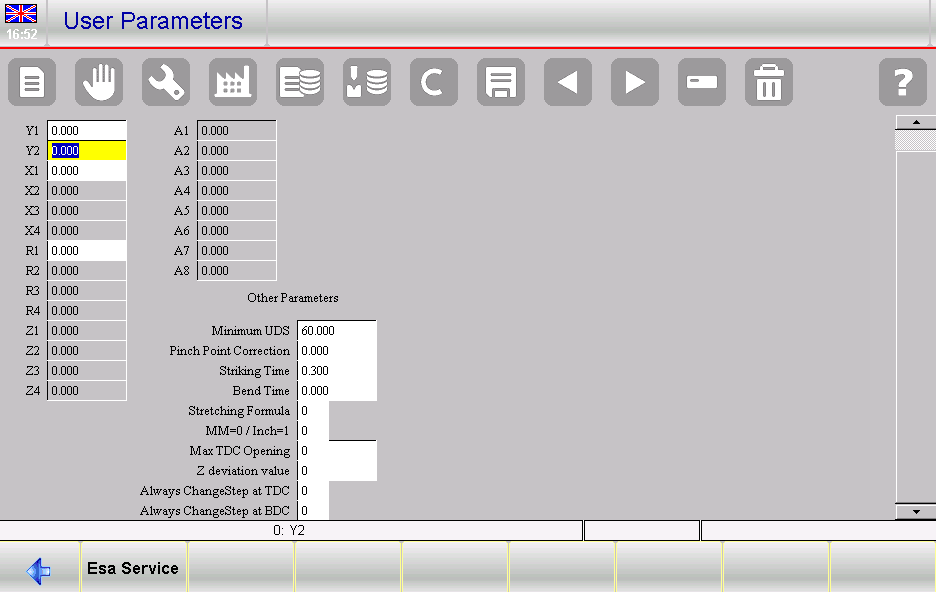
Step 2: Understand the User Parameters Interface
Inside the User Parameters page, operators can view configurable fields related to axis reference corrections and calibration adjustments.
The interface allows direct modification of configured axis values without changing the original factory machine parameters.
This design helps operators safely optimize machine performance while preserving factory calibration data.
How to Configure ESA S650 User Parameters
Step 3: Understanding Axis Reference Corrections
The ESA S60 User Parameters page allows operators to apply corrections to axis reference values compared with the original factory data.
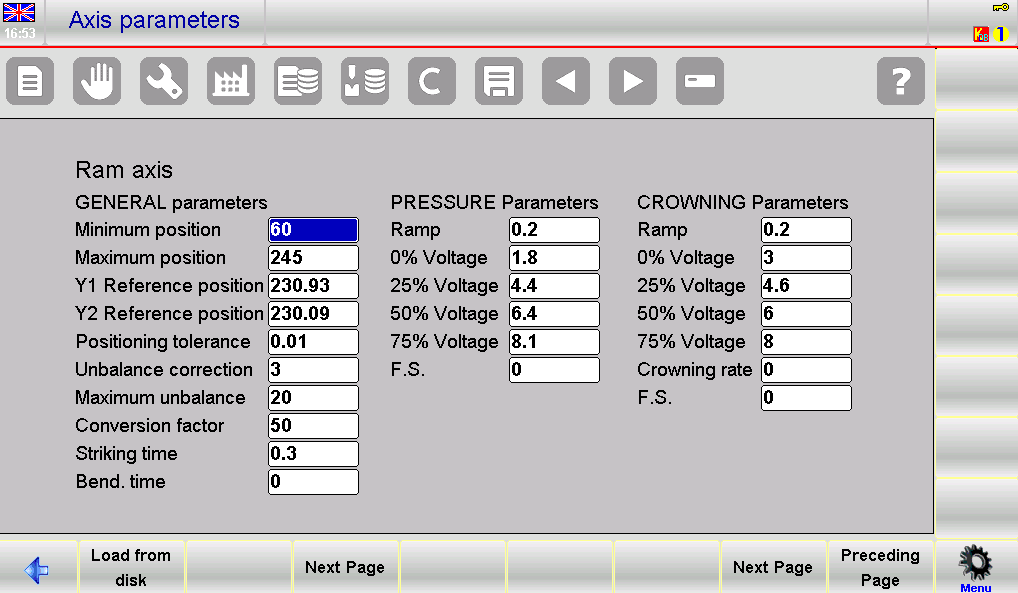
Over time, mechanical wear or slight machine deterioration may affect bending precision. In these situations, reference corrections help maintain accurate positioning.
Per esempio:
- Original Y1 factory value: 230.93 mm
- Original Y2 factory value: 230.09 mm
If machine wear requires adjustment:
- Y1 correction: -0.09 mm
- Y2 correction: +0.10 mm
These correction values can be entered directly into the User Parameters fields.
Step 4: Applying Axis Corrections
After entering correction values:
- The original factory parameters remain unchanged
- The ESA S650 automatically applies the correction during ram calibration
Using the previous example:
- Anno 1 becomes 230.84 mm
- Y2 becomes 230.19 mm
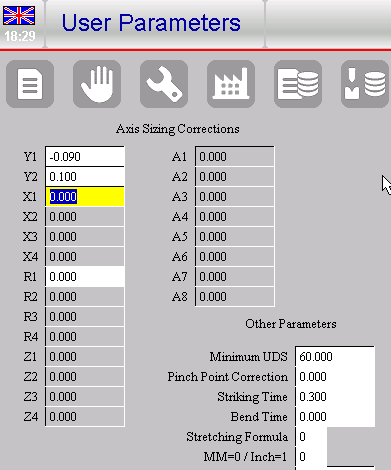
This automatic compensation system helps maintain accurate ram positioning and bending consistency without modifying protected machine settings.
Benefits of Using ESA S650 User Parameters
Improving Machine Accuracy
Proper use of ESA S650 User Parameters helps operators maintain high bending precision even after long-term machine use.
Reference corrections compensate for:
- Usura meccanica
- Small positioning deviations
- Axis alignment changes
- Calibration drift
This improves overall bending consistency and reduces production errors.
Protecting Factory Machine Parameters
One major advantage of the ESA S650 User Parameters system is that it protects original factory settings from accidental modification.
Operators can safely apply daily calibration corrections without affecting:
- Core machine parameters
- Factory calibration data
- Manufacturer safety settings
This separation improves machine stability and operational safety.
How to Save ESA S650 User Parameters
Step 5: Saving Parameters to External Memory
After configuring the ESA S650 User Parameters, operators can save the data externally.
To save the parameter file:
- Premere il tasto Salva pulsante
- The system stores the settings in the UserPara.par file
External backups are useful for:
- Machine maintenance
- System recovery
- Parameter duplication
- Preventing data loss
Saving parameter backups regularly is recommended for long-term machine management.
Step 6: Best Practices for Parameter Backup
When saving user parameters:
- Create backups before major adjustments
- Store copies on external memory devices
- Record important calibration values
- Maintain version history for troubleshooting
These practices help simplify future maintenance and parameter restoration.
How ESA S650 Handles Parameter Resetting
Step 7: Automatic Reset of Corrections
If the machine manufacturer modifies the factory reference values for an axis that already contains user corrections, the ESA S650 automatically resets the related correction values.
This prevents conflicts between:
- Updated factory parameters
- Existing user corrections
The system will display a warning message informing the operator about the parameter update.
Step 8: Understanding Automatic Reference Restoration
After reset:
- The user correction is removed
- The axis returns to the updated factory reference value
This automatic management system helps maintain safe and accurate calibration conditions after machine service or manufacturer adjustments.
Best Practices for ESA S650 User Parameters Management
Maintaining Stable Calibration
To ensure stable performance when using ESA S650 User Parameters:
- Verify corrections carefully before saving
- Apply only necessary compensation values
- Monitor axis performance regularly
- Recalibrate after mechanical maintenance
These practices help maintain long-term machine precision.
Avoiding Common Configuration Mistakes
Operators should also avoid:
- Entering excessive correction values
- Overwriting backup files unintentionally
- Ignoring factory parameter updates
- Applying corrections without measurement verification
Careful parameter management reduces the risk of calibration errors and improves production reliability.
Domande frequenti (FAQ)
What is the ESA S650 User Parameters page used for?
The ESA S650 User Parameters page is used to apply user-level machine adjustments such as axis reference corrections without modifying protected factory machine parameters.
Does the User Parameters page require a password?
No, the ESA S650 User Parameters page can be accessed without a password.
Are factory parameters changed when using User Parameters?
No, the original factory machine parameters remain unchanged. The system only applies temporary correction values during calibration.
Conclusione
The ESA S650 User Parameters page provides a safe and efficient way to manage axis reference corrections and maintain accurate machine calibration without modifying protected factory settings. By learning how to access, configure, and save user parameters correctly, operators can compensate for mechanical wear, improve bending precision, and maintain stable machine performance over time.
Features such as automatic correction management, external parameter backup, and protected factory data help simplify maintenance while improving operational reliability. Proper use of ESA S650 User Parameters can significantly reduce calibration errors and improve long-term production consistency.
For additional technical support, machine setup assistance, or more detailed ESA S650 documentation, feel free to contact HARSLE or explore additional resources available on our website.


