


ESTUN E315P Datum provides a reference-based method for establishing and tracking the position of a servo axis during pressa piegatrice commissioning. When the Teach Enable parameter is changed to Datum, the controller uses Datum Mode instead of the normal teaching method to determine the axis reference.
For Datum Mode to operate correctly, several conditions must work together. These include the physical datum sensor, Reference Position, Datum Direction, Motor Rotation, and Encoder Counting settings. The controller and servo system must also recognize the datum signal correctly.
Understanding how ESTUN E315P Datum works helps technicians establish a reliable axis reference and avoid position errors caused by incorrect direction or signal configuration.
What Is ESTUN E315P Datum?
IL ESTUN E315P Datum function establishes an axis reference by using a physical datum signal together with predefined position and direction parameters.
During normal axis configuration, the E315P can use a teaching procedure to establish the current position. Datum Mode provides another method of position tracking based on a defined machine reference.
Quando Teach Enable è impostato su Datum, the controller changes the way it establishes the axis position. The axis then uses the configured datum information to locate its reference.
The physical reference system can include a sensor, such as a proximity switch, installed at a defined position on the machine. The relationship between this sensor and the actual physical datum is established through the controller parameters.
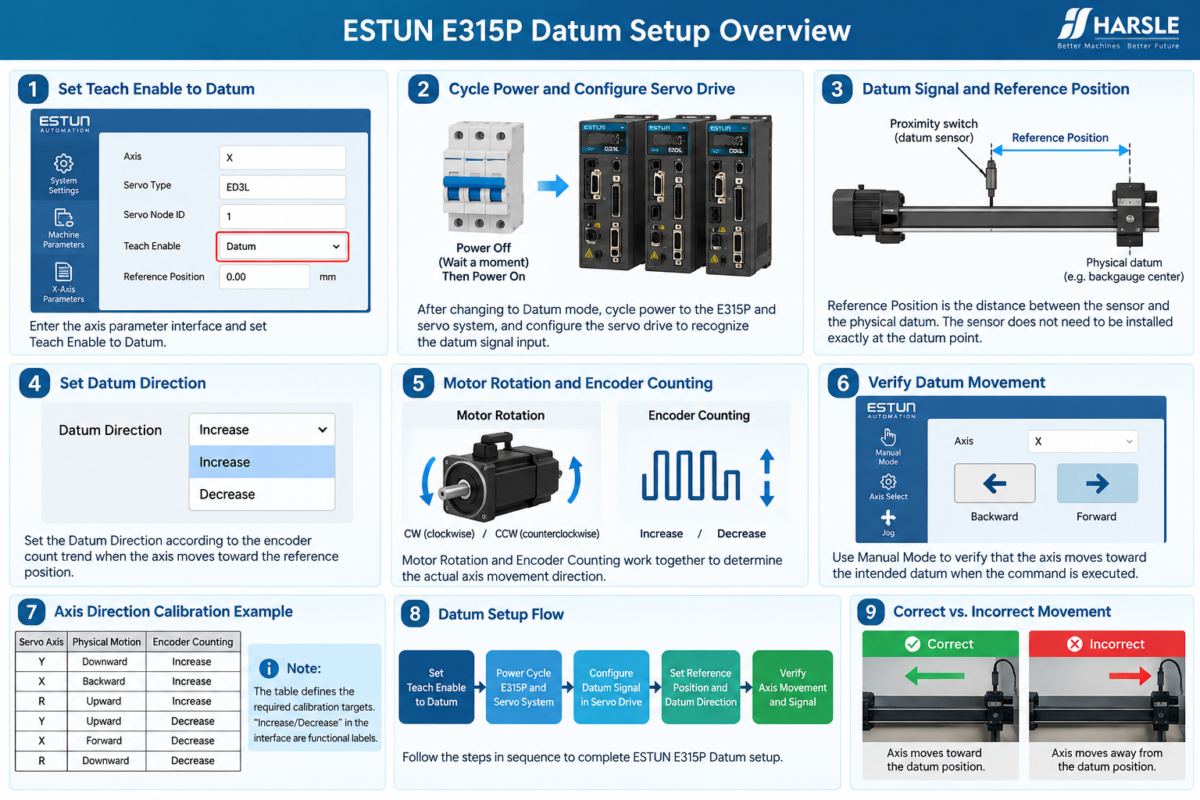
How to Enable Datum Mode
Before using ESTUN E315P Datum, enter the corresponding axis parameter interface and change Teach Enable A Datum.
After this parameter is changed, two important actions are required.
First, cycle power to both the E315P and the servo system. This allows the updated configuration to take effect.
Second, configure the servo-drive parameters so that the servo system can recognize the datum signal input.
The commissioning procedure should not continue until the controller and servo system are communicating normally after the restart.
Datum Mode depends on both software configuration and physical signal recognition. Simply selecting Datum in the controller does not complete the setup.
How Does the Datum Signal Work?
The datum signal connects the physical machine reference with the servo control system.
The basic relationship can be understood as:
Physical sensor → Datum signal → Servo system → Position reference
A proximity switch, for example, can provide the physical signal used during datum operation. When the relevant machine movement reaches the sensor position, the signal allows the system to identify the corresponding reference condition.
For this reason, the sensor connection and servo-drive configuration should be verified before adjusting other ESTUN E315P Datum parameters.
If the signal cannot be recognized correctly, changing the Reference Position or Datum Direction will not solve the underlying signal problem.
What Is the Reference Position?
Reference Position is one of the key parameters used in Datum Mode.
It defines the distance between the sensor and the physical datum. The sensor itself does not necessarily have to be installed exactly at the mechanical reference point.
For example, the physical datum may be associated with a specific mechanical location, while the proximity switch is installed at another position. The Reference Position allows the controller to establish the positional relationship between these two locations.
This value therefore depends on the actual machine structure and sensor installation.
When configuring ESTUN E315P Datum, technicians should determine the Reference Position from the actual mechanical arrangement rather than copying a value from another machine.
What Is the Datum Direction?
Another important parameter is Datum Direction.
The available settings are:
- Aumento
- Decrease
The selected direction determines the encoder count trend associated with movement toward the reference position.
However, Datum Direction should not be treated as an independent movement command. Its actual effect depends on the relationship between several settings, including Motor Rotation and Encoder Counting.
The final requirement is straightforward: when datum operation is performed, the physical axis must move toward the intended reference position.
Therefore, the correct Datum Direction is determined by the required machine movement rather than by the parameter name alone.
How Does Motor Rotation Affect Datum Movement?
IL Motor Rotation parameter determines the commanded rotation direction of the servo motor.
Depending on how the motor and mechanical transmission are installed, clockwise or counterclockwise motor rotation can produce different physical axis movements.
This means that technicians should not determine the correct ESTUN E315P Datum direction only by observing motor rotation.
Instead, observe the resulting movement of the machine axis.
If datum operation causes the axis to move away from the reference position, the relationship between Motor Rotation, Encoder Counting, and Datum Direction should be checked.
The required physical movement is the final criterion.
How Does Encoder Counting Affect Datum Mode?
Encoder Counting defines how the controller interprets axis movement through the encoder signal.
The counting direction can be configured as Aumento O Decrease. During previous axis commissioning, this relationship should already have been checked against the physical movement of the machine.
Datum Mode uses this established direction relationship when moving toward the reference.
Therefore, before configuring ESTUN E315P Datum, technicians should make sure that the basic axis direction and encoder counting behavior are already correct.
If encoder counting is inconsistent with the actual axis movement, datum referencing may not produce the intended result even when the physical sensor is working normally.
How to Verify ESTUN E315P Datum Movement
After Datum Mode, Reference Position, and direction-related parameters have been configured, verify the actual machine movement.
Observe whether the selected axis moves toward the intended reference position during datum operation.
The following relationship should be checked together:
Datum Direction + Motor Rotation + Encoder Counting + Physical Movement
Do not rely only on the Increase or Decrease label displayed on the controller. The important result is whether the actual axis travels in the required direction and approaches the correct physical reference.
If the axis moves away from the datum, stop the operation and review the direction settings before continuing.
What If the Datum Cannot Be Established?
When the expected reference cannot be established, first determine whether the problem concerns movement or signal recognition.
If the axis moves in the wrong direction, check:
- Datum Direction
- Motor Rotation
- Encoder Counting
If the axis moves toward the correct reference but the datum is still not recognized, inspect the physical sensor, datum signal, and corresponding servo-drive configuration.
This distinction prevents technicians from repeatedly changing position parameters when the actual problem is related to signal detection.
The Reference Position should also be checked to confirm that it corresponds with the actual distance between the sensor and physical datum.
Complete Datum Verification Before Further Commissioning
A correct ESTUN E315P Datum setup requires more than entering a reference value. The servo axis, encoder feedback, physical sensor, and controller configuration must all correspond with the actual machine structure.
Before proceeding to further commissioning, confirm that Teach Enable is set correctly, the system has been restarted after changing Datum Mode, and the servo drive recognizes the datum signal.
Then verify the Reference Position and Datum Direction and observe the actual axis movement.
When the physical movement, encoder counting, and datum signal operate together correctly, the E315P can establish a reliable reference position for subsequent axis operation.
Frequently Asked Questions(FAQ)
What Should I Check If the Axis Moves Away From the Datum?
Stop the movement and check the relationship between Datum Direction, Motor Rotation, and Encoder Counting. The parameter labels alone should not be used to judge the result. The actual physical axis must move toward the required reference position.
Can the Datum Sensor Be Installed Away From the Physical Datum?
Yes. The sensor position and physical datum do not necessarily have to be identical. The Reference Position establishes the distance relationship between the sensor and the actual physical datum, so this value should correspond with the real machine structure.
Can I Copy the Reference Position From Another Press Brake?
It is not recommended. Reference Position depends on the actual distance between the sensor and physical datum on the specific machine. Differences in mechanical structure or sensor installation may require a different value.
Conclusione
ESTUN E315P Datum establishes an axis reference by combining the physical datum signal with the controller’s Reference Position and direction-related parameters. Correct operation depends on the coordination of Datum Direction, Motor Rotation, Encoder Counting, and actual axis movement.
When Datum Mode is enabled, the required power cycle and servo-drive signal configuration should be completed before testing. Technicians should then verify both the direction of physical movement and recognition of the datum signal.
If a problem occurs, distinguishing between a movement-direction issue and a signal-detection issue can make troubleshooting more efficient. A correctly configured ESTUN E315P Datum provides a reliable reference for subsequent servo-axis operation and machine commissioning.


