


The ESA S650 Saving Programs function is essential for managing CNC bending programs across different controller software versions. If you need to save, convert, or back up programs for compatibility with older ESA system versions, understanding this feature can help prevent data loss and improve workflow flexibility. In this guide, I’ll explain how to properly configure ESA S650 Saving Programs, how to save individual programs or all programs into previous versions, and how to safely store program files using external USB devices. Whether you are updating controllers, sharing programs between machines, or organizing backups, this article will help you manage ESA S650 program saving more efficiently.
What Is ESA S650 Saving Programs Function?
Understanding the Purpose of Program Saving
Сайт ESA S650 Saving Programs feature allows operators to save CNC bending programs in different software versions for compatibility between machines and controllers.
After software version 10.1, the work program format changed because the number of machine functions increased to 20. While version 10.x controllers can still read programs created in older versions, newer program files are not compatible with earlier controller versions.
To solve this compatibility issue, ESA S650 includes a version-saving function that allows users to:
- Save programs in previous versions
- Export programs for older CNC systems
- Back up numeric programs externally
- Transfer programs between machines
This function is especially useful for factories operating multiple ESA controllers with different software generations.
Why ESA S650 Saving Programs Is Important
Proper program saving helps manufacturers:
- Protect valuable production data
- Maintain compatibility between machines
- Prevent software version conflicts
- Improve production continuity
- Simplify program transfer and backup
Without proper version management, some programs may fail to open correctly on older ESA systems.
Understanding the ESA S650 Version Saving Page
Main Functions of the Version Saving Page
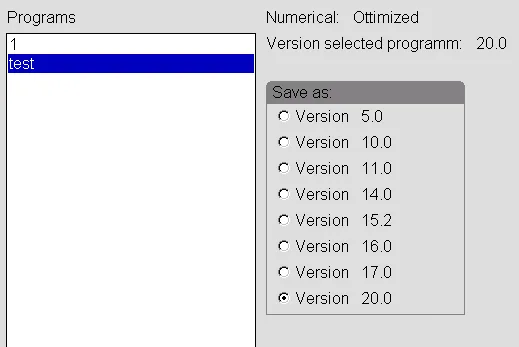
The ESA S650 Version Saving page contains several important tools for managing program versions.
The page includes:
- A list of numeric programs in the current directory
- The version index of the selected program
- Version selection checkboxes
- Сайт [Сохранить как…] function key
- Сайт [Сохранить ВСЕ как…] function key
These tools allow operators to convert programs into earlier formats while preserving important production data.
Selecting the Correct Version Format
When saving a program, operators can choose the target software version.
Например:
- Version 14.0
- Earlier compatible formats
- Different CNC software generations
Choosing the correct version ensures the program can run properly on the target machine.
How to Save a Numeric Program in a Previous Version
Step 1: Open the Program List Page
To save a program in an earlier version:
- Press the button to enter the Список программ page
- Выберите функциональную клавишу [Сохранить версию]
This opens the Version Saving page.
Step 2: Select the Program and Target Version
After entering the saving page:
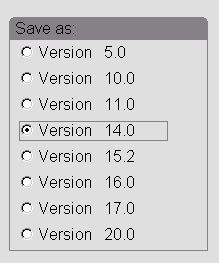
- Select the numeric program you want to convert
- Choose the desired version format using the touch screen
Например:
- Version 14.0
- Earlier compatible versions
This allows the ESA S650 to prepare the program for conversion.
Step 3: Save the Program
Once the version is selected:
- Нажмите кнопку [Сохранить как…] кнопка
A save window will appear requesting:
- Название программы
- File identification
After entering the desired program name:
- Нажмите [Ok]
The ESA S650 will save the converted program directly into the CNC program list.
Benefits of Saving Individual Programs
Saving a single program in a previous version is useful when:
- Sharing programs with another machine
- Testing compatibility
- Archiving important production files
- Updating only selected jobs
This method keeps workflow organized while reducing unnecessary file duplication.
How to Save All ESA S650 Programs in a Previous Version
Step 4: Access the Save All Function
To convert all programs simultaneously:
- Откройте Список программ page
- Нажмите [Сохранить версию]
The Version Saving page will appear again.
Step 5: Select the Target Version
Using the touch screen:
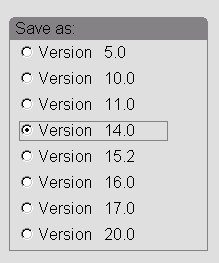
- Select the version format required for export
This version will apply to every program during the conversion process.
Step 6: Insert an External USB Device
Before saving all programs:
- Insert a formatted USB storage device into the ESA S650 USB port
- Verify sufficient free storage space is available
Using external storage protects the original CNC data while creating a secure backup copy.
Step 7: Save All Programs
After preparing the USB device:
- Нажмите кнопку [Сохранить ВСЕ как…] function key
The ESA S650 will:
- Convert all programs
- Save them into the selected version format
- Export them to the external memory device
This process is highly efficient for large production environments.
Advantages of ESA S650 Program Backup Management
Improving Production Security
Regular program backups help prevent:
- Program loss due to hardware failure
- Accidental deletion
- Software corruption
- Version incompatibility issues
Maintaining backup copies improves production reliability and machine recovery capability.
Simplifying Multi-Machine Operations
Factories often operate multiple CNC systems with different software versions.
The ESA S650 Saving Programs function allows:
- Easy program sharing
- Cross-machine compatibility
- Centralized program management
- Simplified production coordination
This is especially useful for companies running older and newer ESA controllers simultaneously.
Supporting Long-Term Program Storage
Older production jobs may need to be reused months or years later.
Saving programs in compatible versions allows manufacturers to:
- Maintain long-term archives
- Reuse successful bending programs
- Reduce future programming time
- Preserve production standards
Proper version management supports long-term manufacturing efficiency.
Best Practices for ESA S650 Saving Programs
Save Programs Regularly
Operators should frequently:
- Save updated programs
- Create backup copies
- Export important production files
Regular saving minimizes the risk of unexpected data loss.
Verify USB Device Compatibility
Before exporting programs:
- Use properly formatted USB devices
- Ensure sufficient free storage space
- Safely remove storage after saving
This helps avoid transfer errors or file corruption.
Organize Program Naming Clearly
When saving converted programs:
- Use consistent file naming methods
- Include version references if needed
- Separate archived programs from active jobs
Clear organization improves program management efficiency.
Check Compatibility Before Production
After transferring programs:
- Open the files on the target machine
- Verify bend data and tooling settings
- Perform a test run if necessary
This ensures safe production operation after version conversion.
Часто задаваемые вопросы (FAQ)
What is ESA S650 Saving Programs used for?
It allows operators to save and convert CNC bending programs into earlier software versions for compatibility and backup purposes.
Where are converted programs stored?
Single converted programs are stored in the CNC program list, while batch exports can be saved to external USB storage.
Why are newer ESA S650 programs incompatible with older versions?
After version 10.1, the program format changed because additional machine functions were introduced.
Заключение
The ESA S650 Saving Programs function provides a reliable solution for program version management, compatibility control, and secure backup storage. By understanding how to save individual programs, export all programs, and convert files into earlier software versions, operators can maintain smooth production workflows across different ESA controller generations.
Proper program backup and version management help reduce production risks, improve machine compatibility, and protect valuable manufacturing data. Whether you are managing multiple CNC systems or archiving long-term production jobs, using ESA S650 Saving Programs correctly can greatly improve operational efficiency and data security.
For additional technical support, ESA controller guidance, or advanced CNC documentation, feel free to contact HARSLE or explore more technical resources available on our website.


