


ESTUN E315P Password Protection is designed to control access to advanced controller functions while keeping basic operating parameters available for normal use. After the controller is powered on, operators can access common settings such as single-step or multi-step programs and tooling parameters without additional authentication.
However, advanced functions such as Teaching Mode, System Parameter Configuration, and Diagnostic Functions require password authentication. Understanding how ESTUN E315P Password Protection works helps operators distinguish between normal operating settings and restricted system-level functions while reducing the risk of unauthorized parameter changes.
What Is ESTUN E315P Password Protection?
The E315P controller uses password authentication to restrict access to specific advanced settings.
Not every operation requires a password. After normal startup, operators can still access and edit basic parameters required for daily press brake operation.
Password protection is mainly applied when entering functions that can affect machine configuration, commissioning, or system diagnostics.
With ESTUN E315P Password Protection, the controller therefore separates normal production operations from advanced technical settings.
This access structure allows operators to use the machine normally while reserving sensitive settings for authorized personnel.
Which Functions Require Password Protection?
According to the E315P function settings, several advanced operations require authentication.
Teaching Mode
Teaching Mode is used during specific machine setup and parameter configuration procedures.
Because changes made in this mode may influence machine positioning or reference settings, access is protected by authentication.
Operators performing normal bending production generally do not need to enter this mode.
System Parameter Configuration
System parameters determine important aspects of the controller and machine configuration.
Сайт ESTUN E315P Password Protection system prevents unrestricted access to these settings. This helps avoid accidental changes to parameters that should normally remain unchanged during daily operation.
Diagnostic Functions
Diagnostic functions are mainly used when checking machine status, signals, or system conditions during commissioning and troubleshooting.
These functions also require authentication because they are intended for technical operation rather than routine production.
How to Access Password-Protected Settings?
Accessing restricted settings starts from the normal E315P startup interface.
Start From the Normal Boot Screen
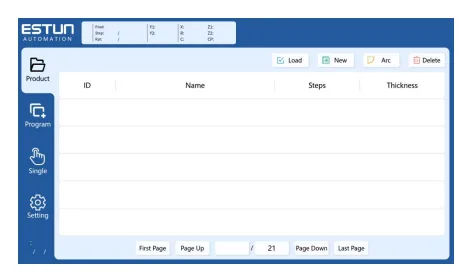
After powering on the E315P, wait for the controller to complete startup and display the normal boot screen.
The main interface provides access to the controller’s standard operating pages.
At this stage, basic operating functions remain available without entering a password.
Image summary: After powering on the E315P, wait for the normal boot screen before accessing advanced settings.
Open the System Settings Interface
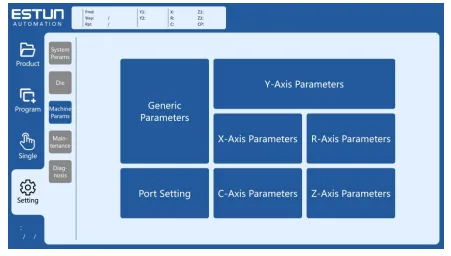
From the normal interface, select the Настройки function to enter the relevant settings area.
The System Settings interface contains different parameter categories for machine configuration.
Depending on the selected function and current permission level, some pages can be opened directly while restricted functions require authentication.
Image summary: Open the Settings menu to access the E315P system and machine parameter interfaces.
Enter the Required Password
When a restricted screen is selected, the controller displays a password keypad.
Enter the appropriate password to complete authentication.
Once the password is accepted, the system grants access to the corresponding protected function according to the available permission level.
The correct password should only be provided to personnel authorized to modify the relevant machine settings.
What Can You Access After Authentication?
After successful authentication, ESTUN E315P Password Protection allows authorized users to access the corresponding advanced functions.
Depending on the required operation, these may include:
- Teaching-related settings
- System parameter configuration
- Machine parameter settings
- Diagnostic functions
- Other restricted configuration pages
Authentication does not mean that every parameter should be modified. Technicians should only change settings when the correct parameter values and machine configuration are known.
For example, the System Settings interface may contain parameter areas related to different machine axes and control functions. Incorrect changes could affect machine operation.
Why Does the E315P Protect Advanced Parameters?
Advanced controller parameters can directly influence how the press brake operates. Allowing unrestricted access could result in accidental changes during normal machine use.
The ESTUN E315P Password Protection system helps separate two different types of operation.
For daily production, operators can access the functions required to create or run bending programs without repeatedly entering passwords.
For commissioning, maintenance, or troubleshooting, authorized personnel can authenticate before accessing more sensitive controller settings.
This approach provides convenient daily operation while maintaining controlled access to important configuration functions.
What Should You Check Before Changing Protected Settings?
Before modifying any password-protected parameter, first confirm why the adjustment is required and whether the current value has been recorded.
Important precautions include:
- Confirm the correct parameter before editing.
- Record the original value before making changes.
- Follow the machine configuration and technical documentation.
- Avoid changing unrelated parameters.
- Verify machine operation after an authorized adjustment.
Password access should not be treated as permission to test unknown settings.
If a parameter function or required value is unclear, verify it with the relevant machine documentation or technical personnel before making changes.
Best Practices for ESTUN E315P Password Protection
Proper use of ESTUN E315P Password Protection helps maintain a clear distinction between routine operation and advanced machine configuration.
Operators should use normal production functions without changing restricted parameters unnecessarily. Passwords for advanced settings should be managed carefully and provided only to personnel who understand the corresponding controller functions.
When protected settings must be adjusted, record the original configuration first and make only the required changes.
By using ESTUN E315P Password Protection correctly, operators can maintain convenient access to everyday functions while reducing the possibility of accidental changes to important system and machine parameters.
Часто задаваемые вопросы (FAQ)
How Do I Access Password-Protected Settings?
Start from the normal E315P boot screen and enter the Настройки interface. When you attempt to access a restricted function, the controller displays a password keypad.
Enter the appropriate password to obtain the required access permission.
What Should I Do Before Changing a Protected Parameter?
Before making any changes, record the original parameter value and confirm the correct setting from the machine documentation.
Only modify the required parameter and avoid changing unrelated settings.
What If I Do Not Know the Correct Password?
Do not repeatedly try unknown passwords or modify other settings to bypass authentication.
If access to a protected function is required, obtain the correct password or permission from the appropriate machine administrator, manufacturer, or authorized technical personnel.
Заключение
ЭСТУН E315P Password Protection provides controlled access to advanced controller functions while allowing operators to use basic production settings normally. Functions such as Teaching Mode, System Parameter Configuration, and Diagnostic Functions require authentication because they involve more sensitive machine settings.
When accessing protected parameters, technicians should confirm the purpose of the adjustment, record the original values, and modify only the required settings.
By using ESTUN E315P Password Protection correctly, manufacturers can maintain convenient daily press brake operation while reducing the risk of accidental or unauthorized changes to important controller parameters.


