


The ESTUN E315P Continue Enable parameter controls whether a press brake automatically transitions between bending worksteps or requires foot pedal operation to proceed. This function is particularly important in multi-step bending programs, where several operations must be completed in a defined sequence.
According to the ESTUN E315P operating manual, Continue Enable provides two configuration options: Enable and Disable. These settings determine how the controller proceeds between worksteps while following the applicable machine control conditions.
This guide explains how Continue Enable works, how to configure the parameter, and how to select an appropriate setting for reliable multi-step bending operations.
What Is ESTUN E315P Continue Enable?
The ESTUN E315P Continue Enable is a system parameter associated with workstep transitions during press brake operation.
It is located in the controller’s C.2 System Parameters section.
The operating manual provides the following specifications:
| Параметр | Спецификация |
|---|---|
| Parameter Name | Continue Enable |
| Default Value | Запрещать |
| Available Options | Enable / Disable |
| Запрещать | Requires foot pedal operation to proceed to the next workstep |
| Давать возможность | Allows automatic transition to the next workstep |
| Функция | Controls the workstep continuation method |
The default setting is Disable.
With this configuration, the operator must use the foot pedal to continue to the next bending workstep.
When Continue Enable is activated, the controller allows automatic workstep transitions according to the programmed sequence and applicable operating conditions.
This parameter does not independently override the machine’s safety requirements.
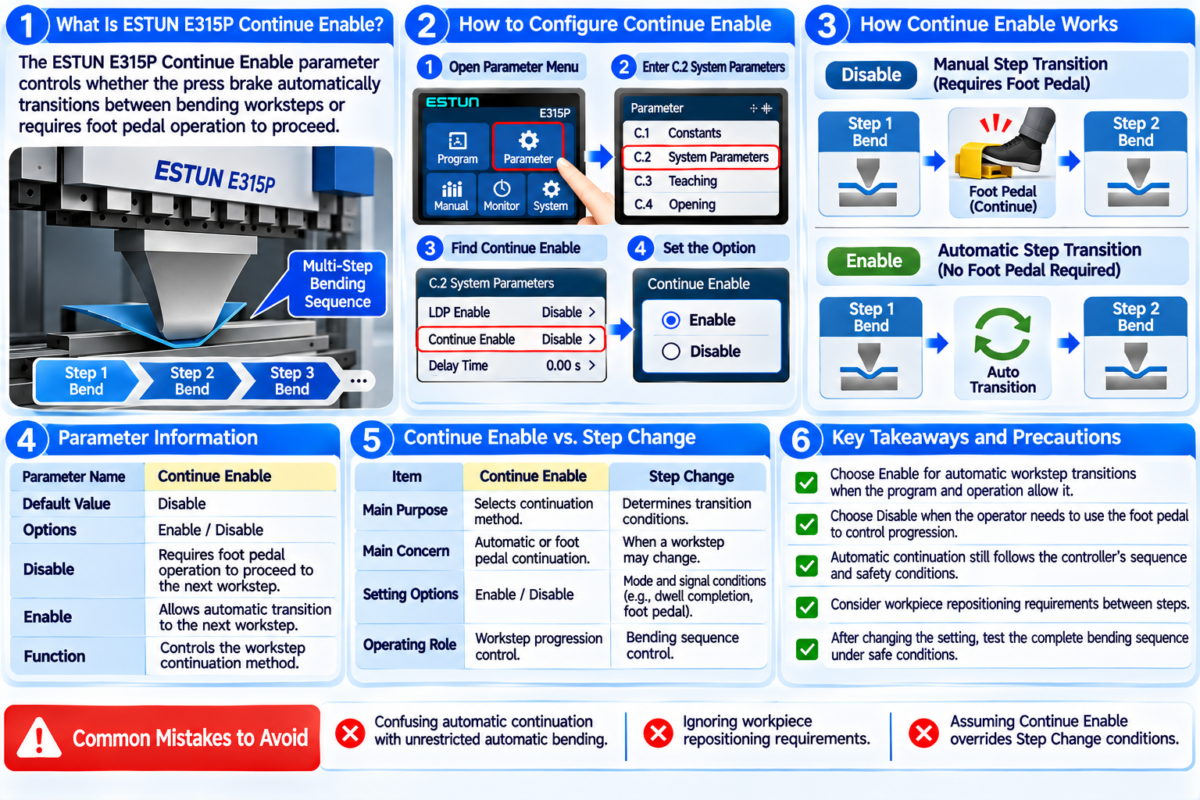
How Does ESTUN E315P Continue Enable Work?
The ESTUN E315P Continue Enable determines how the controller proceeds between consecutive bending worksteps.
The manual describes two operating configurations.
Continue Enable: Disable
When Continue Enable is set to Disable, the operator must use the foot pedal to proceed to the next workstep.
For example, consider a program containing three bending steps.
After completing the first workstep, the controller requires the appropriate ножная педаль operation before continuing to the second step.
The same continuation requirement applies when proceeding to the next workstep.
This configuration allows the operator to control progression through the bending sequence.
Continue Enable: Enable
When Continue Enable is set to Enable, the controller allows automatic transitions between bending worksteps.
After the current workstep is completed and the applicable transition conditions are satisfied, the program can proceed to the next workstep without requiring a separate foot pedal action for each transition.
However, automatic step continuation should not be confused with unrestricted automatic machine movement.
The actual bending sequence remains subject to the machine’s control logic, operating signals, and safety requirements.
How to Configure ESTUN E315P Continue Enable
Before changing the parameter, operators should review the intended bending program and confirm the machine’s approved operating configuration.
Step 1: Access System Parameters
Open the ESTUN E315P controller’s parameter settings.
Найдите C.2 System Parameters section described in the operating manual.
Find the parameter labeled Continue Enable.
Step 2: Check the Existing Setting
Review whether the parameter is currently set to Enable or Disable.
The factory default is Disable.
If the machine has already been commissioned successfully, record the existing configuration before making changes.
Step 3: Select the Required Mode
Choose the appropriate ESTUN E315P Continue Enable setting according to the intended workstep continuation method.
Выбирать Запрещать when the operator must use the foot pedal to proceed between worksteps.
Выбирать Давать возможность when automatic workstep transitions are required and permitted by the machine’s approved operating configuration.
Do not change this parameter simply to bypass an unexpected interruption or unresolved machine fault.
Step 4: Verify the Workstep Sequence
After adjusting the parameter, review the programmed bending sequence.
Confirm that the worksteps are arranged correctly and that the expected transition conditions are understood.
Step 5: Perform a Controlled Test
Qualified personnel should verify the selected continuation method using the manufacturer’s approved operating procedures.
Check that the controller proceeds between worksteps as intended and that all required safety functions remain effective.
Continue Enable vs. Step Change
Although both functions relate to workstep transitions, they serve different purposes.
Сайт ESTUN E315P Continue Enable determines whether workstep continuation requires foot pedal operation or allows automatic progression.
Step Change concerns the conditions under which the controller can transition between worksteps.
| Функция | Continue Enable | Шаг изменения |
|---|---|---|
| Main Purpose | Selects continuation method | Determines transition conditions |
| Main Concern | Automatic or foot pedal continuation | When a workstep may change |
| Operating Role | Workstep progression | Bending sequence control |
| Relevant Factors | Enable / Disable setting | Program stage and control signals |
According to the E315P manual, step transitions depend on the relevant operating sequence and signal conditions.
For example, the controller’s Step Change description includes conditions associated with dwell completion and foot pedal signals.
Therefore, enabling Continue Enable does not mean that every transition condition can be ignored.
Both functions must be considered when evaluating the complete bending program.
When Should Continue Enable Be Used?
Сайт ESTUN E315P Continue Enable may be considered when configuring multi-step bending operations.
Operator-Controlled Workstep Progression
Disable mode is appropriate when the intended operating procedure requires the operator to initiate continuation through the foot pedal.
This approach may be relevant when the operator needs to manage workpiece positioning or preparation between bending steps.
However, the actual suitability depends on the machine’s approved operating procedures.
Automatic Workstep Continuation
Enable mode allows automatic progression between worksteps when the relevant conditions are satisfied.
This may be useful for programs designed to follow a continuous sequence without requiring a separate pedal action at every transition.
Before using this configuration, operators must confirm that the programmed sequence is suitable for automatic continuation.
Production Sequence Management
The selected mode should correspond to the actual workpiece handling requirements.
If manual repositioning is necessary between bending operations, operators should not assume that automatic continuation is appropriate.
The machine manufacturer’s operating instructions and risk assessment should determine the permitted configuration.
Common Continue Enable Configuration Mistakes
Several mistakes should be avoided when configuring the ESTUN E315P Continue Enable.
Confusing Automatic Continuation with Automatic Bending
Enable mode allows automatic workstep transitions. It does not independently establish that all machine movements can occur without operator input or safety checks.
Ignoring Workpiece Repositioning
Some multi-step bending programs require the operator to reposition the workpiece between operations.
Automatic continuation should not be selected without considering these handling requirements.
Assuming Continue Enable Overrides Step Change
The controller still follows applicable transition conditions.
If a workstep does not advance, operators should investigate the relevant signals and program conditions rather than repeatedly changing Continue Enable.
Changing Parameters During Production
Configuration changes should not be made during an active bending cycle.
Operators should follow approved procedures before modifying system parameters.
Practical Recommendations for Smooth Workstep Transitions
Before adjusting the ESTUN E315P Continue Enable, review the bending program, workpiece handling requirements, and existing machine configuration.
Determine whether the operation requires foot pedal continuation or permits automatic transitions.
Record the original parameter value and verify that the selected mode matches the approved operating procedure.
After making changes, test the complete workstep sequence under controlled conditions.
Pay particular attention to the interaction between Continue Enable, Step Change, and other relevant machine signals.
If unexpected movement or abnormal behavior occurs, stop testing and investigate the cause before resuming production.
Proper configuration of the ESTUN E315P Continue Enable helps operators manage workstep progression consistently while maintaining the intended bending sequence and required safety conditions.


