


Accurate production counting helps pressa piegatrice operators monitor completed workpieces and manage production quantities. The ESTUN E315P Counting Method provides two counting options, allowing the controller to increase or decrease the current count after each completed processing cycle.
According to the E315P operating manual, the controller supports Increase and Decrease counting modes. These options serve different production requirements, particularly when operators need to monitor completed cycles or work toward a predefined production quantity.
This guide explains how the counting function works, how to select the appropriate mode, and how counting differs between single-step and multi-step bending programs.
What Is ESTUN E315P Counting Method?
The ESTUN E315P Counting Method determines how the Current Count changes after the controller completes a processing cycle.
The function is included in the controller’s programming constants and provides two operating modes.
| Parametro | Descrizione |
|---|---|
| Parameter Name | Counting Method |
| Default Value | Aumento |
| Available Options | Increase / Decrease |
| Unità | Nessuno |
| Counting Interval | After each completed program cycle |
In Increase mode, the Current Count increases automatically after each completed cycle.
In Decrease mode, the Current Count decreases after each completed cycle until it reaches zero.
The selected counting method does not change the programmed bending angle or axis positioning parameters. Instead, it determines how the controller tracks production progress.
How Does Increase Counting Work?
Increase is the default ESTUN E315P Counting Method.
When this mode is selected, the Current Count automatically increases by one after each completed program cycle.
For example, suppose the initial Current Count is 0.
| Completed Cycles | Current Count |
|---|---|
| 0 | 0 |
| 1 | 1 |
| 2 | 2 |
| 3 | 3 |
| 4 | 4 |
This mode is suitable when operators want to record the number of completed processing cycles.
The displayed count provides a convenient reference for monitoring production progress.
However, operators should distinguish between completed processing cycles and the number of physical workpieces produced. The relationship depends on how the bending program is organized.
How Does Decrease Counting Work?
Decrease mode works in the opposite direction.
Instead of increasing the Current Count, the controller reduces it by one after each completed program cycle.
When the count reaches zero, processing stops according to the manual.
For example, if the required production quantity is 5, the Current Count can be initialized accordingly.
| Completed Cycles | Current Count |
|---|---|
| 0 | 5 |
| 1 | 4 |
| 2 | 3 |
| 3 | 2 |
| 4 | 1 |
| 5 | 0 |
Once the count reaches zero, the controller stops processing.
This makes Decrease mode particularly useful for production tasks with a predefined quantity.
The ESTUN E315P Counting Method therefore supports both completed-cycle tracking and remaining-cycle management.
How to Configure ESTUN E315P Counting Method
Before adjusting the counting mode, confirm that the intended bending program has been prepared.
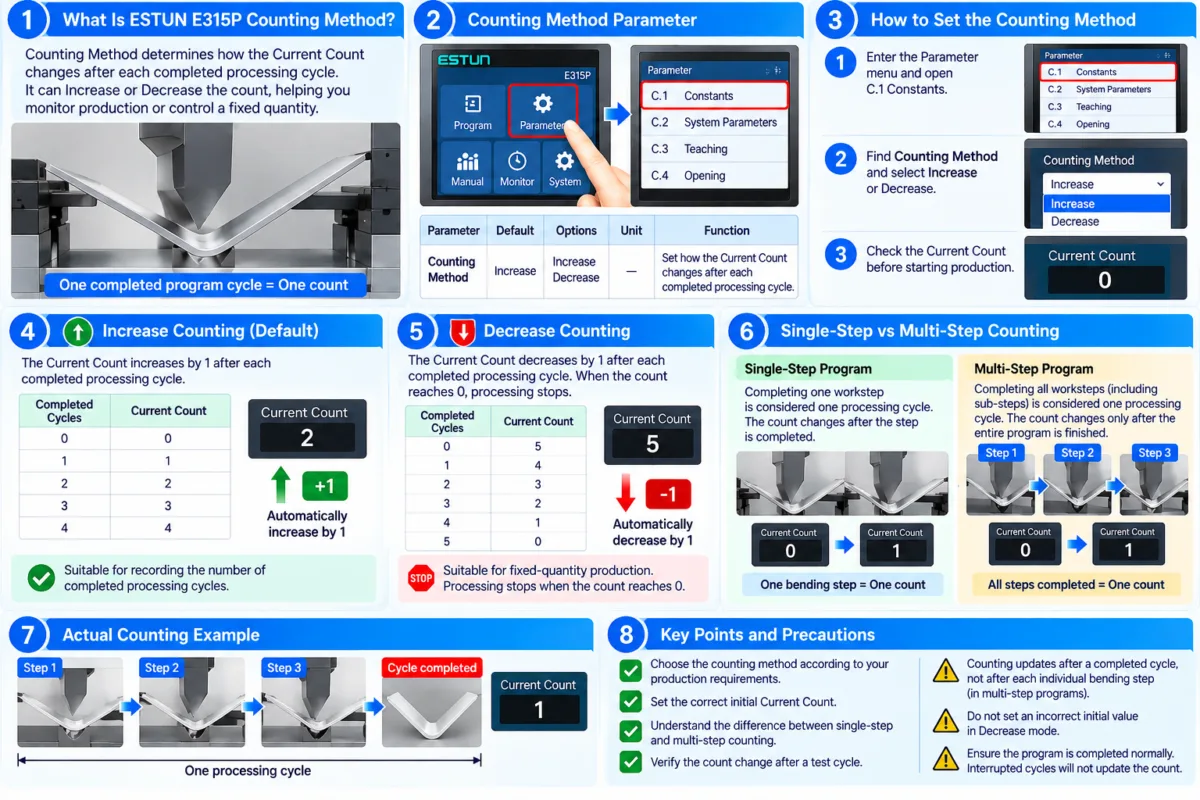
Step 1: Locate the Counting Method Parameter
Access the relevant Programming Constants settings on the E315P controller.
Find the parameter labeled Counting Method.
The manual identifies Increase as the default option.
Step 2: Select the Required Mode
Choose the counting method according to the production requirements.
Select Increase when the objective is to track completed processing cycles.
Select Decrease when the objective is to work toward a predefined remaining cycle count.
Step 3: Check the Current Count
Before starting production, verify the displayed Current Count.
For Increase mode, confirm that the starting value is appropriate for the production record.
For Decrease mode, ensure that the starting count corresponds to the intended number of remaining cycles.
Step 4: Verify the Counting Result
Run an appropriate test program under safe operating conditions.
After one complete processing cycle, check whether the Current Count changes in the expected direction.
The count should increase or decrease by one according to the selected mode.
How Are Single-Step and Multi-Step Programs Counted?
The E315P manual distinguishes between single-step and multi-step processing cycles.
Understanding this distinction is essential when configuring the ESTUN E315P Counting Method.
Single-Step Program
In a single-step program, completing one workstep is considered one processing cycle.
Therefore, the Current Count changes after that workstep is completed.
Multi-Step Program
In a multi-step program, one processing cycle includes all required worksteps, including sub-steps.
The Current Count changes only after the complete program cycle has been finished.
For example, a program containing four bending steps does not necessarily increase the count four times.
Instead, completing all four steps constitutes one processing cycle, resulting in a single count change.
This distinction prevents operators from confusing individual bending steps with completed program cycles.
When Should You Use Decrease Counting?
Decrease mode is particularly useful when a production task requires a fixed number of processing cycles.
For example, if an operator needs to complete 50 program cycles, the Current Count can be set to 50 before production begins.
After each completed cycle, the controller reduces the remaining count.
When the count reaches zero, processing stops.
This allows operators to monitor the remaining production quantity without manually subtracting completed cycles.
However, the operator should ensure that one program cycle corresponds to the intended production unit.
If one physical workpiece requires several complete program cycles, the displayed count should not automatically be interpreted as the number of finished workpieces.
Why Does the Current Count Not Change?
If the Current Count remains unchanged, first confirm that the program has completed an entire processing cycle.
For multi-step programs, finishing only one bending step does not necessarily complete the cycle.
Next, verify that the selected counting method matches the intended operation.
Also check whether the bending sequence has been interrupted before completion.
The ESTUN E315P Counting Method updates the count after completed cycles, so an incomplete program may not produce the expected change.
Avoid modifying unrelated machine parameters before checking the program completion condition.
Practical Tips for Accurate Production Counting
To use the ESTUN E315P Counting Method effectively, operators should select the counting mode before starting a production batch.
Verify the initial Current Count and confirm how the program defines one complete processing cycle.
For multi-step programs, ensure that all required bending steps and sub-steps are included in the intended cycle.
After completing the first production cycle, check that the Current Count changes correctly.
When using Decrease mode, pay particular attention to the initial quantity because processing stops when the count reaches zero.
Correct configuration of the ESTUN E315P Counting Method helps operators track production progress consistently and manage predefined processing quantities more efficiently.
Domande frequenti
Can the Current Count Be Changed Before Starting Production?
The Current Count should be checked before starting a production batch to ensure it matches the intended counting method. For Decrease mode, the starting value should represent the remaining number of processing cycles. Any adjustment should be made through the controller’s available counting controls.
What Happens If Production Is Interrupted Before a Cycle Finishes?
The manual specifies that counting occurs after a completed program cycle. Therefore, an interrupted or incomplete cycle should not be treated as a completed cycle. Operators should verify the displayed Current Count before resuming production.
Can I Use Increase Mode for Batch Production?
Yes. Increase mode is suitable for monitoring the number of completed processing cycles. However, unlike Decrease mode, the manual does not specify that Increase mode automatically stops production at a predefined quantity.
Conclusione
IL ESTUN E315P Counting Method provides two practical options for monitoring press brake production: Increase and Decrease.
Increase mode automatically adds one to the Current Count after each completed program cycle, making it suitable for tracking completed operations. Decrease mode subtracts one after each cycle and stops processing when the count reaches zero, making it useful for predefined production quantities.
Operators should also understand the difference between single-step and multi-step counting. In a multi-step program, the count changes only after all required worksteps and sub-steps are completed.
By selecting the appropriate ESTUN E315P Counting Method, verifying the initial count, and checking the results after a complete processing cycle, operators can maintain accurate production records and improve batch management.


