


Correct ESTUN E315P Port Settings are essential for establishing the relationship between controller functions and the press brake input/output signals. Through the Port Configuration page, technicians can assign specific function numbers to input and output ports according to the machine’s electrical configuration.
The E315P also provides simulated logic levels for testing and commissioning, allowing technicians to check certain control functions without relying entirely on external wiring. In this guide, we will explain how to access ESTUN E315P Port Settings, assign I/O functions, understand interface numbers, and use simulated logic levels correctly.
What Are ESTUN E315P Port Settings?
O ESTUN E315P Port Settings determine how controller functions are assigned to the corresponding input and output interfaces.
A press brake contains many electrical signals, including switches, sensors, relays, valves, and other control components. The E315P must correctly identify which input or output corresponds to each machine function.
Port Configuration allows technicians to establish this relationship by assigning the required numeric ID to each function.
This configuration is particularly important during initial machine commissioning, electrical configuration, and troubleshooting.
How to Access ESTUN E315P Port Settings
Port Configuration is located within the controller’s advanced parameter area and requires the appropriate permission level.
Obtain the Required Permission
According to the E315P manual, Level 1 permission is required to configure the port settings.
Complete the required authentication before attempting to modify these parameters.
Because port assignments directly affect machine control signals, unauthorized changes should be avoided.
Open the Port Configuration Page
After obtaining the required permission, enter the Parâmetros de controle interface and select Port Configuration.
The Port Configuration screen displays the available machine functions and their currently assigned interface numbers.
Before making any changes, it is recommended to record the original configuration for reference.
Image summary: Access Port Configuration from the Control Parameters interface after obtaining the required permission level.
How to Assign Input and Output Ports
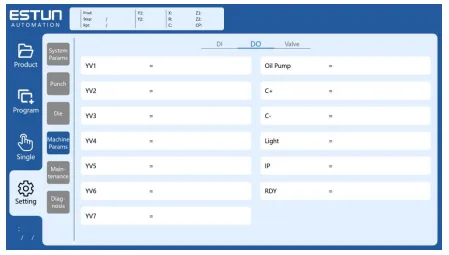
The main purpose of ESTUN E315P Port Settings is to assign controller functions to the correct input and output interfaces.
Select the Required Port
Locate the function that needs to be configured and select its current port value.
The controller will display a numeric keypad for entering the required interface number.
Before entering a new value, check the machine electrical schematic and confirm which physical signal corresponds to the selected function.
Enter the Interface Number
Enter the required numeric ID using the keypad.
Input interfaces are represented using I identifiers, while output interfaces use O identifiers.
Por exemplo:
- I1, I2, I3… represent input signal definitions.
- O1, O2, O3… represent output signal definitions.
The exact assignment depends on the machine configuration and should always match the electrical schematic.
Verify the Assignment
After entering the interface number, confirm that the new value corresponds to the intended machine function.
Incorrect ESTUN E315P Port Settings may cause a signal to be interpreted incorrectly or cause an output command to control the wrong function.
For this reason, technicians should verify each modified assignment individually instead of changing multiple ports without checking them.
Understand Interface Numbers Correctly
One of the most important points when configuring the E315P is understanding what the displayed interface number represents.
Interface Numbers Are Signal Definitions
An interface designation such as I1 represents a signal definition, not necessarily a physical connector pin number.
This distinction is important.
Technicians should not assume that an interface labeled I1 corresponds directly to Pin 1 on a connector. Signal definitions and physical terminal positions must be verified using the controller documentation and machine electrical schematic.
Confusing these two concepts may result in incorrect wiring or configuration.
Follow the Electrical Schematic
The machine electrical schematic should be used as the primary reference when changing ESTUN E315P Port Settings.
Before modifying an assignment, confirm:
- The required machine function
- The corresponding signal definition
- The actual electrical wiring
- The correct controller interface
This provides a more reliable configuration than identifying ports only by their displayed numbers.
How to Use Simulated Logic Levels
The E315P provides simulated logic values that can be useful during commissioning and troubleshooting.
According to the Port Configuration instructions:
| Valor | Simulated Logic |
|---|---|
| 99 | High level |
| 0 | Low level |
These values allow technicians to simulate a logic state without depending entirely on an external input signal.
Use 99 to Simulate a High Level
Entrando 99 can simulate a high logic level for the corresponding function.
This can help technicians check how the controller responds when a specific condition is considered active.
Use 0 to Simulate a Low Level
Entrando 0 simulates a low logic level.
This allows the corresponding condition to be treated as inactive during testing.
Use Simulation Carefully
Simulated logic levels are useful for diagnostics, but they should be used carefully.
Before applying a simulated value, technicians should understand the function being tested and consider whether changing its logic state could cause an unexpected machine response.
After testing, restore the required ESTUN E315P Port Settings according to the actual machine configuration.
When Should Port Configuration Be Checked?
Port settings normally do not require frequent adjustment during daily press brake operation.
However, they may need to be checked during:
- Initial machine commissioning
- Controller replacement
- Electrical system modification
- I/O troubleshooting
- Signal diagnosis
- Parameter recovery
If an input signal is physically present but the controller does not respond as expected, checking the port assignment can help determine whether the software configuration matches the actual wiring.
Similarly, if an output function activates incorrectly, technicians can compare the assigned output number with the electrical schematic.
Important Checks Before Changing Port Settings
Before modifying ESTUN E315P Port Settings, technicians should first confirm that a configuration change is actually required.
Check the following information:
- Current port assignment
- Machine electrical schematic
- Actual terminal wiring
- Signal definition
- Required permission level
Record the original parameter before making any adjustment.
After changing a port assignment, verify the corresponding machine function carefully before returning the press brake to normal operation.
Avoid changing unrelated port assignments during troubleshooting, as multiple simultaneous changes can make the original fault more difficult to identify.
Best Practices for ESTUN E315P Port Settings
Correct ESTUN E315P Port Settings depend on matching the controller configuration with the actual press brake electrical system.
Technicians should use the machine electrical schematic to identify each input and output signal, distinguish signal definitions from physical pin numbers, and record original values before making changes.
The simulated high and low logic functions can be useful during diagnosis, but they should only be used when the technician understands the corresponding machine function.
By configuring and verifying each port systematically, technicians can maintain reliable communication between the E315P controller and the press brake electrical system while reducing configuration-related faults.
Perguntas Frequentes (FAQ)
What Are ESTUN E315P Port Settings Used For?
ESTUN E315P Port Settings are used to assign controller functions to the corresponding input and output interfaces. Correct port configuration ensures that the E315P can properly recognize input signals and control output functions according to the press brake electrical system.
Does I1 Mean Physical Pin 1?
No. An interface designation such as I1 represents a signal definition rather than a physical connector pin number.
When configuring ESTUN E315P Port Settings, always check the controller documentation and machine electrical schematic to identify the corresponding physical connection.
What Does 0 Mean in Port Configuration?
The value 0 is used to simulate a low logic level.
After completing a diagnostic test, technicians should restore the correct port configuration according to the actual machine requirements.
Conclusão
Correct ESTUN E315P Port Settings ensure that controller functions correspond properly with the Dobradeira input and output signals. Technicians should understand the difference between signal definitions and physical pin numbers and always verify port assignments against the machine electrical schematic.
The E315P also provides simulated logic values, with 99 representing a high level and 0 representing a low level, which can assist with commissioning and signal diagnosis when used correctly.
By recording original values, verifying each I/O assignment, and carefully using simulation functions, technicians can configure ESTUN E315P Port Settings more reliably and reduce I/O-related configuration problems during press brake commissioning and troubleshooting.


