


The CybTouch 8 Corrections function allows operators to fine-tune bending results without modifying the original part program. During production, variations in material thickness, material strength, tooling wear, or machine conditions may cause slight deviations in bend angle or flange dimensions. Instead of recreating the program, CybTouch 8 provides several correction functions that compensate for these variations quickly and accurately. In this guide, I will explain how to use CybTouch 8 Corrections, including angle correction, crowning adjustment, back gauge correction, and production optimization to improve first-part accuracy and maintain consistent bending quality.
Understanding CybTouch 8 Corrections
O CybTouch 8 Corrections function allows operators to compensate for small deviations that occur during bending without modifying the original part program. Variations in material properties, tooling conditions, or machine behavior may cause slight differences in bend angles or flange dimensions. Instead of editing the programmed values, operators can apply correction values directly from the Página numérica de curvatura to achieve the desired bending result.
Depending on production preferences, corrections can be applied while executing the entire program step by step or while repeating a single bend until the required result has been achieved.
The controller supports corrections for several machine axes and bending parameters, including:
- Bend angle (Y1 and Y2 axes)
- Coroação
- Ponto de aperto
- Back gauge X-axis
- Back gauge R-axis
This correction workflow helps improve first-part accuracy while preserving the original bending program.
Using Semi-Automatic Mode
For applications that require repeated adjustments during setup, Semi-Automatic Mode provides a convenient workflow.

Instead of progressing through every programmed bend, Semi-Automatic Mode allows the same bending step to be executed repeatedly. This enables operators to measure the workpiece after each bend, apply corrections if necessary, and repeat the operation until the desired result is achieved.
Once the bend has been optimized, production can continue to the next programmed step.
To activate or deactivate Semi-Automatic Mode, press and hold the designated button for more than one second.
This feature is especially useful during first-piece inspection, tooling changes, or when processing unfamiliar materials.
Applying Angle Corrections
After measuring the actual bend angle, any necessary compensation should be performed through the Correção de ângulo page rather than by editing the programmed bend angle.

To apply an angle correction, enter the measured angle using the Correção de ângulo function. The controller automatically calculates the required corrections for both the Y1 e Y2 axes, helping maintain synchronized beam movement during the next bending cycle.

If required, operators can also fine-tune the left and right sides of the beam independently by adjusting the Y1 or Y2 correction values manually. This is particularly useful when slight angle differences occur across the length of the workpiece.
If all angle adjustments need to be removed, the Reset Corrections function restores the correction values to their default state.
Using dedicated correction values instead of modifying the original program allows operators to preserve the programmed dimensions while compensating for production variations.
Adjusting Crowning and Pinch Point
For long workpieces or applications requiring consistent bending angles across the entire bending length, Coroação compensation may also be adjusted.
The controller automatically calculates the required Ponto de aperto position based on the programmed tooling and bending parameters. If additional adjustment is required, operators can manually modify the calculated value using the Pinch Point Correction função.
The displayed grey value represents the automatically calculated reference value. Any correction entered by the operator is applied relative to this calculated position rather than replacing it entirely.
By combining automatic calculation with manual fine-tuning, CybTouch 8 provides greater flexibility for maintaining consistent bending accuracy under different production conditions.
Correcting Back Gauge Positions
In addition to angle corrections, CybTouch 8 Corrections also supports adjustments for the back gauge axes.
If the measured flange dimensions differ slightly from the programmed values, correction values can be applied directly to the:
- posição do eixo X
- Altura do eixo R
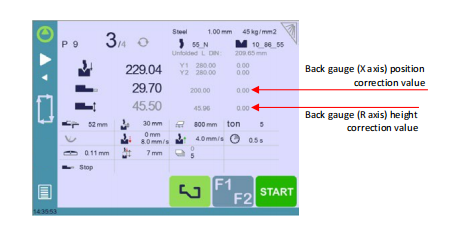
The controller displays the calculated position values next to each correction field. Operators simply enter the required correction value, and the adjustment is applied relative to the calculated position.
Back gauge corrections can be entered either through the dedicated correction page or directly from the Página numérica de curvatura, providing additional flexibility during production setup.
These corrections allow dimensional adjustments without modifying the original part program, making production changes faster and easier.
Applying Corrections During Production
A typical correction workflow begins after the first workpiece has been bent.
Operators should first measure the finished part carefully to determine whether any dimensional or angular deviations are present. Depending on the inspection results, the appropriate correction—such as angle, crowning, pinch point, or back gauge compensation—can then be applied through the correction page.
After entering the required values, the same bending step can be repeated using Semi-Automatic Mode until the desired result is achieved. Once the workpiece meets specification, production can continue with the remaining bends or parts without modifying the original bending program.
This workflow minimizes material waste, reduces setup time, and improves production consistency.
Best Practices for Using CybTouch 8 Corrections
To achieve reliable and repeatable bending results, operators should follow several recommended practices when applying CybTouch 8 Corrections.
- Measure the first workpiece before applying any correction.
- Use the dedicated correction functions instead of modifying programmed bend values.
- Apply the smallest correction necessary and verify the result before making additional adjustments.
- Use Semi-Automatic Mode when multiple trial bends are required.
- Check tooling installation and material properties before increasing correction values.
- Reset correction values when changing tooling or processing a different material.
- Save the verified program after the first-piece inspection has been completed.
Following these recommendations helps maintain accurate bending results, shortens machine setup time, and ensures consistent production quality across different materials and workpiece designs.
Perguntas Frequentes (FAQ)
Why shouldn’t I modify the programmed bend angle directly?
The controller recommends applying corrections through the Correções page rather than editing the programmed bend values. This preserves the original program while compensating for variations caused by material properties, tooling, or machine conditions.
What is Semi-Automatic Mode used for?
Semi-Automatic Mode allows the same bending step to be repeated continuously while corrections are being applied. Operators can measure the workpiece after each bend, make adjustments if necessary, and repeat the operation until the desired result is achieved before proceeding to the next step.
What is Pinch Point Correction?
The controller automatically calculates the Ponto de aperto position based on the programmed tooling and bending parameters. If necessary, operators can apply an additional correction to fine-tune this calculated position for improved bending performance.
Conclusão
The CybTouch 8 Correçãos function provides a practical and efficient way to optimize bending accuracy without altering the original part program. By combining Correção de ângulo, Coroação, Pinch Point Correctione Back Gauge (X & R Axes) Correction, operators can quickly compensate for variations caused by material properties, tooling, or machine conditions.
The addition of Semi-Automatic Mode further simplifies the setup process by allowing the same bending step to be repeated until the desired result is achieved. This approach minimizes material waste, shortens setup time, and improves first-part quality before full production begins.
By understanding when and how to apply each correction, operators can maintain consistent bending performance, reduce manual reprogramming, and maximize the capabilities of the CybTouch 8 controller. For more advanced programming techniques and controller features, continue exploring the HARSLE CybTouch 8 documentation series.


