


ET18 More Data Settings provide additional bending parameters for controlling ram return distance, pressure holding, unloading, backgauge movement, and production-related functions on an electro-hydraulic press brake. These settings help operators manage individual bending steps and adapt the program to specific processing requirements.
Unlike the main programming interface, which focuses on angolo di piegaturas and axis positions, this page contains supplementary parameters that influence the bending sequence.
This guide explains how to access the additional settings, understand their functions, and review important parameters before production.
What Are ET18 More Data Settings?
ET18 More Data Settings are accessible from the main programming interface of the EASYCAT ET18 hydraulic bending control system.
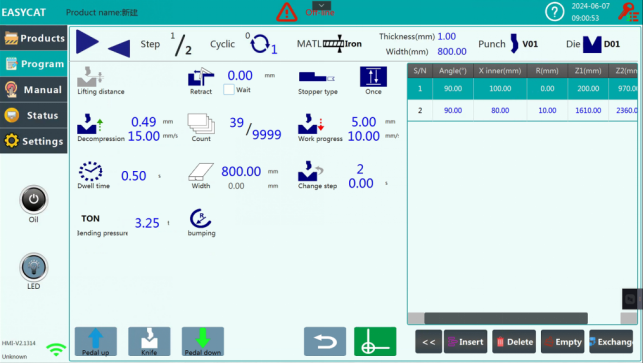
According to the operating manual, operators can select the green Di più icon on the programming page to enter the additional data settings interface.
The page displays several parameters associated with bending movement, pressure control, workpiece dimensions, and production progress.
These parameters include Lifting Distance, Unload, Pressure Time, Bending Pressure, Yield Distance, Product Count, Width, Big Arc, Work Progress, and Change Step.
Understanding their individual functions is essential because each parameter affects a different part of the bending process.
How to Access ET18 More Data Settings
The controller manual provides a straightforward entry method.
Step 1: Open the Programming Interface
Access the Program page from the controller’s main navigation menu.
Ensure that the required bending program is selected before reviewing its additional parameters.
Step 2: Select the More Icon
Locate the green More icon at the bottom of the programming interface.
Select this icon to enter the ET18 More Data Settings page.
Step 3: Review the Available Parameters
The additional settings interface displays parameter names, corresponding values, and relevant function icons.
Before making adjustments, identify which settings apply to the current bending operation.
Step 4: Verify the Bending Program
After adjusting the required parameters, review the program and confirm that the selected values match the intended processing requirements.
Any changes affecting machine movement or pressure should be verified under appropriate operating conditions.
Understanding Lifting Distance and Unload
Two important parameters on the additional settings page concern ram return movement and pressure release.
Lifting Distance
Lifting Distance defines the return distance of the upper die along the Y-axis for each bending step.
This setting determines the specified upward return movement after the relevant bending operation.
The required distance depends on the workpiece geometry and the clearance needed for subsequent operations.
Operators should confirm that the selected return distance provides sufficient clearance for the workpiece.
Unload
The Unload parameter refers to the unloading stroke after bending.
According to the ET18 manual, this movement is used to release the incoming pressure after the bending operation.
Unloading is different from the upper die’s return distance. It concerns the pressure-release stage rather than simply defining the ram’s upward travel.
Operators should follow the manufacturer’s approved settings when adjusting unloading-related parameters.
Adjusting Pressure Time and Bending Pressure
The ET18 More Data Settings page also contains parameters associated with pressure holding during bending.
Pressure Time
Pressure Time defines the pressure holding duration at the lower stop position for each bending step.
This parameter determines how long the machine maintains the corresponding pressure-holding stage.
The appropriate setting depends on the processing requirements and machine configuration.
Pressione di flessione
Bending Pressure refers to the pressure applied during the bending operation.
The manual identifies this parameter as a bending pressure setting but does not provide a universal recommended value.
Operators should therefore use the machine manufacturer’s technical specifications when determining suitable pressure settings.
Incorrect pressure-related adjustments may affect bending performance or exceed the intended operating conditions.
Understanding Yield Distance and Change Step
The X-axis backgauge also has additional movement-related settings.
Yield Distance
Yield Distance defines the concession distance of the X-axis for each bending step.
This parameter is associated with the backgauge yielding movement during the bending sequence.
The manual indicates that the concession distance is entered in the corresponding field.
Operators should distinguish this parameter from Lifting Distance because the two settings concern different axes.
Change Step
Change Step concerns X-axis positioning for the next bending step after the current step has been executed.
This function is associated with the transition between programmed bending operations.
When reviewing the ET18 More Data Settings, operators should verify that the relevant X-axis positions correspond to the intended bending sequence.
Product Count, Width, and Work Progress
Several additional parameters provide information about workpiece processing and production requirements.
Product Count: Displays the current processed workpiece count and the total quantity. The manual also identifies a display indicating when the relevant function is unavailable.
Width: Specifies the width of the sheet metal being processed.
Work Progress: Described in the manual as the speed of piece bending. Operators should interpret this parameter according to the controller’s documented function rather than assuming it represents a universal production-rate calculation.
These settings provide additional information for preparing and monitoring bending operations.
Understanding the Big Arc Function
The ET18 More Data Settings page includes a parameter called Big Arc.
According to the manual, this function enables large circular arc processing.
Arc bending generally involves producing a curved workpiece profile rather than a single sharp bend.
However, the provided manual section does not specify the complete programming procedure for the Big Arc function.
Operators should refer to the corresponding controller instructions before attempting arc-bending operations.
Important Precautions When Adjusting Parameters
Before modifying ET18 More Data Settings, operators should understand how the selected parameters relate to machine movement and bending performance.
First, distinguish between Y-axis lifting distance and X-axis yielding distance. These parameters control different movements and should not be used interchangeably.
Second, avoid changing pressure-related settings without confirming the machine’s approved operating requirements.
Third, review the complete bending sequence after adjusting parameters associated with step transitions.
The manual also notes that after the knife is opened, the pedal will slow down. Operators should observe the actual machine response and follow the applicable operating instructions.
Finally, verify the program and tooling setup before beginning production.
Domande frequenti (FAQ)
Where Can Operators Find ET18 More Data Settings?
Operators can access the additional settings by selecting the green More icon on the main programming page. This opens the interface containing supplementary bending parameters.
What Does the Unload Parameter Control?
The Unload parameter specifies the unloading stroke used to release pressure after bending. It is associated with pressure release rather than the complete upward return movement of the ram.
Can Pressure Time Be Adjusted for Different Bending Steps?
The ET18 manual identifies Pressure Time as the pressure holding duration at the lower stop position for each step. Operators should select appropriate values according to the machine’s technical requirements.
Conclusione
ET18 More Data Settings provide important supplementary controls for managing bending movement, pressure holding, unloading, and workpiece processing.
By understanding parameters such as Lifting Distance, Unload, Pressure Time, Bending Pressure, and Yield Distance, operators can better interpret the requirements of individual bending steps.
The additional settings page also includes functions related to production counting, workpiece width, arc processing, and X-axis positioning between steps.
Before modifying ET18 More Data Settings, operators should verify the machine configuration, follow the manufacturer’s approved parameter requirements, and confirm the complete bending sequence.
Proper parameter management helps support consistent pressa piegatrice operation, reduce avoidable setup errors, and improve the efficiency of daily sheet metal bending production.


