


When it comes to enhancing the efficiency of your metalworking processes, understanding the capabilities of the DELEM DA-52S Manual Mode is crucial. If you’re seeking insights into how this mode can improve precision and productivity, you’re in the right place. In this article, I’ll delve into the specifics of DELEM DA-52S Manual Mode, illustrating how it simplifies operations on press brakes. Whether you’re a seasoned professional or new to operating these machines, this guide will equip you with valuable knowledge on optimizing efficiency using the manual mode, ensuring you get the most out of your equipment.
Introduction
The DELEM DA-52S Manual Mode offers precision and flexibility, enhancing operational efficiency on the workshop floor. This manual mode allows operators to have direct control over the machinery, facilitating detailed customizations and adjustments on the fly, essential for intricate operations.

By pushing this key the CNC is in manual mode.
After pushing the ‘Start’ button all parameters are active and the backgauge will go into position. It is also possible to move the axes manually.


Use the key ‘change view’ to switch to a screen with zoomed values.
Parameter Explanation
Understanding the essential parameters within the DELEM DA-52S Manual Mode is crucial for effective machine control. Parameters such as axis alignment, cycle speed, and tool position play significant roles in ensuring precise and efficient press brake operations.
All parameters can be independently programmed, allowing for customized operation tailored to specific materials and job requirements.
- Punch (UP): Select from the tooling library to determine bend form and depth.
- Die (UN): Choose the die configuration essential for bending operations.
- Material (MA): Select from up to 6 preprogrammed materials for accurate bending depth calculations.
- Thickness (TH): Input the sheet thickness for precise force and angle computations.
- Length (BL): Define sheet length affecting backgauge positioning.
- Method (BM): Select between air bending and bottoming, impacting force and outcomes.
- Angle Correction (Cα): Adjust for discrepancies between programmed and measured angles.
- Angle (α): Input the desired bend angle, influencing Y-axis settings.
- Y1 and Y2 Axes (Y): Determine values for precise angle achievement, crucial for conical bending.
- Mute (M): Set Y-axis transition from fast to pressing speed at a specific position value.
- Decompression (BP): Program stroke for pressure release after bending.
- Force (P): Compute necessary force based on material, thickness, and die opening.
- X-Axis (X): Set backgauge position for accurate sheet placement.
- Retract (DX): Specify retract distance during bending, starting at the pinching point.
- Auxiliary Axis (R): Configure additional axes like R or Z for complex tasks.
- Opening (DY): Control gap between punch and die post-bend to reduce handling time.
- Speed (S): Determine pressing speed for balance between efficiency and precision.
- Decomp Speed (BS): Set beam speed during decompression stroke.
- Hold Time (T): Determine dwell time at the bend point for consistency.
- Parallelism (Y2): Adjust to ensure uniformity between cylinders.
Activating these parameters upon start optimizes control and boosts operation efficiency in DELEM DA-52S Manual Mode.
Zoomed Values
DELEM DA-52S Manual Mode includes a feature for zoomed values, allowing operators to closely inspect detailed settings and adjustments. This feature is particularly beneficial for making precise tweaks in critical parameters, ensuring superior quality control.
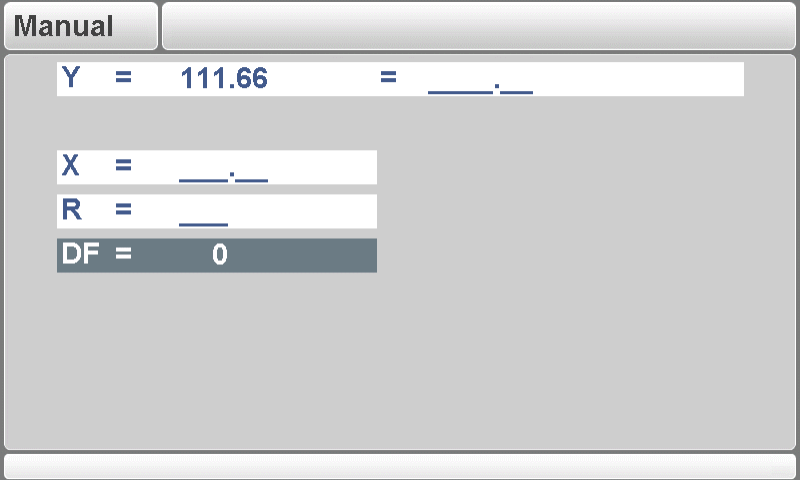
By utilizing zoomed values, operators can perform detailed calibrations that are crucial for maintaining consistency across multiple operations and minimizing errors during complex tasks.
Manual Operation of the Axes

Press this key to activate the manual movement mode.
Once the ‘manual pos’ key is engaged, navigate using the cursor bar to the axis you wish to adjust.

- Auxiliary Axes: In “Stop” + “Manual Mode”, you can manually adjust the backgauge by selecting it with the “Manual positioning” key and moving it using the keypad. This allows for precise and customized adjustments.
- Y-axis: In “Start” + “Manual Mode”, position the Y-axis manually, ensuring:
- The ‘adjust’ function is active, indicated by “Adjust” on-screen.
- The axis is below the mute-point.
- A pressing command is set in the CNC.
Teaching Positions
The DELEM DA-52S Manual Mode lets you save specific axis positions. After moving an axis, press ENTER to store its position, transferring the current axis value to the programmed field. This ensures repeatability and accuracy for future operations.
General Operation
Activating Manual Mode on the DELEM DA-52S enhances flexibility and efficiency by allowing manual axis control. Use the arrow keys on the front panel to navigate to ‘manual pos’ and select the desired axis. Pressing the keys will move the axis, providing precise control.
- Auxiliary Axes: In “Stop” + “Manual Mode,” you can manually adjust the backgauge by selecting it with the “Manual positioning” key and moving it using the keypad. This allows for precise and customized adjustments.
- Y-axis: In “Start” + “Manual Mode,” position the Y-axis manually, ensuring:
- The ‘adjust’ function is active, indicated by “Adjust” on-screen.
- The axis is below the mute-point.
- A pressing command is set in the CNC.
Teaching Positions
The DELEM DA-52S Manual Mode lets you save specific axis positions. After moving an axis, press ENTER to store its position, transferring the current axis value to the programmed field. This ensures repeatability and accuracy for future operations.
Frequently Asked Questions(FAQ)
What are the key parameters to monitor in DELEM DA-52S Manual Mode?
In DELEM DA-52S Manual Mode, it’s essential to monitor axis alignment, tool positioning, and cycle speed. These parameters help maintain precision and consistency across operations, ensuring quality results and reducing setup time between jobs.
How can I resolve common issues related to manual axis operation in the DELEM DA-52S?
To resolve common issues such as axis drift or sensor misalignment during manual operation, first verify that all system components are correctly calibrated. Regular maintenance and using the zoomed values feature can also help quickly identify and address these issues, minimizing downtime.
How does the DELEM DA-52S Manual Mode enhance the efficiency of press brake operations?
The DELEM DA-52S Manual Mode improves efficiency by allowing operators to fine-tune machine settings, such as axis alignment and cycle speed, directly. This hands-on approach ensures precise control, quick adjustments, and customization for different projects, leading to more efficient workflows.
Conclusion
In conclusion, the DELEM DA-52S Manual Mode significantly enhances operational efficiency by offering precise control and customization capabilities for press brake operations. By understanding and utilizing the key parameters such as axis alignment, cycle speed adjustments, and leveraging the zoomed values for detailed calibrations, operators can achieve superior quality and precision in their work. The ability to manually adjust the axes further increases the versatility and responsiveness of the machinery for complex tasks.
By implementing these strategies, you ensure that your operations run smoothly and efficiently, maximizing both productivity and the lifespan of your equipment. For further assistance or to explore more about the DELEM DA-52S capabilities, we encourage you to contact our team or explore additional resources and documentation available on our website.


