


When it comes to optimizing the efficiency and precision of your metalworking operations, mastering DELEM DA-52S tool programming is essential. If you’re searching for detailed insights on how to effectively program tools using the DELEM DA-52S, you’ve come to the right place. In this article, I’ll guide you through the process of mastering DELEM DA-52S Tool Programming, highlighting techniques that will enhance your machining processes. Whether you’re new to this system or looking to refine your skills, this guide will provide you with the essential knowledge needed to maximize the potential of your equipment.
Introduction
The DELEM DA-52S system is a cornerstone in the field of metal forming, offering precise and efficient control for tool programming.

Press this key for tool programming.
The first time this key is pressed, the screen for punch programming appears. To switch to programming of bottom dies, press this key again.
Programming of Punches
In the realm of DELEM DA-52S Tool Programming, setting up your punches correctly is essential for achieving precise bends and maintaining tool longevity.
Punch Library
The Punch Library in the DELEM DA-52S allows operators to catalog and efficiently manage up to 30 punch tools, which is essential for streamlining workflows and ensuring effective tool usage. Familiarizing yourself with this library is crucial for efficient DELEM DA-52S Tool Programming.
Step 1: Accessing the Punch Library
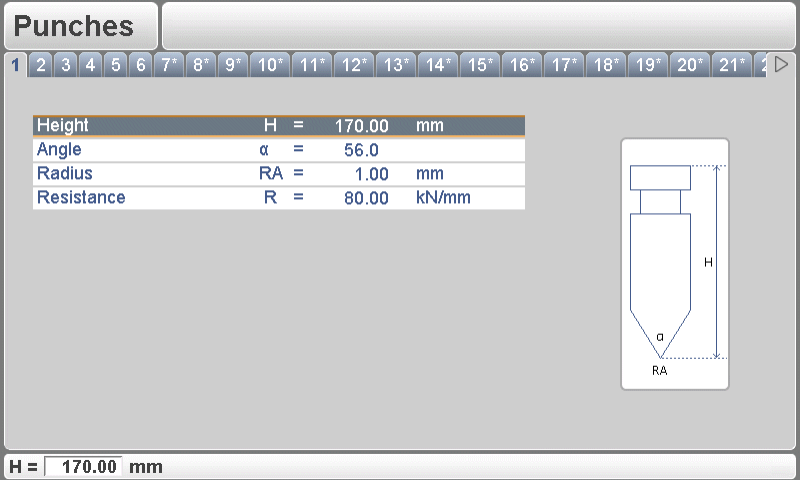
Programming of punches begins by pressing the tools key on the DELEM DA-52S. Use the left/right arrow keys to navigate through the library and view existing punches or select a tool slot that’s not programmed, indicated by an asterisk (*).
Step 2: Adding Punch Tools
To add a new punch, enter the tool’s specifications such as type, width, and angle. Accurate input of these parameters ensures the DELEM DA-52S can apply them during operation effectively.
Mastering the Punch Library within the DELEM DA-52S Tool Programming can significantly enhance your efficiency, providing both precision and longevity to your machine operations.
Punch Parameters
For optimal DELEM DA-52S Tool Programming performance, precise input and adjustment of punch parameters are essential.
Key Parameters:
- Height (H): Critical for bend depth calculations. Ensure accurate input for precise bending.
- Angle (a): Determine and set the punch tip angle for the desired bend results.
- Radius (RA): While used as a selection criterion, ensure it matches the task requirements.
- Resistance (R): Set the maximum allowable force (in kN/mm) to prevent overload and damage.
Optimization Steps:
- Material Adjustment: Fine-tune settings to accommodate different material types for consistent results.
- Thickness Compensation: Adjust for variations in thickness to maintain precision and quality.
By adhering to these guidelines, you enhance the effectiveness and lifespan of your punches, achieving precise and reliable metal forming with the DELEM DA-52S system.
Programming of Bottom Dies
Properly programming bottom dies is as important as punches, as they work in tandem to form precise bends in the workpiece. Getting familiar with the DELEM DA-52S Tool Programming for bottom dies will enhance your machining efficiency and precision.
Die Library
The Die Library is another fundamental component in DELEM DA-52S Tool Programming, offering a structured way to manage and recall die information. It allows you to store and organize up to 30 dies, providing a comprehensive database for your tools.
Step 1: Navigating the Die Library
The programming of dies is started by pressing the tools key.

Step 2: Adding and Storing Dies
When adding a new die, enter all relevant specifications, including V-width, angle, and die height. Accurate data ensures consistency in product output.
Die Parameters
Fine-tuning die parameters optimizes bending operations and helps avoid costly material waste.
Height (H): Influences bend depth; ensure accurate input.
V-opening (W): Distance between touching lines; crucial for bend accuracy.

Angle (α): Determines bend shape; match to project requirements.
Radius (RA): Affects curvature; select based on desired bend.
Mute (M): Distance for speed change; optimize for smooth operation.

X-safe (SN): Calculated safety zone (minimum X-axis value), which will be used in the case an R-axis is mounted. This to prevent finger to die collision. The indicated minimum value is computed automatically from the die dimensions as follows:
- X-SAFE = FS + ½ V in which:
- FS = flat section on the back side of the V-grove
- V = opening value
In this formula also a small additional safety value (0.5 mm) has been added.
Resistance (R): Maximum force in kN/mm; maintain within safe limits.
By mastering these elements of DELEM DA-52S tool programming—through an understanding of punch and die management—you can improve productivity and precision on your shop floor, achieving superior results with each use.
Frequently Asked Questions(FAQ)
How can I get started with DELEM DA-52S Tool Programming for my press brake?
To start with DELEM DA-52S Tool Programming, first familiarize yourself with the interface and tool library. Begin by defining the tools you will use and configuring your machine settings as per the operational needs. Make use of the graphical interface to simplify and expedite this process.
How do I troubleshoot common issues in DELEM DA-52S Tool Programming?
When diagnosing issues in DELEM DA-52S Tool Programming, verify that all tool parameters are correctly entered and that the latest software updates have been installed. Consult the user manual for specific error codes, and perform regular machine maintenance to prevent recurring issues.
Conclusion
Mastering DELEM DA-52S Tool Programming involves several key steps: understanding the interface, accurately defining and managing tools, customizing tool parameters, and regularly updating and maintaining the system. Together, these elements enable operators to optimize their machine’s performance, ensuring accurate and efficient machining processes.
To maximize the potential of your DELEM DA-52S, it’s crucial to follow the outlined steps meticulously. Proper setup and continuous learning are instrumental in enhancing the machine’s capabilities. If you have any questions or require further assistance, don’t hesitate to contact our team. Additionally, for more in-depth resources and support, please explore our library of documentation and guides available on our website.


