


CybTouch 8 Materials configuration plays a critical role in achieving accurate bending results and reducing setup time. The controller uses material-specific properties such as thickness, sigma value, springback compensation, and blank length calculation parameters to generate precise bending programs. By properly configuring CybTouch 8 Materials, operators can improve angle accuracy, reduce trial-and-error adjustments, and ensure consistent production quality across different material types.
In this guide, I will explain how to access the Materials page, configure material properties, manage springback corrections, apply BDC compensation, and create custom materials for specialized applications. Whether you are working with mild steel, stainless steel, aluminum, or custom materials, understanding CybTouch 8 Materials will help you optimize bending performance and improve programming efficiency.
Accessing the CybTouch 8 Materials Page
The Materials page allows operators to define and manage the characteristics of different materials used during bending operations.
To access the Materials page:
- Open the controller menu.
- Select Materials.
- Enter the required password if access protection is enabled.
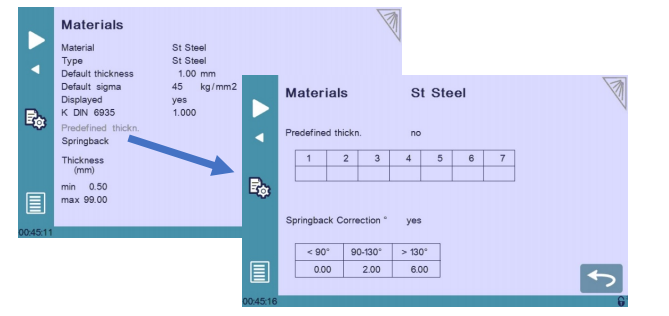
Depending on the machine configuration, access to the Materials page may require a Level 2 password.
The controller includes several predefined materials by default, including:
- Steel
- Stainless Steel
- Aluminum
Additional materials can be created and customized according to production requirements.
Understanding Material Parameters
Each material stored in the CybTouch 8 database contains several configurable properties that influence bending calculations.
Material Name
The Material field identifies the selected material.
Operators can rename materials to match internal production standards and simplify material selection during programming.
Default Thickness
The Default Thickness parameter automatically populates the thickness value when creating a new part using the selected material.
Using predefined thicknesses helps:
- Reduce programming time
- Improve consistency
- Minimize data entry errors
Default Sigma
Sigma represents the tensile strength of the material and is used during force and bending calculations.
The controller uses this value to estimate:
- Required bending force
- Material behavior
- Springback characteristics
Accurate sigma values help improve calculation precision and reduce correction requirements.
Display Option
The Displayed parameter determines whether a material appears in the material selection list.
When enabled:
- The material can be selected during programming.
When disabled:
- The material remains stored but hidden from normal operator menus.
This feature is useful for keeping unused materials out of production screens.
Configuring K DIN 6935
The K DIN 6935 parameter is used during blank length calculations according to the DIN 6935 standard.
Unlike traditional K-factor calculations, this parameter adjusts the thickness value used within the DIN 6935 formula.
Proper configuration can improve:
- Flat pattern calculations
- Blank length predictions
- Material consumption accuracy
For high-precision manufacturing applications, reviewing this parameter is recommended whenever new materials are introduced.
Using Predefined Thickness Values
CybTouch 8 allows operators to define up to seven predefined thickness values for each material.
Benefits of Predefined Thicknesses
Common thicknesses can be stored for rapid selection, such as:
- 1 mm
- 2 mm
- 3 mm
- 4 mm
- 5 mm
- 6 mm
- 8 mm
Advantages include:
- Faster programming
- Consistent data entry
- Reduced operator mistakes
- Improved workflow efficiency
When creating a new program, operators can simply select a predefined thickness instead of entering values manually.
Setting Minimum and Maximum Thickness Limits
The Thickness Min/Max parameters define the acceptable thickness range for a material.
These limits help prevent invalid programming data and improve consistency.
For example:
- Minimum thickness: 0.5 mm
- Maximum thickness: 90 mm
If an entered value falls outside the permitted range, operators can quickly identify and correct the issue before production begins.
How to Configure Springback Correction
Springback compensation is one of the most valuable functions available within CybTouch 8 Materials.
Different materials react differently after bending. As pressure is released, the material partially returns toward its original shape, creating a deviation from the programmed angle.
Springback Correction Table
The controller allows three correction zones:
- Below 90°
- Between 90° and 130°
- Above 130°
Correction values can be entered for each range.
The controller automatically interpolates between these values to generate a smooth compensation curve across the entire bending range.
Example of Springback Compensation
Suppose a material exhibits approximately:
- 1° springback below 90°
- 2.5° springback between 90° and 130°
- 5° springback above 130°
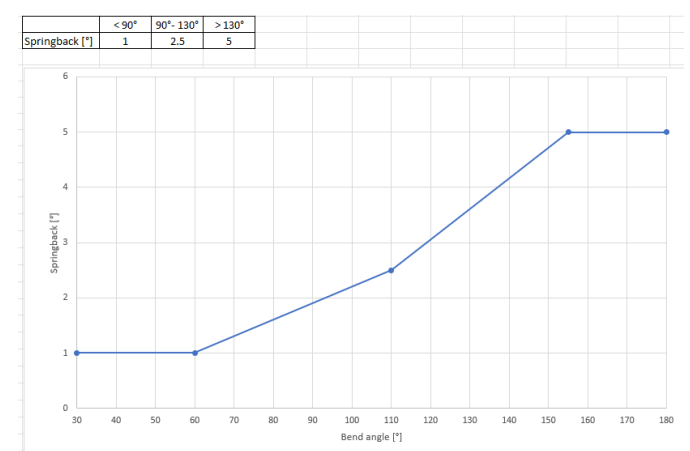
The controller will automatically apply intermediate values when calculating bend positions.
This significantly reduces manual angle corrections during production.
Benefits of Springback Correction
Properly configured springback tables can:
- Improve angle accuracy
- Reduce scrap rates
- Minimize test bends
- Improve repeatability
- Increase production efficiency
For materials that consistently produce angle deviations, updating springback values is strongly recommended.
Understanding BDC Correction
BDC (Bottom Dead Center) Correction allows operators to apply a permanent adjustment to the calculated bottom position of the ram.
Why BDC Correction Is Important
Small differences between theoretical calculations and actual machine behavior can affect final bend angles.
BDC Correction compensates for these systematic differences.
Unlike temporary bend corrections, this adjustment remains active across all bending operations.
Important Considerations
BDC Correction should be used carefully.
Large correction values may indicate:
- Machine calibration issues
- Beam indexing problems
- Tooling inaccuracies
- Incorrect material data
If excessive corrections are required, further machine inspection is recommended.
How to Add a New Material
Creating custom materials allows the controller to support specialized production requirements.
Step 1: Select an Unconfigured Material
Choose an unused material slot from the material database.
Step 2: Enter Material Characteristics
Configure:
- Material name
- Sigma value
- Thickness limits
- Predefined thicknesses
- Springback compensation values
Step 3: Save the Material
After all parameters have been entered, save the configuration.
The new material will immediately become available for future programming operations.
Best Practices for CybTouch 8 Materials
To achieve the highest bending accuracy, material data should be reviewed and updated regularly. Whenever a new material supplier, thickness, or alloy is introduced, test bends should be performed and springback values verified.
Maintaining an accurate material database helps reduce setup time, improve consistency, and maximize the performance of the CybTouch 8 controller. By properly configuring CybTouch 8 Materials, operators can create more reliable programs, improve production quality, and achieve more predictable bending results.
Frequently Asked Questions(FAQ)
What are CybTouch 8 Materials used for?
CybTouch 8 Materials are used to store material-specific properties such as thickness, sigma value, springback compensation, and blank length calculation parameters. These settings help the controller generate more accurate bending calculations and improve production consistency.
How many predefined thickness values can be stored for a material?
CybTouch 8 allows up to seven predefined thickness values for each material. These values help operators select commonly used thicknesses quickly when creating new programs.
Why are my bend angles inconsistent even after programming correctly?
Inconsistent bend angles may be caused by incorrect material settings, inaccurate sigma values, improper springback correction tables, tooling wear, or machine calibration issues. Reviewing the material configuration is often a good starting point for troubleshooting.
Conclusion
Properly configuring CybTouch 8 Materials is essential for achieving accurate and repeatable bending results. By defining material properties such as thickness, sigma value, thickness limits, springback compensation, and BDC correction, operators can significantly improve the quality of bending calculations and reduce setup time.
Features such as predefined thickness values, custom material creation, and automatic springback compensation allow the controller to adapt to a wide variety of materials and production requirements. Maintaining an accurate material database also helps minimize programming errors, improve angle consistency, and reduce scrap during production.
If you need additional assistance with CybTouch 8 Materials configuration, springback optimization, or press brake programming, feel free to contact the HARSLE technical support team. You can also explore more HARSLE documentation and training resources to learn advanced CybTouch controller functions and improve your overall bending performance.


