


When it comes to mastering the ET Series parameter setting for the numerical control system of a full electric servo bending machine, you’re in the right place. Understanding these parameters is crucial for optimizing machine performance and ensuring precise bending results. In this guide, I’ll walk you through the essentials of ET Series parameter setting, helping you effectively configure your bending machine to achieve the best results. Whether you’re new to this technology or looking to refine your skills, this article will provide you with the insights and practical steps needed to take full advantage of your machine’s capabilities.
Navigating the Parameter Setting Interface

To begin with ET Series Parameter Setting, click the parameter function keys to enter the parameter setting interface.
You’ll have access to user decoding, system decoding, parameter recovery, and U-disk operations through the sub-function keys.

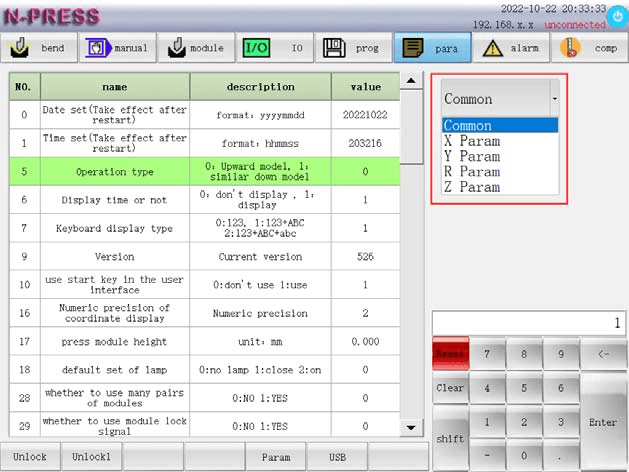
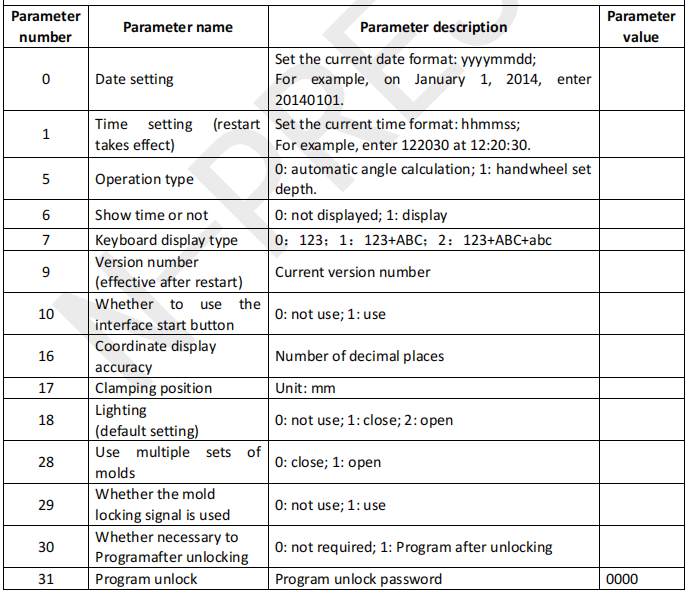
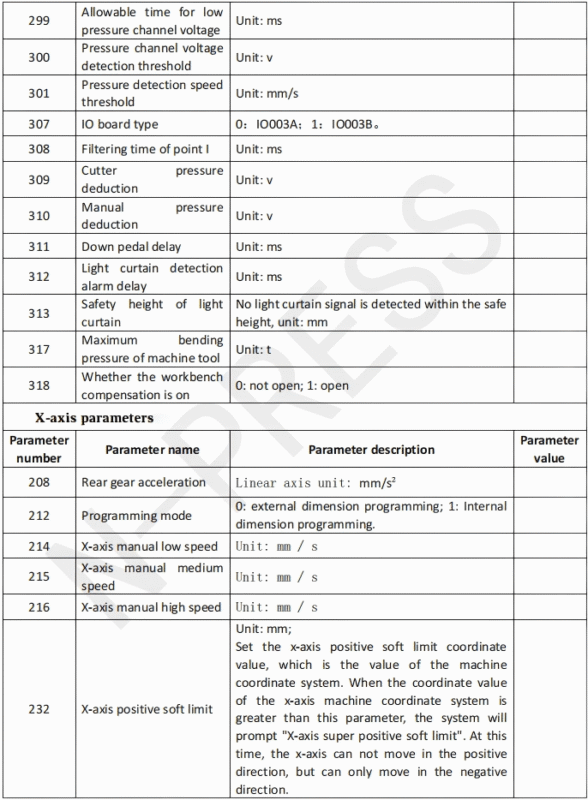
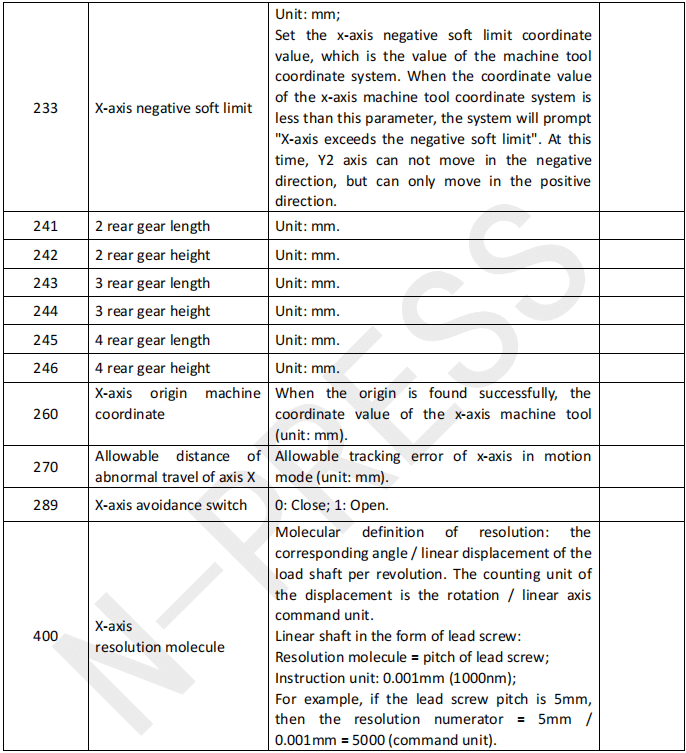
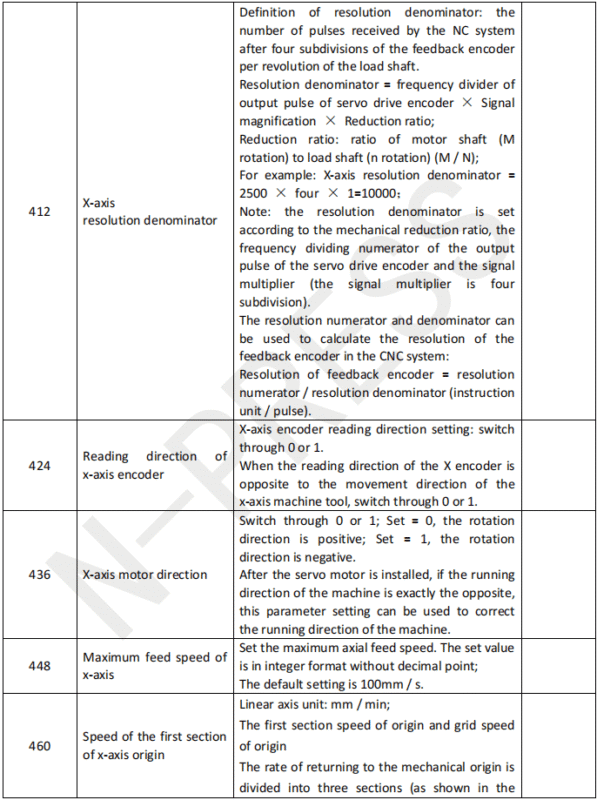
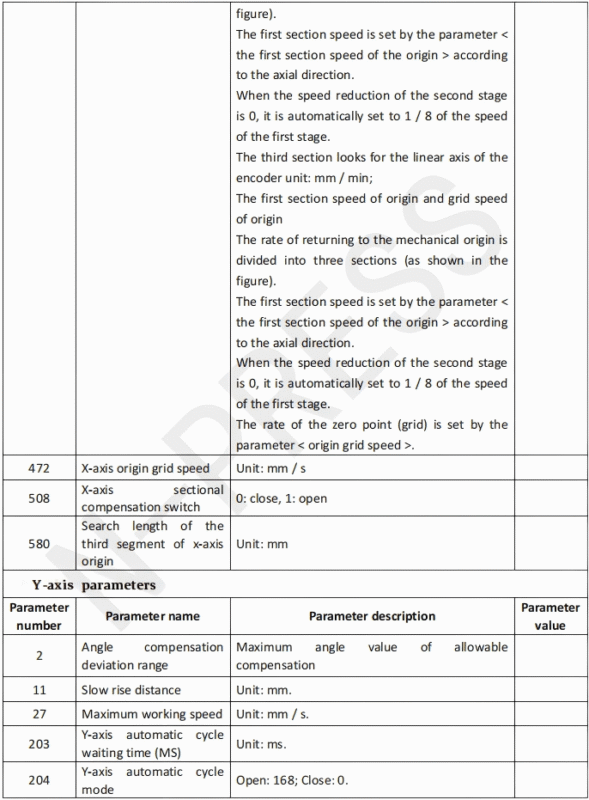
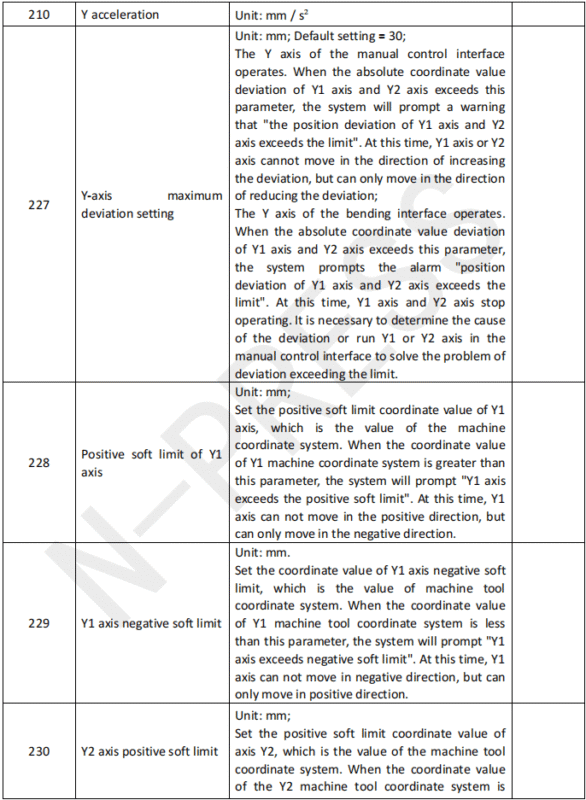
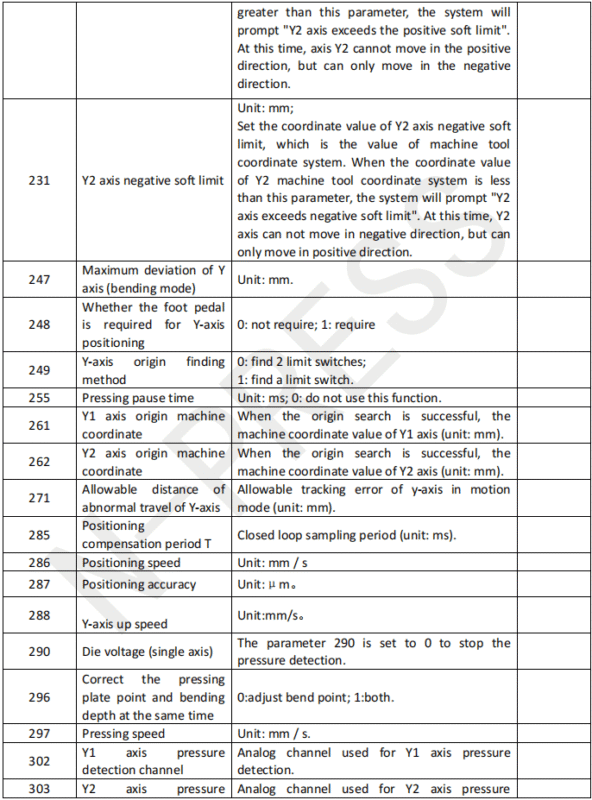
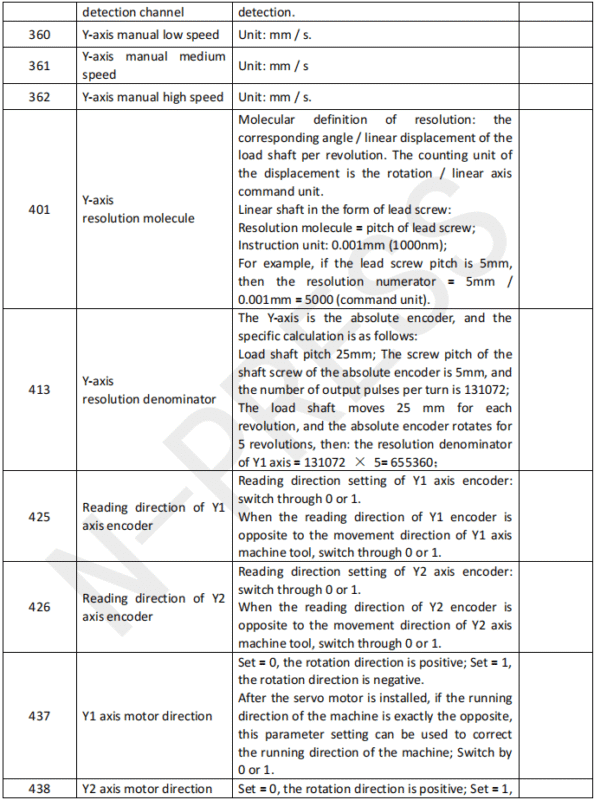
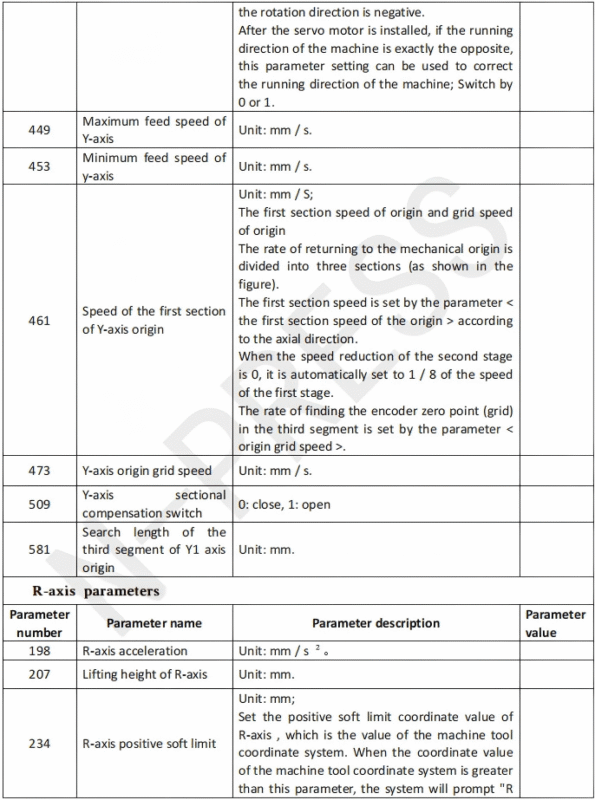
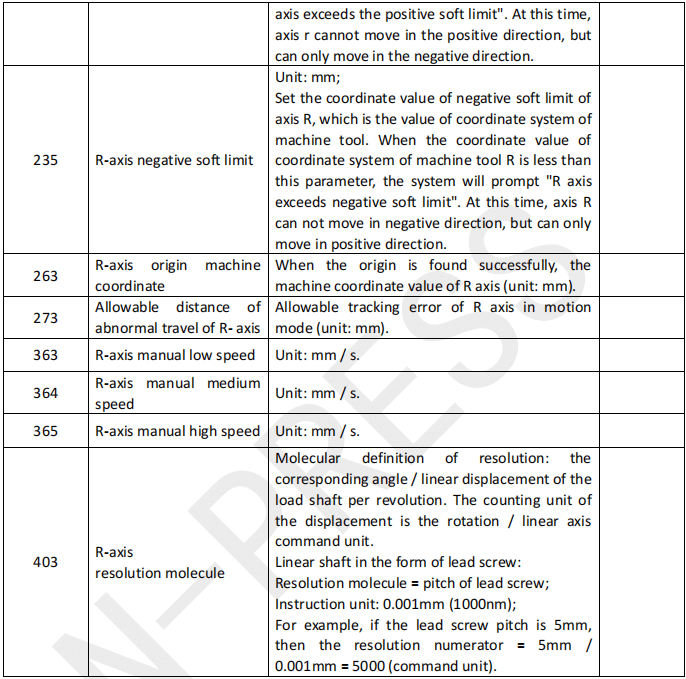
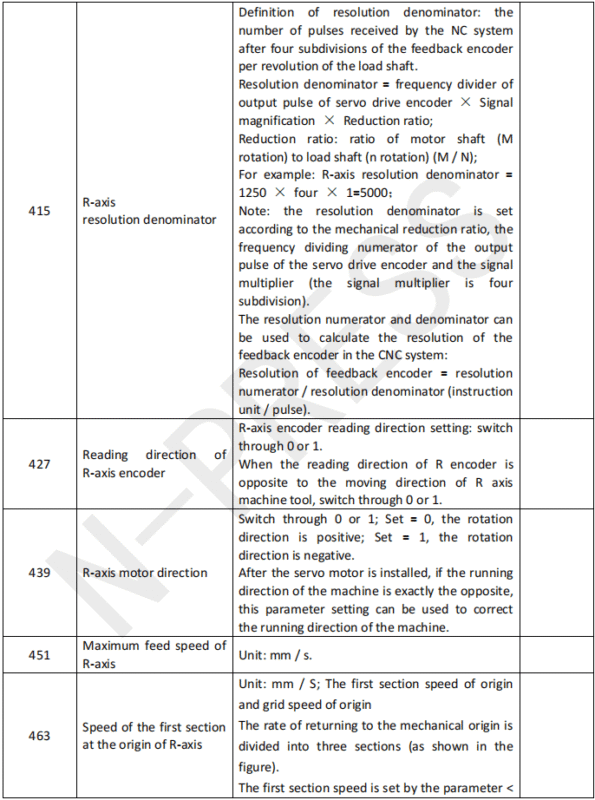
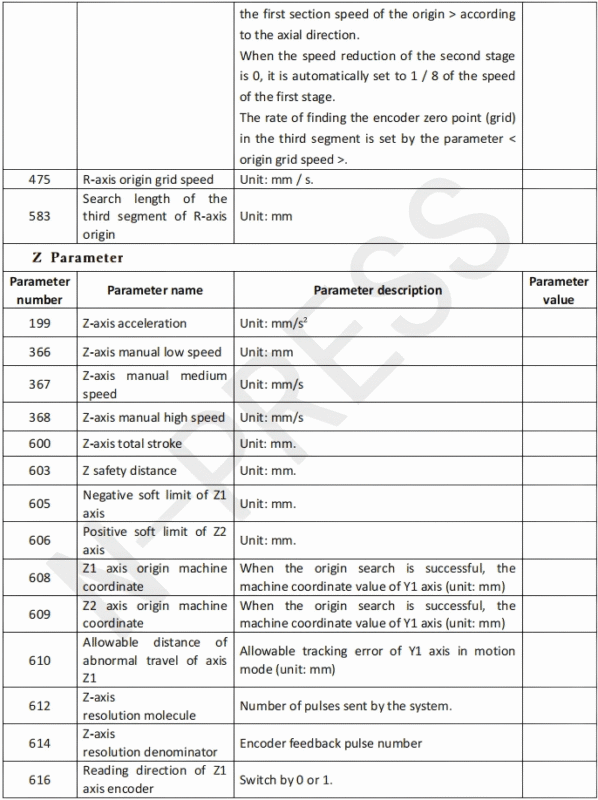
The parameter setting interface can be used for comprehensive parameters, X-axis parameters, Y-axis parameters, R-axis parameters and Z-axis parameters. The parameter setting interface includes serial number, parameter name, parameter description and parameter value.
Detailed Overview of Parameter Functions
User Decoding for Custom Setting
After parameter decoding, you can set user parameters. Here’s how:
- Click the sub-function key ‘Unlock‘ ; a dialog box appears.

- Click ‘Cancle‘ to cancel decoding if necessary; the system will clear prompt information automatically.
Use the auxiliary keyboard to input the customer code and press ‘Enter‘ to confirm. Once successful, parameter backup or recovery becomes accessible.
System Decoding for Comprehensive Control
Once system decoding is complete, all parameters can be set. Follow these steps:
- Click the sub-function key ‘Unlock‘ to launch the dialog box.
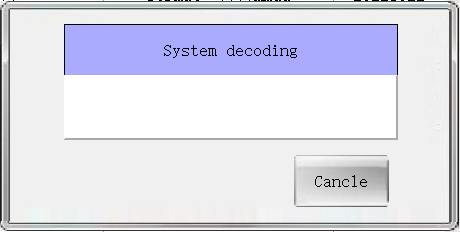
- If needed, cancel decoding to clear prompts automatically.
- Use the auxiliary keyboard to input the customer code, click ‘Enter‘ to confirm the decoding, and the system will prompt “system decoding succeeded” in the information column. Each time you enter this interface, you need to re-decode. In addition, the ET Series Parameter Setting can be configured only after the decoding is successful.
The ET Series Parameter Setting ensures that the manufacturer’s parameters are accurately set, allowing for optimal machine performance.
Setting Specific Parameters
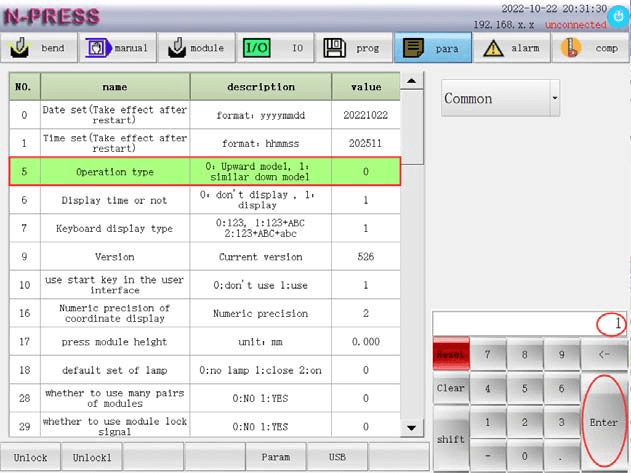
Click the parameter setting sub-function key for desired adjustments. For example, to set “parameter 005” in comprehensive parameters to “1”:
- Select parameter “No. 5”.
- Input value “1”.
- Click “Enter” to apply changes successfully.
Managing Files with U Disk Operations
Utilize the U-disk operation sub-function key to manage files:
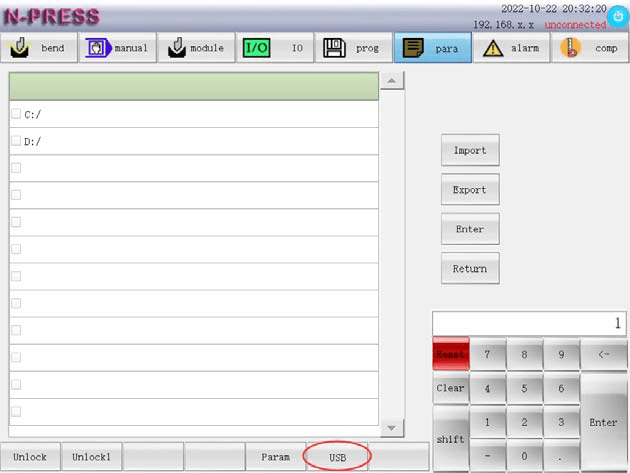
- Import: Load program files from U-disk into the system.
- Export: Save system files onto the U-disk.
- Access: Directly access U-disk stored files.
- Return: Navigate back to the previous interface.
Comprehensive Parameter Insights
The parameter settings cover comprehensive parameters, along with X, Y, R, and Z-axis adjustments. Mastering these settings offers precise control over the bending machine’s performance.
By following these detailed steps, users can effectively master the ET Series Parameter Setting, optimizing the operation and maintenance of the full electric servo bending machine. Proper understanding and implementation of these settings ensure enhanced machine performance and longevity.
The following table will provide a detailed explanation of the meanings of the parameters.


Frequently Asked Questions(FAQ)
Can I save custom parameter settings for repeated use?
Yes, most ET Series systems allow you to save custom parameter settings. This feature is particularly useful for repeat orders or batches, ensuring consistency and saving time by quickly applying pre-set configurations to future projects.
How often should I review and adjust the ET Series Parameter Settings?
It is recommended to review and adjust the ET Series Parameter Settings whenever there is a change in material, tooling, or production requirements. Regular reviews also help maintain precision and prevent issues over long-term use.
What are some common issues encountered with ET Series Parameter Settings, and how can I resolve them?
Common issues include incorrect angle settings leading to faulty bends, and misconfigured material parameters causing machine errors. To resolve these, double-check all inputs and adjust settings according to the recommended guidelines provided in the machine’s manual.
Conclusion
Mastering the ET Series Parameter Setting is crucial for optimizing the performance and efficiency of your full electric servo bending machine. By understanding and applying the key steps outlined in this article, you can ensure that your machine operates with precision and consistency. This includes accurately configuring parameters to meet production specifications and maintaining flexibility for various operational demands.
To fully leverage the potential of your machine, following these guidelines is essential. Proper parameter setting not only enhances machine precision but also significantly streamlines the operational workflow, leading to improved productivity and reduced downtime.
For further assistance or if you have specific questions about configuring the ET Series parameters, we invite you to contact our support team. Additionally, explore our documentation library for more in-depth resources and guidance on getting the most out of your bending machine.


