


When it comes to monitoring systems, the E200PS Alarm System is a powerful tool designed for efficient machine oversight. If you’re searching for ways to optimize monitoring and management processes with this system, you’ve come to the right place. In this article, I’ll guide you through the effective use of the E200PS Alarm System, specifically focusing on its straightforward monitoring features. You’ll discover how to access and navigate the IO MONITOR page, reset alarms, and understand real-time input and output states. Whether you’re new to the system or looking to enhance your operational efficiency, this overview will equip you with the insights needed to harness the full potential of the E200PS Alarm System.
Alarm Reset on the E200PS Alarm System
Alarms prevent potential damage by stopping machine operations immediately. When there is any alarm, the machine stops immediately. To resume operations, you need to clear the alarm efficiently.
Identify the Recent Alarm

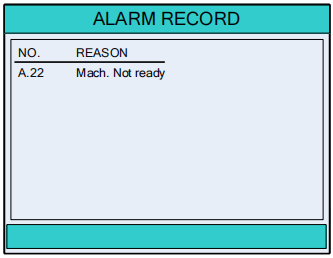
On the CONST page, press this button to enter the ALARM RECORD page.
The most recent alarm information is displayed at the top.
Process the Alarm Information
Carefully review the alarm details provided on the page to understand the issue. This insight will guide you in addressing the cause of the alarm.
Clear the Alarm


Once the issue is resolved, press the appropriate buttons to clear the alarm. This action enables you to resume normal machine operation seamlessly.
Monitoring Functions with the E200PS Alarm System
Accessing the IO MONITOR Page
To efficiently monitor your system using the E200PS Alarm System, navigate to the IO MONITOR page.

On the CONST page, press this button to enter IO MONITOR page.
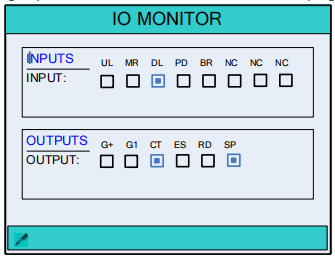
Here, you’ll be able to view real-time input and output states, allowing you to oversee machine operations effectively and make informed decisions based on the data displayed. This feature is crucial for ensuring seamless machine performance and quickly identifying any discrepancies that may arise during operation.
Understanding the YV MONITOR Page
Once you’re on the IO MONITOR page, you can further delve into the system’s monitoring capabilities by pressing to enter the YV MONITOR page.
ON the IO MONITOR page, press this button to enter YV MONITOR page.
This page provides detailed insight into the various parameters being monitored, enhancing your understanding of machine operations and helping you pinpoint any potential operational issues promptly.
Understanding these states allows you to identify any irregularities that may indicate potential issues, such as sensor malfunctions or unexpected variances in output. Being able to swiftly diagnose and address these issues improves the overall reliability of your operations, reducing downtime and enhancing productivity. This proactive approach enables you to make data-driven decisions that optimize machine performance and ensure smooth, continuous operation.
Alarm List
For a detailed understanding of all potential alarms and their significance, refer to Appendix B: Alarm List. This section provides a comprehensive list of alarm codes and their descriptions, facilitating quick identification and resolution of issues.
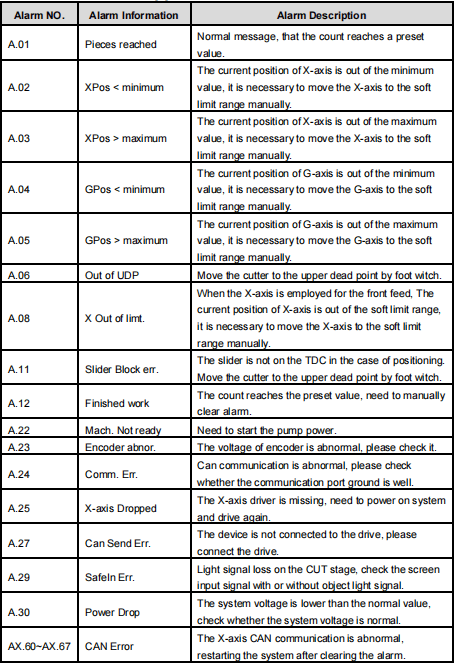
By following this structured approach, you can effectively monitor and manage your machine operations using the E200PS Alarm System, ensuring a swift, reliable, and efficient operational environment.
Frequently Asked Questions(FAQ)
How do I reset alarms on the E200PS Alarm System efficiently?
To efficiently reset alarms on your E200PS Alarm System, navigate to the alarm management section of the interface. From there, follow the instructions to acknowledge and clear any active alarms. This not only streamlines your workflow but also ensures the system operates smoothly.
Can I customize alert notifications on the E200PS Alarm System?
Yes, the E200PS Alarm System allows you to customize alert notifications to meet your specific needs. Adjust the settings within the alarm configuration menu to set notifications for critical states or abnormalities, enhancing your ability to respond promptly to issues.
How often should I perform system checks for optimal performance of the E200PS Alarm System?
Regular system checks are recommended every 300 hours of operation. These checks should include verifying alarm functions, inspecting input/output statuses, and ensuring all system updates are applied. Regular maintenance maximizes the system’s efficiency and reliability.
Conclusion
In summary, the E200PS Alarm System provides a robust framework for efficient monitoring and management of machine operations. By mastering the navigation of the IO MONITOR page, effectively resetting alarms, and understanding real-time input and output states, you can significantly enhance your operational efficiency. These key steps ensure that you are well-equipped to maximize the capabilities of the E200PS Alarm System.
For further assistance or to delve deeper into optimizing your machine’s performance, feel free to contact our team. We are committed to providing you with comprehensive support and resources. Additionally, explore our other documentation for more insights into leveraging the full range of features available with the E200PS Alarm System.


