


The CybTouch 8 Bend Numerical Page is the primary workspace for creating, editing, and executing bending programs on a CybTouch 8 press brake controller. From this page, operators can configure bend angles, backgauge positions, material properties, bending force, crowning, and other essential parameters required for accurate sheet metal bending. In this guide, I will explain how to use the CybTouch 8 Bend Numerical Page, understand its main functions, and configure the most important bending parameters for efficient and reliable production. Whether you are creating a new program or modifying an existing one, this article will help you operate the Bend Numerical Page with greater confidence and accuracy.
Understanding the CybTouch 8 Bend Numerical Page
The CybTouch 8 Bend Numerical Page is the main operating screen of the CybTouch 8 controller. It serves as the central workspace where operators create, edit, and execute bending programs. Almost every programming task begins and ends on this page, making it one of the most frequently used interfaces during daily production.
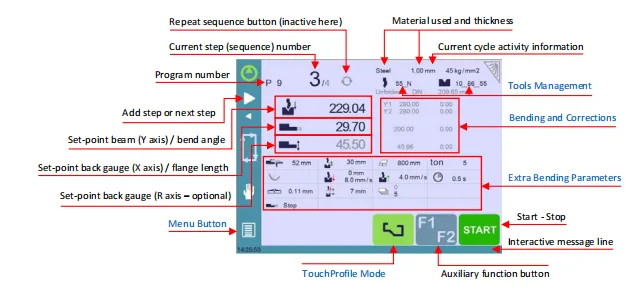
From the CybTouch 8 Bend Numerical Page, operators can manage program information, configure bend parameters, adjust backgauge positions, select materials, apply bending corrections, and monitor the current production cycle. The page also provides quick access to tooling management, extra bending parameters, and program execution controls.
Understanding each section of this interface allows operators to program more efficiently while improving bending accuracy and reducing setup time.
Exploring the Main Interface
The CybTouch 8 Bend Numerical Page combines program editing and machine control into a single screen. Several key areas are displayed simultaneously, allowing operators to monitor and modify the current bending operation.
The main interface includes:
- Program name

- Current bend (sequence) number

- Material type and thickness
- Bend angle
- Y-axis position
- X-axis backgauge position
- R-axis backgauge position (if equipped)
- Tool management
- Bending corrections
- Extra bending parameters
- Start and Stop controls
- Interactive message line
- Auxiliary function buttons
This layout minimizes page switching and enables faster program creation.
Managing Programs and Bend Sequences
Creating or Selecting a Program
The program name displayed at the top of the page identifies the current bending program. Touching the program name allows operators to create a new program, open an existing one, or save modifications.
Proper program naming helps organize production files and simplifies future retrieval.
Managing Bend Steps
Each program contains one or more bend steps. The current step number indicates which bending operation is being edited.
Touching the step number opens several useful functions, including:
- Insert a new bend step
- Delete the current bend step
- Jump directly to another bend step
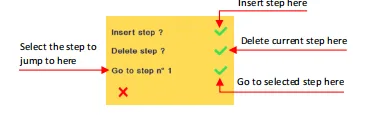
These functions allow operators to modify bending sequences without recreating the entire program.
For numerical programs, inserting or deleting steps makes it easy to optimize production workflows or accommodate design changes.
Setting the Bend Angle and Y-Axis Position
The bend angle is one of the most important parameters configured on the CybTouch 8 Bend Numerical Page.
The controller offers several methods for defining the Y-axis movement depending on the programming mode.
Bend Angle Mode
In Bend Angle mode, the operator simply enters the desired bend angle. CybTouch automatically calculates the required beam position using the selected tooling and material information.

This is the most commonly used method because it simplifies programming while maintaining high accuracy.
Target Position Mode
Operators can also directly view or modify the calculated target position of the Y-axis when necessary.

This mode is useful during machine adjustment or advanced programming where direct position values are preferred.
Bottoming Mode
When Bottoming mode is selected, the controller continues bending until the calculated Bottom Dead Center (BDC) position is reached. If the selected punch and die support bottoming, operators can fine-tune the calculated value to achieve the desired bending result.

Configuring the Backgauge Position
Accurate backgauge positioning is essential for repeatable bending results.
Setting the X-Axis Position
The X-axis controls the horizontal movement of the backgauge.
The CybTouch 8 Bend Numerical Page provides multiple programming methods:
- Enter the flange length directly.

- Display the calculated X-axis position.

- Use relative positioning for incremental movements.

Relative positioning is useful when creating programs with multiple sequential bends. However, the first bend must always use an absolute position before relative movements can be applied.
Setting the R-Axis Position
Machines equipped with an R-axis allow vertical adjustment of the backgauge.
The controller automatically calculates the required R-axis position, but operators can manually modify the displayed value if necessary.
If manual changes need to be removed, simply clear the entered value. CybTouch recalculates the default position automatically after confirmation.
Configuring Material Parameters
Material properties directly influence bending calculations.
The CybTouch 8 Bend Numerical Page allows operators to define several important material settings.
Material Selection
The selected material determines which material database is used during bending calculations.
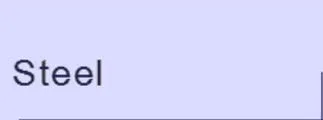
Touching the material name cycles through the available materials configured in the controller.
Material Thickness
Material thickness is automatically loaded from the material database but can be modified manually for individual programs.
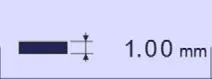
If predefined thickness values are enabled, operators can quickly choose one from the available list instead of entering a custom value.
Material Sigma
Material sigma represents the tensile strength used for bending force calculations.
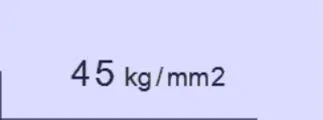
The controller automatically loads the default sigma value associated with the selected material, but operators may change it when processing different material grades.
Using Extra Bending Parameters
The lower section of the CybTouch 8 Bend Numerical Page contains additional parameters that further optimize the bending process.
Depending on the controller configuration and machine options, available parameters may include:
- Backgauge retraction: Enable and adjust backgauge retraction to avoid collisions and improve part handling during bending.
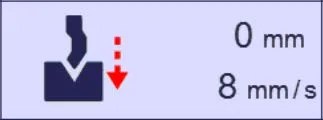
- Speed change threshold and bending speed: Control when the beam changes speed during the bending cycle to balance productivity and bending accuracy.
- Bending length: Set the effective bending length used to calculate the required bending force and crowning compensation.
- Step bending: Configure step bending parameters for producing large-radius bends using multiple incremental bending steps.
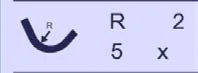
- Slow return: Reduce the beam return speed after bending to improve safety and prevent long workpieces from dropping too quickly.
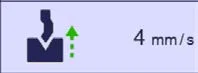
- Dwell time: Set how long the punch remains at Bottom Dead Center (BDC) before returning to improve bending consistency.
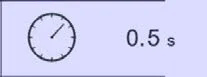
- Force: Automatically calculate or manually adjust the bending force based on the selected material and part dimensions.
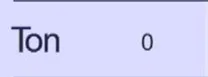
- Opening (TDC): Define the Top Dead Center opening height to provide sufficient clearance for loading and unloading workpieces.

- Crowning: Apply crowning compensation to maintain consistent bending angles across the entire workpiece length.
- Backgauge finger type: Select the appropriate backgauge finger configuration according to the machine setup and workpiece requirements.
- Number of parts: Specify the production quantity so the controller can automatically count completed parts during operation.
- Backgauge manual control: Enable manual control of the backgauge movement for setup, adjustment, or special operating conditions.
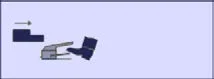
- Offset Pinch Point: Shift the pinch point away from the die to support special bending applications and improve forming flexibility.
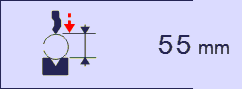
These settings allow operators to fine-tune individual bending operations for greater efficiency and accuracy.
Frequently Asked Questions(FAQ)
What is the difference between flange length and X-axis position?
Flange length is the finished dimension of the bent part, while the X-axis position is the calculated location of the backgauge. When programming by flange length, the controller automatically calculates the appropriate X-axis position based on the selected tooling and bending parameters.
Can I manually modify the material thickness and sigma?
Yes. Although the controller automatically loads the default thickness and sigma values from the selected material database, both parameters can be manually adjusted to match the actual material being processed.
What is the Offset Pinch Point function used for?
The Offset Pinch Point function shifts the pinch point farther away from the die during bottoming operations. It is particularly useful for special bending applications, such as closing one side of a box, and can help improve forming quality while reducing unnecessary machine movement.
Conclusion
The CybTouch 8 Bend Numerical Page is the central workspace for press brake programming, combining program management, bend configuration, material selection, backgauge positioning, and machine control into a single intuitive interface. By understanding how to configure bend angles, backgauge positions, material properties, and extra bending parameters, operators can create more accurate programs while reducing setup time and improving production consistency.
Features such as step management, automatic parameter calculation, Offset Pinch Point, Copy to All, and programmable production quantities provide additional flexibility for both simple and complex bending applications. Learning to use these functions effectively allows operators to optimize workflow, minimize programming errors, and achieve higher bending precision.
If you need further assistance with the CybTouch 8 Bend Numerical Page, controller programming, or advanced press brake operation, contact the HARSLE technical support team. You can also explore our complete CybTouch 8 documentation series for more tutorials covering navigation, materials, programming, maintenance, diagnostics, and controller configuration.


