


CybTouch 8 Program Management provides a complete set of tools for creating, saving, loading, browsing, deleting, and transferring bending programs on the CybTouch 8 controller. Efficient program management helps operators organize production jobs, reduce setup time, and quickly switch between different workpieces. Whether you are creating a new bending program or importing one from VisiTouch Offline software, mastering CybTouch 8 Program Management can improve workflow efficiency and ensure that production programs are always available when needed.
Understanding CybTouch 8 Program Management
The CybTouch 8 Program Management functions allow operators to organize and maintain all bending programs stored on the controller. Since production often involves multiple workpieces with different bending requirements, efficient program management is essential for reducing setup time and improving overall productivity.
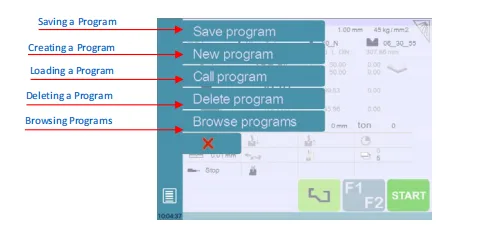
Through the Program Management menu, operators can perform several common tasks, including:
- Save a program
- Create a new program
- Load an existing program
- Delete unused programs
- Browse stored programs
- Import programs created with VisiTouch Offline
These functions make it easier to organize production data and quickly access the correct program whenever a production order is repeated.
Saving a Program
After creating or modifying a bending program, it should be saved for future use.
To save a program, touch the Program Name field and select Save Program from the Program Management menu. Enter a meaningful program name and confirm the operation.
Using descriptive program names makes it easier to identify workpieces later and helps reduce the risk of selecting the wrong program during production.
Saving programs also preserves all programmed information, including bending steps, tooling selections, material settings, and production parameters.
Creating a New Program
Creating a new program is the starting point for programming a new workpiece.
Open the Program Management menu and select New Program. The controller then asks which programming method should be used.
Depending on the application, operators can choose:
- Graphical — creates a new program using TouchProfile Mode.
- Numerical — creates a new program using Numerical Mode.
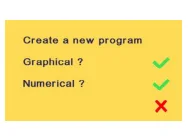
Selecting the appropriate programming method allows operators to create programs using the workflow that best matches the part drawing and production requirements.
Loading an Existing Program
When a previously saved workpiece needs to be manufactured again, operators can quickly reload the stored program instead of creating it from the beginning.
To load a program:
- Open the Program Management menu.
- Select Call Program.
- Choose the desired program from the program list.
- Confirm the selection.
The selected program is immediately loaded into the controller’s working memory and is ready for production after the machine setup has been verified.
This function significantly reduces setup time for repeat production jobs.
Deleting and Browsing Programs
As the number of stored programs increases, organizing them becomes increasingly important.
The Delete Program function allows operators to remove programs that are no longer required. Before deletion, the controller asks for confirmation to help prevent accidental data loss.
The Browse Programs function provides a convenient way to review stored programs without loading them immediately. Operators can move through the available programs using the browsing controls until the required program is located.
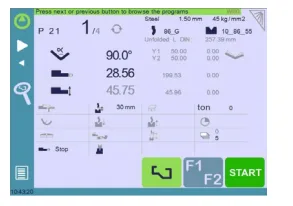
Browsing is especially useful for graphical programs, allowing users to quickly identify the correct workpiece before starting production.
Maintaining an organized program library helps improve efficiency and makes future program retrieval much easier.
Exporting Programs from VisiTouch Offline
CybTouch 8 Program Management also supports importing programs created with VisiTouch Offline software.
After creating and saving a part in the offline software, operators can export the program and enable the CybTouch conversion option during the export process. The converted program is then transferred to a USB storage device.
For easier recognition by the controller, it is recommended to create a folder named “DataCybT” on the USB drive and save the exported program inside this directory. When the USB device is connected to the controller, the program list becomes directly available for selection and import.
Offline programming helps reduce machine downtime because programs can be prepared, edited, and verified before arriving at the press brake.
Best Practices for CybTouch 8 Program Management
Proper use of CybTouch 8 Program Management helps improve production efficiency and maintain a well-organized program library.
For the best results, operators should:
- Save every completed program using a clear and descriptive name.
- Select the appropriate programming mode before creating a new program.
- Verify loaded programs before starting production.
- Delete obsolete programs only after confirming they are no longer required.
- Use the Browse function to locate graphical programs quickly.
- Export and back up important programs regularly using VisiTouch Offline and a USB storage device.
- Store exported programs inside the recommended DataCybT folder for easier controller recognition.
Following these practices helps reduce setup time, protect valuable production data, and improve the overall efficiency of daily press brake operations.
Frequently Asked Questions(FAQ)
How do I load an existing program?
Open the Program Management menu, select Call Program, choose the required program from the list, and confirm your selection. The selected program is loaded into the controller’s working memory and is ready for production after the machine setup has been verified.
Can I transfer programs from VisiTouch Offline?
Yes. Programs created in VisiTouch Offline can be exported, converted to the CybTouch format, and transferred to the controller using a USB storage device. This allows programs to be prepared offline before production begins.
What should I verify after loading or importing a program?
Before starting production, verify the material, sheet thickness, tooling selection, bending sequence, production parameters, and machine setup to ensure they match the actual workpiece and machine configuration.
Conclusion
CybTouch 8 Program Management provides a complete solution for organizing bending programs throughout their entire lifecycle—from creating and saving new programs to loading existing jobs, browsing stored files, deleting obsolete programs, and importing programs prepared with VisiTouch Offline.
By using these functions effectively, operators can reduce setup time, improve program organization, and simplify repeat production. Proper program management also minimizes the risk of selecting incorrect files and helps maintain a consistent workflow across different manufacturing orders.
Whether preparing a new workpiece or recalling an existing production job, mastering CybTouch 8 Program Management enables operators to work more efficiently while keeping production data organized, accessible, and ready for future use.


