


Enabling the ESA S640 Metal-working Machine Function can be a game-changer for anyone involved in the metalworking industry. If you’re looking to get the most out of your equipment, you’re in the right place. In this guide, I will walk you through the steps needed to activate the ESA S640 metal-working machine function, ensuring that you can harness its full potential for tasks like the “New Bend” function and Dutch folding bend forcing. By understanding how to enable and optimize this feature, you’ll be able to enhance your metalworking processes significantly. Whether you’re a novice or an experienced professional, this article aims to provide you with the knowledge you need to efficiently use your ESA S640 system.
Enabling the “Metal-working Machine” Function
Enabling the ESA S640 Metal-working Machine Function opens up advanced capabilities in your operation. Here’s a detailed guide on how to enable it:
Step 1: Access the Configuration Page
- From the Editor page, press the key to open the menu.
- Select item 2 >> Configuration to enter the Configuration page.
Step 2: Enter Machine Parameters
- Select item 6 >> Machine parameters.
- Enter the required password and press [Ok].
- Press the key Parameters 2.
Step 3: Enable the Metal-working Machine
- Enter the value 1 in the Metal-working machine field found in the Auxiliary Functions parameters group.
Result: Once completed, both the “New Bend” and “Dutch Folding” bend forcing functions will be enabled, enhancing your machine’s functionality.
How to Use the “New Bend” Function
The “New Bend” function facilitates the creation of bends with consistent data, optimizing the bending process:
- Next Bend Function: By pressing the button while on the last bend, a new bend is added mirroring the previous bend’s data.
- Insert Step Function: Select the Enter step from the menu to add a new bend at the current position, replicating previous data.
Note: Beware of unintentionally adding bends while intending to scroll. Use the navigation button to navigate through bends and the [New Step] button for traditional new step addition whenever this function is not enabled.
Dutch Folding Bend Forcing
With the ESA S640 Metal-working Machine Function enabled, executing Dutch Folding becomes straightforward and efficient:
This advanced feature, accessible in both the Editor and Summary Bends pages, empowers users to perform Dutch Folding with minimal effort. By setting the Y1 Angle field to a value of 0, you effectively configure the system to handle Dutch Folding bends. This process ensures consistent accuracy and precision in creating these complex bends.
Benefits of Using Dutch Folding:
Consistency: Ensures uniformity across similar projects, maintaining quality and reducing the margin for error.
Precision and Control: By automating the setting process, operators can achieve highly precise bend angles without manual adjustments.
Enhanced Efficiency: Quick setup reduces downtime, allowing for a seamless transition between different bending tasks and increasing productivity.
Versatility: This flexible feature supports various metal-working needs, adapting to both simple and intricate designs with ease.
Understanding the Last Bend Icon

In the ESA S640 interface, the last bend icon is a crucial visual cue for operators, indicating that the current bend is the final one in a section.
This feature is essential for preventing the accidental addition of new bends, which can disrupt the sequence.
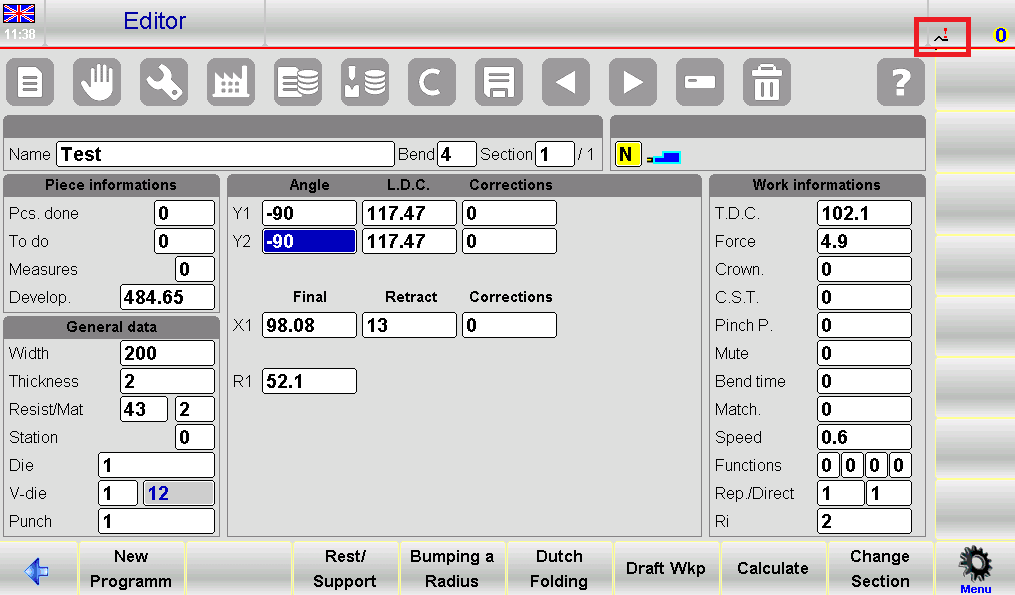
Importance of the Last Bend Icon:
- Error Prevention: The icon serves as a reminder, helping operators avoid mistakenly adding bends beyond the intended sequence.
- User-Friendly Interface: Positioned at the top right part of the screen, as illustrated in figure 59, the icon provides clear, immediate feedback on the bend sequence status.
- Workflow Efficiency: By signaling the last bend, it helps maintain the integrity of the current bend configuration, optimizing workflow and reducing the need for corrections.
Frequently Asked Questions(FAQ)
How can I enable the ESA S640 Metal-working Machine Function on my equipment?
To enable the ESA S640 Metal-working Machine Function, navigate to the system settings on your ESA S640 interface. Select the “Machine Functions” tab and check the box for “Metal-working”. Follow the on-screen prompts to complete the setup. Ensure that all components are properly connected and the machine is powered on.
Can the ESA S640 Metal-working Machine Function handle complex bends like the Dutch Folding bend?
Yes, the ESA S640 Metal-working Machine Function is capable of handling complex bends, including the Dutch Folding technique. By using advanced algorithms and programmable settings, the machine can precisely execute intricate bends with high accuracy.
How is the “New Bend” Function activated within the ESA S640 system?
The “New Bend” Function is activated by accessing the ESA S640’s program menu. Select “Create New Bend” and enter the desired specifications, such as angle, material type, and bend sequence. The system will guide you through the process, ensuring your settings are saved for future use.
Conclusion
Enabling the ESA S640 Metal-working Machine Function involves understanding the interface and properly configuring the system settings. Start by accessing the main menu and selecting the “Metal-working Machine” option. Follow through with the on-screen prompts to calibrate the settings according to your specific project needs. Remember to test the configuration with a sample material to ensure accuracy and efficiency. Regularly update the system software to maintain optimal functionality.
Proper setup of the ESA S640 Metal-working Machine Function is crucial for maximizing its capabilities and ensuring consistent performance. To further enhance your understanding or if you require assistance with specific configurations, feel free to contact our support team. Additionally, explore our detailed documentation library for more insightful articles and guides that address various aspects of metal-working systems and operations.


