


When it comes to introducing new products using full electric servo bending machines, leveraging the ET Series Program Instance is a game-changer. If you’re seeking to understand how this feature can streamline product development and enhance operational flexibility, you’re in the right place. In this article, I’ll explain the steps to effectively use the ET Series Program Instance, illustrating how it can facilitate rapid adaptation to new product specifications and improve the efficiency of your numerical control system. Whether you’re launching a new product line or optimizing existing processes, this guide will equip you with the knowledge needed to harness the full potential of your bending machine.
Bending Programming Method for New Products
Step 1: Entering the Processing Interface
To start programming for a new product with the ET Series Program Instance, click to enter the “processing” interface. This interface forms the foundation for all subsequent programming steps.
Step 2: Clearing Previous Data
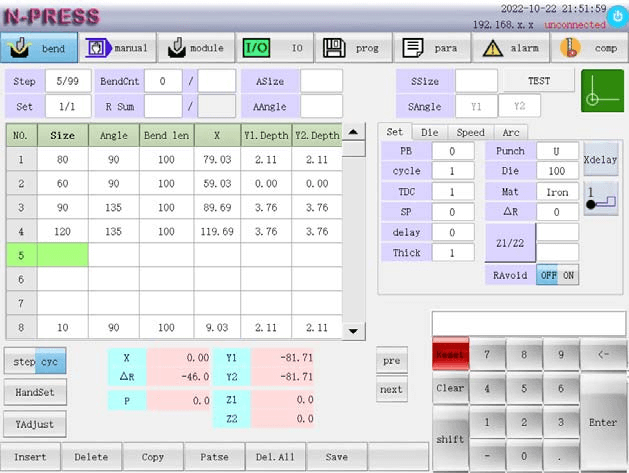
For new product preparation, it’s essential to clear existing data from the current program page. This ensures that no residual settings interfere with your new setup. For example, if you’re working with a 1mm thick iron piece with a bending length of 100mm, ensure these details are your focus.

Step 3: Inputting and Adjusting Program Details
Input the graphic size into the system according to your product’s requirements. Assuming that the upper and lower mold settings are U/100, make necessary adjustments in the program. This step is crucial for accurate bending results.
Step 4: Saving the Program
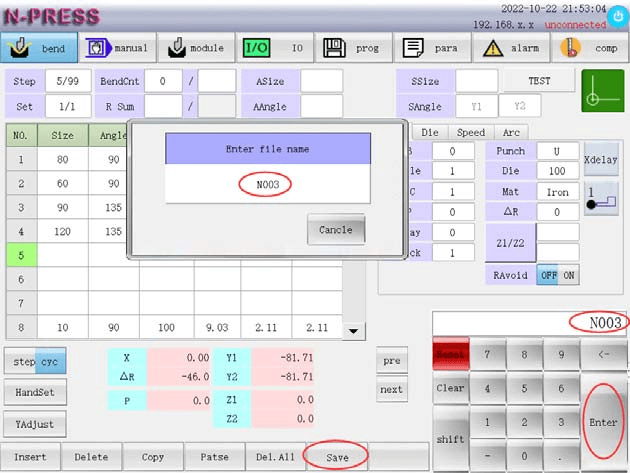
Once you’ve configured your settings, click “save” to open the file name dialog box. Enter a unique file name like “N003” and confirm by pressing “OK“. If there’s a system prompt indicating “file name already exists”, choose an alternate product number to avoid overwriting previous data.
Step 5: Filing and Accessing Program Files
To retrieve and verify your created files, navigate to the “program” interface. Here you can search for your saved file by its document number, ensuring easy access for future use or modifications.

Product Processing Method Using ET Series Program Instance
Step 1: Accessing the Processing Interface
Begin product processing by again entering the “processing” interface. This is your control hub for executing the bending operations in the ET Series Program Instance.
Step 2: Starting the Bending Process
Activate the machine by pressing the “green light start button”. This command initiates the bending sequence, and the interface will display your bending progress in real-time. The clear interface depiction allows you monitoring and precision control over your product manufacturing.

Frequently Asked Questions(FAQ)
What are the initial steps to setting up an ET Series Program Instance for a new product?
To begin setting up an ET Series Program Instance, start by defining the product specifications and desired outcomes. Input these parameters into the numerical control system to create a customized program that meets your new product’s requirements.
Can I modify an existing ET Series Program Instance for a different product?
Yes, existing program instances can be modified to accommodate different products. Adjustments to parameters such as bend angles, pressure levels, and sequence steps can be made to adapt to new production needs.
What precautions should be taken while using an ET Series Program Instance for new products?
Regularly review and verify each parameter within the program instance to ensure compatibility with the new product’s design requirements. It’s also advisable to run simulations or test runs to catch potential issues early, ensuring that your production line performs without unexpected disruptions.
Conclusion
In conclusion, effectively utilizing the ET Series Program Instance for new products involves understanding its configuration to streamline your setup and optimize performance. By mastering the steps outlined for configuring new program instances, you ensure that your full electric servo bending machine adapts seamlessly to new production requirements, offering precision and efficiency.
To continue optimizing your processes and making the most of your numerical control system, we encourage you to reach out to our team for further guidance and support. Whether you require additional information or have specific questions, our experts are ready to assist you. Additionally, explore our other related documentation to gain deeper insights into maximizing your machine’s capabilities.


