


The ESTUN E315P Delay Time is an important parameter for controlling the waiting interval between consecutive bending worksteps. Proper timing allows the workpiece to settle before the next bending operation begins, supporting a consistent multi-step bending sequence.
According to the ESTUN E315P operating manual, this parameter can be adjusted to meet different production requirements. Understanding its function helps operators avoid unnecessary delays and maintain efficient press brake operations.
This guide explains how to configure Delay Time, understand its role in multi-step bending, and distinguish it from other timing parameters.
What Is ESTUN E315P Delay Time?
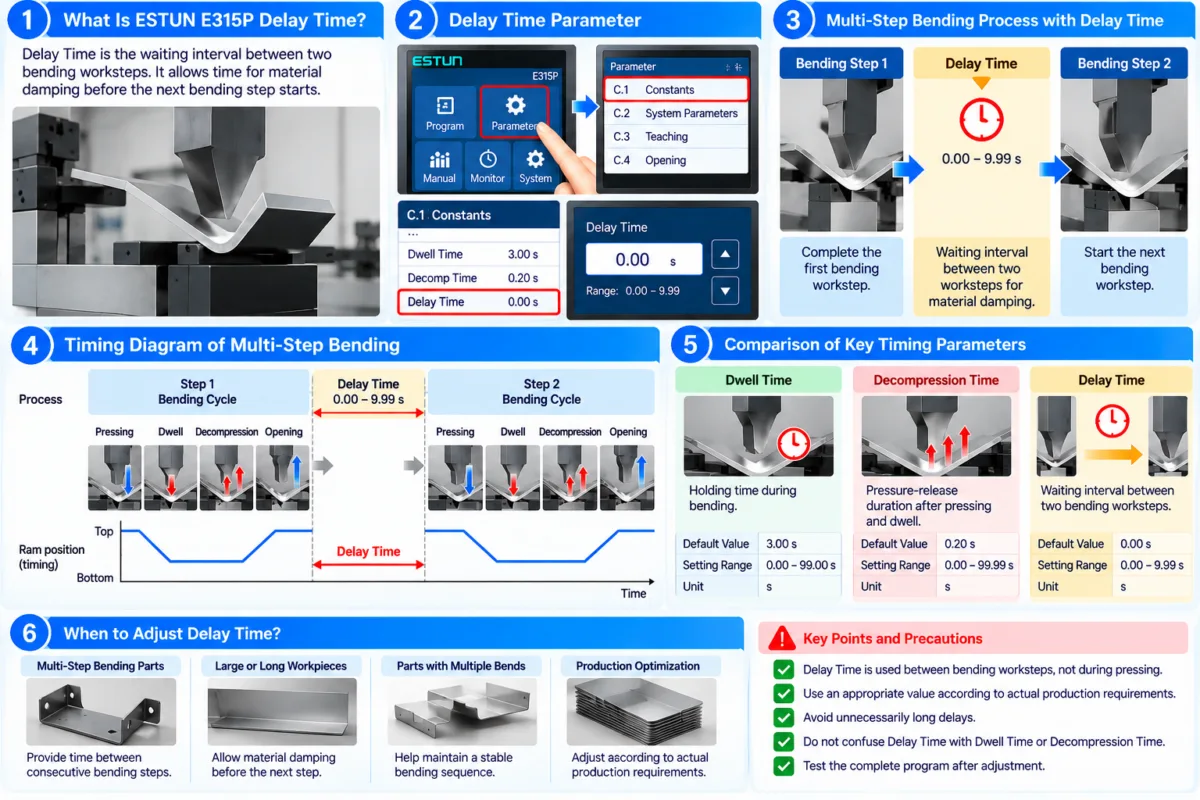
The ESTUN E315P Delay Time is a programming constant that determines the waiting interval when switching between two bending worksteps.
According to the E315P operating manual, the parameter is identified as Delay Time in the C.1 Constants section.
| Parameter | Specification |
|---|---|
| Parameter Name | Delay Time |
| Default Value | 0.00 s |
| Setting Range | 0.00–9.99 s |
| Unit | Seconds (s) |
| Function | Sets the delay between two bending worksteps |
The default value is 0.00 seconds, meaning no additional delay is configured through this parameter.
When a nonzero value is entered, the controller provides a programmed waiting interval during the transition between bending worksteps.
This setting is intended to allow time for material damping between operations.
How Does Delay Time Work Between Bending Steps?
To understand the ESTUN E315P Delay Time, consider a bending program containing several worksteps.
In a multi-step program, the controller executes the programmed bending operations in sequence. After one workstep is completed, the program proceeds toward the next workstep according to its operating conditions.
The Delay Time parameter introduces a waiting interval during this transition.
Step 1: Complete the Current Bending Workstep
The press brake performs the programmed bending operation, including the relevant pressing, dwell, decompression, and opening stages.
Step 2: Apply the Programmed Delay
During the transition between worksteps, the controller applies the configured Delay Time.
For example, a setting of 0.50 seconds represents a programmed delay of half a second.
This is an illustration of the parameter’s timing function, not a recommended setting for a particular machine.
Step 3: Continue to the Next Workstep
After the delay interval and other applicable step-transition conditions are satisfied, the program can proceed to the next bending workstep.
The ESTUN E315P Delay Time therefore provides an additional timing adjustment within multi-step bending operations.
How to Set ESTUN E315P Delay Time
Before changing the parameter, ensure that the machine is in a safe condition and that the intended bending program has been prepared.
Step 1: Access the Constants Settings
Open the controller’s parameter settings and locate the C.1 Constants section described in the E315P manual.
Find the parameter labeled Delay Time.
Step 2: Check the Existing Value
Review the current setting before making changes.
The factory default is 0.00 seconds.
If the machine is already operating normally, record the existing value before modifying it.
Step 3: Enter the Required Delay
Set the ESTUN E315P Delay Time within the permitted range of 0.00–9.99 seconds.
A value of 0.00 seconds applies no additional delay through this parameter.
A positive value introduces a waiting interval between bending worksteps.
The appropriate setting should be determined according to the actual production requirements rather than using an arbitrary value.
Step 4: Verify the Program Sequence
After adjusting the parameter, perform a controlled test using an appropriate multi-step bending program.
Observe the transition between consecutive worksteps and confirm that the programmed waiting interval is applied as expected.
Check that the complete bending sequence operates normally before resuming production.
When Should You Adjust Delay Time?
The ESTUN E315P Delay Time may be useful when a workpiece requires a short settling period between bending operations.
Multi-Step Bending Programs
A workpiece may require several bending operations to achieve its final shape.
When consecutive worksteps are performed, a programmed delay can provide additional time between operations.
Material Damping Requirements
The E315P manual specifically associates Delay Time with allowing material damping between bending worksteps.
Depending on the workpiece and process, a short waiting period may be considered during program setup.
However, the manual does not prescribe specific delay values for individual materials or sheet thicknesses.
Production Sequence Optimization
Operators may review the delay setting when evaluating the timing of a multi-step bending program.
An unnecessarily long delay increases the programmed waiting time, while a delay that is too short for the actual process may not provide the intended settling interval.
The objective is to select a setting that meets the operating requirements without introducing unnecessary waiting time.
Delay Time vs. Dwell Time vs. Decompression Time
The E315P controller includes several timing parameters that perform different functions.
Understanding these differences helps prevent incorrect adjustments.
| Parameter | Default Value | Main Function |
|---|---|---|
| Delay Time | 0.00 s | Waiting interval between bending worksteps |
| Default Dwell Time | 3.00 s | Holding period during the bending cycle |
| Decomp Time | 0.20 s | Pressure-release duration after pressing and dwell |
Delay Time applies to the transition between bending worksteps.
Dwell Time determines the programmed holding period associated with the bending operation.
Decompression Time controls the duration allocated to releasing bending pressure before the opening stage.
These parameters should not be treated as interchangeable.
For example, increasing Delay Time does not directly extend the hydraulic pressure-holding stage. Similarly, changing Decomp Time does not replace the waiting interval between worksteps.
Common Delay Time Setting Mistakes
When configuring the ESTUN E315P Delay Time, operators should avoid several common mistakes.
Confusing Workstep Delay with Pressure Holding
Delay Time is intended for the transition between worksteps. It is not a substitute for Dwell Time.
Applying Excessive Delay
A large delay value may unnecessarily extend the production sequence.
The maximum allowable setting of 9.99 seconds does not mean that such a long delay is required.
Ignoring Other Step-Transition Conditions
The E315P controller also uses operating signals and step-change conditions to manage the bending sequence.
If the program does not proceed to the next workstep, operators should not assume that Delay Time is the only cause.
Changing Multiple Parameters Simultaneously
Adjusting several timing parameters at once makes it difficult to determine which change affects the machine’s behavior.
Where adjustment is necessary, modify parameters systematically and verify the results.
Practical Recommendations for Delay Time Adjustment
For effective use of the ESTUN E315P Delay Time, begin by reviewing the existing machine configuration and the requirements of the bending program.
Confirm whether an additional waiting interval is necessary between worksteps.
If adjustment is required, use a suitable value within the specified range and verify the result under controlled operating conditions.
Pay attention to the complete program sequence rather than evaluating the delay independently.
Operators should also distinguish Delay Time from Dwell Time, Decompression Time, and other step-transition conditions.
By configuring the ESTUN E315P Delay Time correctly, operators can manage waiting intervals between bending worksteps more consistently while avoiding unnecessary delays in multi-step press brake operations.
Frequently Asked Questions(FAQ)
What Is the Default ESTUN E315P Delay Time?
The default ESTUN E315P Delay Time is 0.00 seconds. According to the operating manual, the adjustable range is 0.00–9.99 seconds. Operators can configure this parameter when an additional waiting interval is required between bending worksteps.
Can Delay Time Improve Bending Accuracy?
Delay Time does not directly control bending angle or positioning accuracy. Its primary function is to provide a waiting interval for material damping between bending worksteps. Bending accuracy depends on other factors, including tooling, material properties, programmed dimensions, and machine calibration.
Should Delay Time Be Adjusted for Different Sheet Thicknesses?
The manual does not specify fixed delay values for particular sheet thicknesses. Adjustments should be based on actual material damping requirements, workpiece behavior, and the machine manufacturer’s recommendations rather than thickness alone.
Conclusion
The ESTUN E315P Delay Time is a practical programming constant used to configure the waiting interval between consecutive bending worksteps. With a default value of 0.00 seconds and an adjustable range of 0.00–9.99 seconds, it allows operators to introduce additional time for material damping during multi-step bending operations.
Unlike Dwell Time and Decompression Time, which control specific stages within the bending cycle, Delay Time applies to the transition between worksteps.
Operators should evaluate actual production requirements, retain the original parameter value before making changes, and verify the complete bending sequence after adjustment.
By configuring the ESTUN E315P Delay Time correctly, manufacturers can maintain consistent step transitions, avoid unnecessary waiting periods, and support efficient multi-step press brake operations.


