


The CybTouch 8 Bend Sequencing function allows operators to define the order in which bends are performed after a part profile has been created. A proper bending sequence is essential for preventing collisions, improving workpiece handling, and ensuring accurate bending results. Depending on the controller configuration, CybTouch 8 can automatically calculate the bend sequence or allow operators to manually select the bending order. In this guide, I will explain how to configure CybTouch 8 Bend Sequencing, optimize bend order, adjust back gauge positioning, and prepare a bending program for efficient production.
Understanding CybTouch 8 Bend Sequencing
After a workpiece profile has been created in TouchProfile Mode, the next step is to determine the order in which each bend will be performed. The CybTouch 8 Bend Sequencing function converts the graphical profile into a practical bending sequence, ensuring that every bend is completed in the correct order.
A well-planned bend sequence improves production efficiency, minimizes unnecessary repositioning, reduces the risk of collisions, and helps maintain consistent bending accuracy. Depending on the complexity of the workpiece, operators can either allow the controller to calculate the sequence automatically or define the bending order manually.
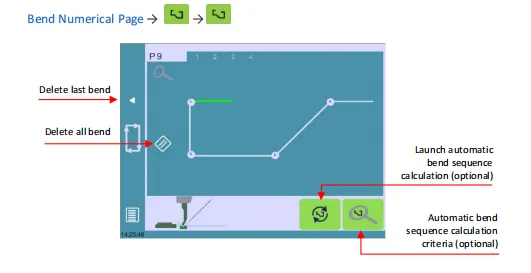
The Bend Sequencing page also provides graphical feedback, making it easier to review every bend before production begins.
Automatically Calculating the Bend Sequence
One of the main advantages of CybTouch 8 Bend Sequencing is its automatic sequencing capability.
After the profile has been completed, the controller can analyze the part geometry and generate a recommended bending order automatically.
During this calculation, CybTouch considers several factors, including:
- Part geometry
- Bend direction
- Tool configuration
- Backgauge accessibility
- Potential collisions
- Machine limitations
The automatically generated sequence provides an excellent starting point for most standard bending applications and can significantly reduce programming time.
For simple parts, the calculated sequence is often ready for production without additional adjustments.
Creating a Manual Bend Sequence
Although automatic sequencing is suitable for many applications, some complex workpieces require manual optimization.
The CybTouch 8 Bend Sequencing page allows operators to manually define the bending order by selecting each bend individually.
Available functions typically include:
- Select the next bend manually.
- Remove the last selected bend.
- Clear the entire sequence.
- Rebuild the bend order.
As each bend is selected, the controller assigns its sequence number directly to the graphical profile, allowing operators to visualize the complete bending process.
Manual sequencing is particularly useful for:
- Large workpieces
- Complex box parts
- Multiple return flanges
- Parts requiring special handling
- Applications with operator-specific preferences
Reviewing the Bend Sequence in the 2D Page
The 2D Bend Page provides a graphical representation of the selected bend sequence.
Instead of viewing only numerical values, operators can review the actual workpiece geometry together with the programmed bending order.
The 2D page allows users to:
- Browse every programmed bend.
- Review the current bend number.
- Verify bending direction.
- Confirm workpiece orientation.
- Preview the next bending operation.
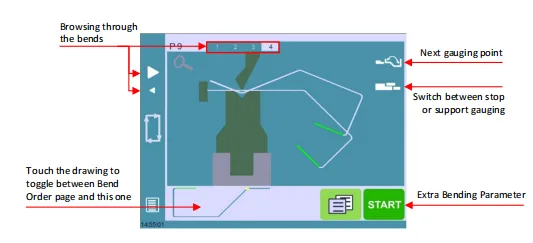
This visual confirmation helps identify sequencing mistakes before production begins, reducing setup time and minimizing material waste.
Using Support Gauging
Certain workpieces require additional support during bending because of their size or shape.
The Support Gauging function assists operators by displaying the recommended gauging position for each bending step.
Support gauging helps improve:
- Workpiece stability
- Positioning consistency
- Operator handling
- Bending repeatability
For long or heavy parts, following the recommended gauging position can significantly improve both safety and bending accuracy.
Operators can switch between the standard view and the support gauging view whenever necessary.
Reviewing Extra Bending Parameters
During bend sequencing, operators can also access the Extra Bending Parameters associated with each bend.
These parameters may include:
- Bending force
- Crowning
- Dwell time
- Speed settings
- Backgauge retraction
- Opening position
Reviewing these values before production helps ensure that every bend is performed using the correct machine settings.
If necessary, individual parameters can be adjusted before the program is finalized.
Preparing the Program for Production
Once the bend sequence has been reviewed and confirmed, the program is ready for production.
Before starting the bending cycle, operators should verify that:
- The bend order is correct.
- The selected punch and die match the installed tooling.
- The backgauge reaches the programmed position.
- Material orientation matches the displayed profile.
- All required parameters have been confirmed.
After verification, return to the Bend Numerical Page, start the hydraulic system if required, and begin the bending cycle according to the controller instructions.
Following this workflow helps reduce setup errors and improves first-part quality.
Best Practices for CybTouch 8 Bend Sequencing
Proper use of CybTouch 8 Bend Sequencing can greatly improve production efficiency and reduce programming mistakes.
For the best results, operators should:
- Use automatic sequencing as the initial programming method whenever possible.
- Review every automatically generated bend before production.
- Manually adjust the sequence for complex workpieces when necessary.
- Verify support gauging positions for large or heavy parts.
- Check tooling selection before confirming the bend order.
- Test the first workpiece before beginning full production.
- Save the completed program after verifying the final bend sequence.
By combining automatic calculations with manual optimization when required, operators can use CybTouch 8 Bend Sequencing to create safer, more efficient, and more reliable bending programs for a wide variety of sheet metal applications.
Frequently Asked Questions(FAQ)
Can CybTouch 8 calculate the bend sequence automatically?
Yes. The controller can analyze the workpiece profile and generate a recommended bend order automatically. The calculation may consider the part geometry, bend direction, tooling, backgauge accessibility, and potential interference.
How do I modify an automatic bend sequence?
Open the Bend Sequencing page and select the bends in the preferred order. You can remove the last selected bend, clear the complete sequence, and rebuild the order according to the actual production requirements.
What is Support Gauging in CybTouch 8 Bend Sequencing?
Support Gauging shows the recommended workpiece support or gauging position for the selected bend. It is particularly useful for long, heavy, or irregularly shaped parts that require additional support during positioning.
Conclusion
The CybTouch 8 Bend Sequencing function transforms a completed workpiece profile into an organized and production-ready bending process. By using automatic sequence calculation as a starting point and manually refining the bend order when necessary, operators can improve part handling, reduce collision risks, and achieve more consistent bending results.
The graphical 2D view, Support Gauging function, and access to Extra Bending Parameters make it easier to verify each step before production begins. Careful review of the generated sequence, tooling selection, backgauge positions, and workpiece orientation is essential for achieving reliable first-part accuracy.
After completing and saving the bend sequence, operators can return to the Bend Numerical Page and prepare the machine for production. For additional assistance with CybTouch 8 Bend Sequencing, graphical programming, or press brake operation, contact the HARSLE technical support team or continue exploring the HARSLE CybTouch 8 documentation series.


