


When it comes to efficiently configuring modern metalworking machinery, mastering the ESA S875 Machine Setup is essential. If you’re searching for a straightforward way to configure your ESA S875 machine quickly and effectively, you’re in the right place. In this article, I’ll guide you through the process of setting up the ESA S875 Machine with ease, focusing on crucial aspects such as the Home Mask, Ram sizing, and Sizing the Stop Axes. By understanding these components, you can optimize your setup process, ensuring precision and enhancing productivity. Whether you’re a beginner or an experienced operator looking to refine your skills, this comprehensive guide will provide you with the insights needed to make the most out of your ESA S875 Machine Setup.
Mastering ESA S875 Machine Setup Efficiently
Initializing the Home Mask
To begin with the ESA S875 Machine Setup, power on the Numerical Control (NC) system. Upon startup, you’ll be greeted with the Home Mask page. Should you find yourself on a different page, simply press the home icon to navigate back to the Home Mask. This step is crucial for accessing the automatic phase and enables the execution of your work program.
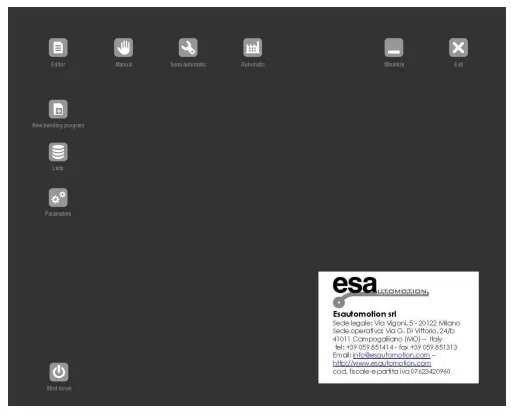
From this page it’s possible:
– to enter in Settings, pressing

– to enter in Manual, pressing

– to enter in Semiautomatic, pressing

– to enter in Automatic pressing

– to minimize the application, pressing

– to exit from the application, pressing

– to realize a new programme of bend, pressing

– to select one of the lists (Programme, Punches, Dies), pressing

– to select one of the mask parameters, pressing

– to turn off the Numerical Control, pressing

Conducting Ram Sizing
- In order to execute programs accurately, it is essential to size the ram correctly. Start by pressing the Manual button.
- If the ram is in the up position, use the down pedal to move it below the zero marks.
- Then, activate the up pedal for manual re-ascent. This ensures that the ram ascends until it reaches the zero marks on the optic lines of the two cylinders. Completing this ensures your ESA S875 Machine Setup is ready for automatic operations.
- If you need to recalibrate without turning off the NC, use the “Repeat Sizing” option followed by the re-ascent pedal.
Calibrating the Stop Axes
Properly sizing the stop axes is optional but recommended, especially if there are doubts about the target’s accuracy. To calibrate, press the Manual and the START button to move the stop axes toward the sizing limit switch. Once touched, the axes will reverse, releasing the switch, and size to the first zero mark of the encoder. This ensures precise ESA S875 Machine Setup for your projects.
Optimizing ESA S875 Machine Performance
Routine Inspection and Maintenance
Regular inspections are crucial for maintaining the ESA S875 Machine’s performance. Establish a schedule to routinely check the machine for any signs of wear or damage. This includes examining the work area for debris, which could potentially impede operations or lead to machine failures. Misalignments should be corrected immediately to maintain precision in operations. Regularly verifying that all machine components are correctly aligned and functioning as intended can prevent larger issues down the road.
Lubrication and Cleaning
Proper lubrication is necessary to reduce friction between the machine’s moving parts, ensuring smooth and efficient operation. Identify the key lubrication points on the ESA S875 and apply the appropriate lubricants as per the manufacturer’s recommendations. Furthermore, thorough cleaning of the machine at regular intervals helps in reducing the build-up of dust and other contaminants. By keeping the ESA S875 clean, you minimize the risk of wear and tear, thereby extending the lifespan of your machine and enhancing its accuracy during operation.
Preventive Maintenance for Longevity
A crucial component of optimizing the ESA S875 Machine Setup is engaging in preventive maintenance. Regularly update the machine’s software to ensure you are utilizing the latest features and enhancements for improved performance. Additionally, check all electrical and mechanical connections to ensure they are secure and functioning correctly.
Frequently Asked Questions(FAQ)
What is the importance of Ram sizing in ESA S875 Machine Setup?
Ram sizing is crucial for achieving precise bending operations. During the ESA S875 Machine Setup, ensure the Ram is calibrated according to the material specifications to maintain accuracy and efficiency.
How can I effectively size the stop axes during ESA S875 Machine Setup?
Proper sizing of the stop axes is essential to ensure the material is correctly positioned. Use a digital caliper to measure and adjust the stop axes as part of the ESA S875 Machine Setup, following the user manual instructions.
How can I optimize my ESA S875 Machine Setup for better performance?
Regularly update the software and perform routine checks to keep the ESA S875 Machine Setup optimized. Ensuring that all components are calibrated and maintained will enhance overall machine performance.
Conclusion
Mastering the ESA S875 Machine Setup quickly involves understanding key components such as the Home Mask, Ram sizing, and the proper sizing of stop axes. These elements play a crucial role in optimizing the performance and precision of your machine. By familiarizing yourself with these setup procedures, you can significantly enhance the efficiency and effectiveness of your operations.
To further refine your skills or address any specific questions, we encourage you to explore additional resources and documentation available through our website. Should you need personalized assistance or have further inquiries, don’t hesitate to reach out to our support team for expert advice. By taking these steps, you can ensure that your ESA S875 machine operates at its best, boosting both productivity and longevity.


