


When it comes to configuring DELEM DA-52S Program Constants, understanding the core setup is crucial for ensuring optimal performance of your press brake operations. If you’re looking to effectively set up your DELEM DA-52S Program Constants, you’re in the right place. In this guide, I’ll walk you through the process of configuring these vital parameters, so you can maximize the efficiency and accuracy of your bending projects. Whether you’re a seasoned operator or a newcomer seeking to refine your skills, this article will equip you with the knowledge necessary to confidently adjust the DELEM DA-52S to suit your specific needs. By following the steps outlined, you’re ensuring that your metalworking tasks are executed with precision and consistency.
Introduction
The DELEM DA-52S is a powerful CNC control system that offers robust features for optimizing press brake operations. Understanding and configuring the program constants correctly ensures enhanced accuracy, efficiency, and productivity.

Press this key to enter the program constants.
The program constants are divided across several pages. They are discussed in the following sections.
General
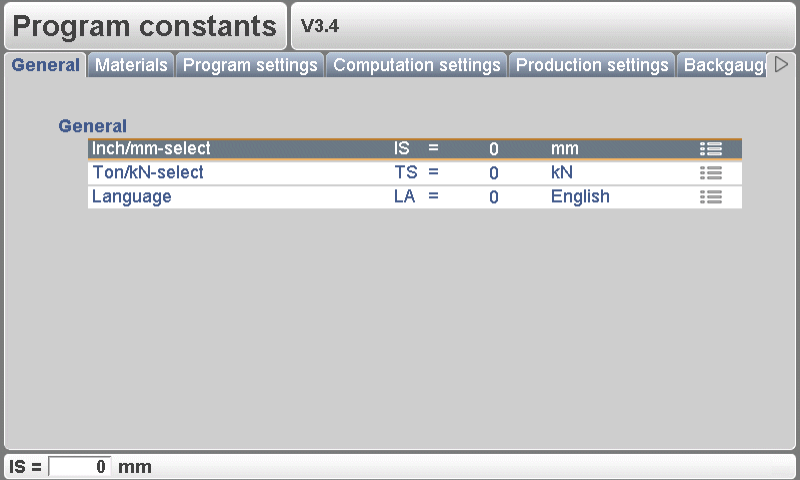
To fully utilize the DELEM DA-52S Program Constants, it is crucial to understand the numerous settings that influence its operation. These constants dictate general machine behavior, operational limits, and user interface configurations. Here’s a simplified guide to navigating and setting these parameters:
Use the arrow keys left/right to browse through the various pages containing parameters. To select individual parameters, use the arrow keys up/down. For certain parameters, a value can be adjusted with the ‘constants’ key, indicated by a specific symbol.
Key Program Constants
- Inch/mm Selection (IS):
Choose your preferred unit of measurement.1for dimensions in inches0for dimensions in millimeters
- Ton/kN Selection (TS):
Determine the unit for portraying force data.1for Tons0for kN
- Language (LA):
Set your preferred language for the user interface. The DELEM DA-52S supports multiple languages, including:
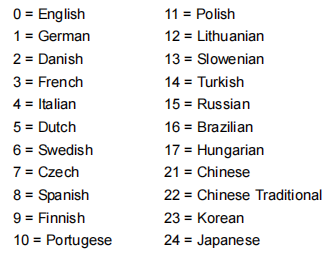
Adjust these settings according to your operational needs to ensure a smooth and accurate machining process.
Materials
Material settings are crucial for ensuring that your DELEM DA-52S performs precise bending operations. Proper configuration involves inputting the correct material type, thickness, and tensile strength to enable the system to calculate the necessary bending parameters accurately.
Step 1: Accessing Material Settings
To begin, navigate to the material settings menu on your DELEM DA-52S. Here, you have the capability to edit existing materials, program new ones, or delete materials that are no longer required. A maximum of six materials can be programmed at any given time on the control panel.
Step 2: Adjusting Material Attributes
In this window, you can edit and input the material properties essential for accurate bending operations:
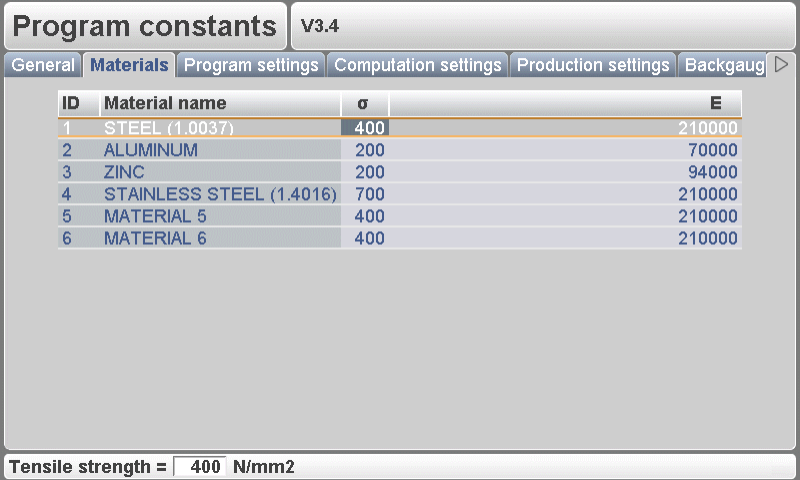
- Material Name: Each material should have a unique name (up to 25 characters) that starts with a letter. This allows easy identification during programming.
- Tensile Strength: Enter the tensile strength of the material. This is crucial for the DELEM DA-52S to apply the correct force during bending operations.
- E Module: The E Module of each material must also be specified to ensure precise calculation of bending parameters.
Materials are initially listed by their ID number. To modify an existing material, select the relevant line, change the property values as needed, and confirm each entry by pressing the ENTER key.
To delete a material, position the cursor on the material line and hit the ‘delete material’ function key (S6). For adding a new material, move the cursor to an empty entry space and start programming the specific values for that material.
Program Settings
The Program Settings in the DELEM DA-52S Program Constants define how the press brake behaves during programming and production, helping operators improve accuracy, consistency, and efficiency.

Machine Number (MN)
Assigning a unique machine number is essential when multiple press brakes operate in the same facility. The number is stored in each bending program and tool filename, ensuring correct machine association.
Key functions:
- Identifies each machine uniquely
- Verifies machine number when loading programs from USB
- Requires confirmation if numbers do not match
- Changing the machine number updates all tool filenames and requires a new tool backup
Angle Correction Database (CD)
This toggle enables or disables the use of a shared angle correction database. When active, corrections entered in production are stored for future use and automatically suggested for similar bends.
The controller compares these bend properties:
- Material
- Thickness
- Die opening
- Die radius
- Punch radius
- Angle
Correction suggestions or interpolations occur when:
- The active angle is within 10° of two known bends
- The corrections of those bends differ by no more than 5°
Default Program Values
To streamline the creation of new bending programs, several default parameters can be preset:
- Y-Opening Default – Initial Y-axis opening value
- Default X-Axis Code (XC) – Default step-change code (factory value: 2)
- Default X Time (XT) – Waiting time before step change
- Default Hold Time (HT) – Dwell time at the bending position
With these optimized DELEM DA-52S Program Constants, operators can maintain consistent bending quality while reducing repetitive setup efforts.
Computation Settings
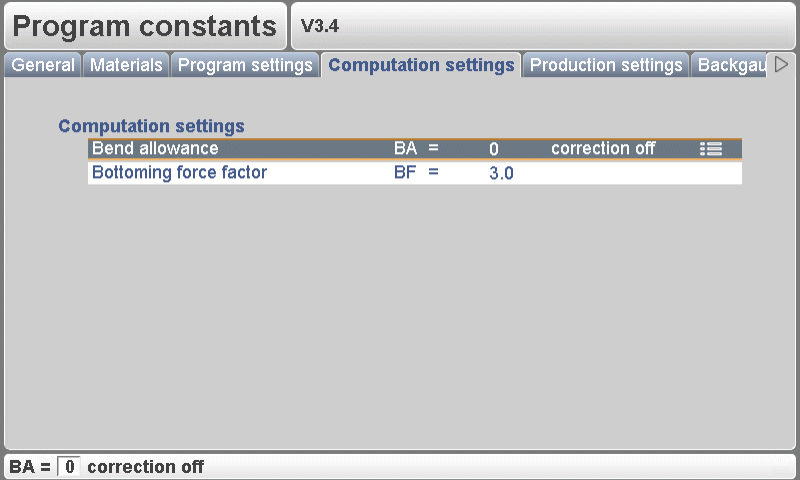
Precision in complex bending operations hinges on the efficient computation settings of your DELEM DA-52S. Calibrating algorithms and keeping software updated are key.
Step 1: Calibrate Calculation Algorithms
Maximize speed and accuracy by calibrating your calculation algorithms. Focus on the Bend Allowance (BA) setting:
- 0 = Correction Off
- 1 = Correction On
This setting determines whether to apply corrections for bend-allowance in the programming phase. Corrections applied during programming are computed and stored, and can be adjusted in production mode.
Step 2: Upgrade Software Algorithms
Regularly update your software to enhance algorithm performance and precision. Pay attention to the Bottoming Force Factor (BF), used to adjust the pressure for air-bending to achieve the desired coining pressure.
Implementing these settings ensures that your DELEM DA-52S operates with exceptional efficiency and precision. For further assistance, explore our documentation or contact our support team.
Production Settings
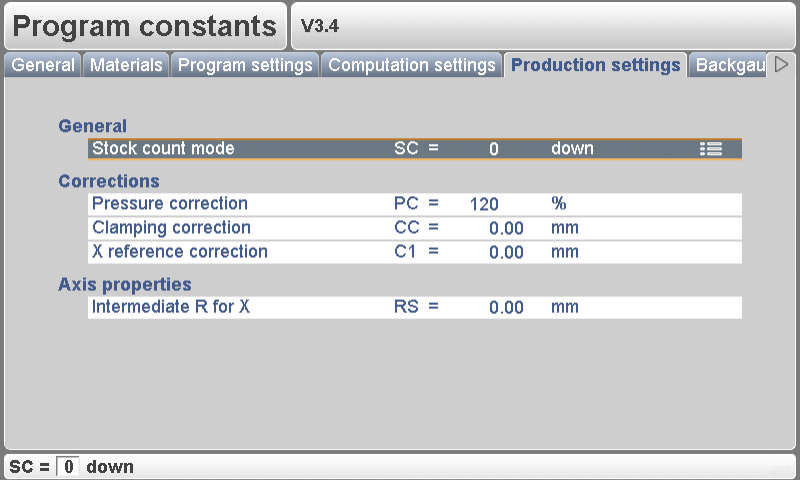
Production settings in the DELEM DA-52S are key for efficiently managing how workpieces are crafted using a press brake machine. Proper configuration optimizes performance and quality.
Step 1: Setting Production Variables
Set accurate production variables like batch size and speed for optimal efficiency. Use the stock count mode (SC) to count products up or down during manufacturing. Downcounting stops the machine at zero after reaching a pre-set quota, while upcounting provides ongoing progress reports. Adjust pressure correction (PC) to control valve pressure, ensuring consistency.
Use clamping correction (CC) to tweak the beam’s clamping position, achieving a firm hold by offsetting the pinch point; positive values deepen, negative values raise. X-reference correction (C1) fixes discrepancies between mechanical and displayed X-axis positions for accuracy.
Step 2: Monitoring Output Quality
Regularly review production quality, making necessary adjustments. Intermediate R for X-movement (RS) prevents collisions by adjusting the R-axis while the X-axis moves within the safety zone, ensuring smooth operations.
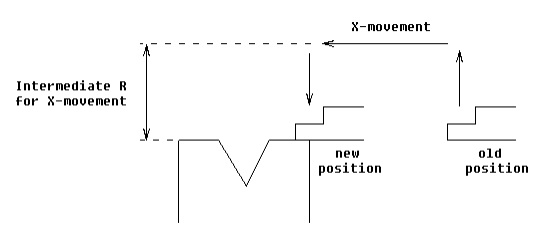
By configuring these DELEM DA-52S program constants effectively, you can maximize machine performance and product quality.
Backgauge Dimensions
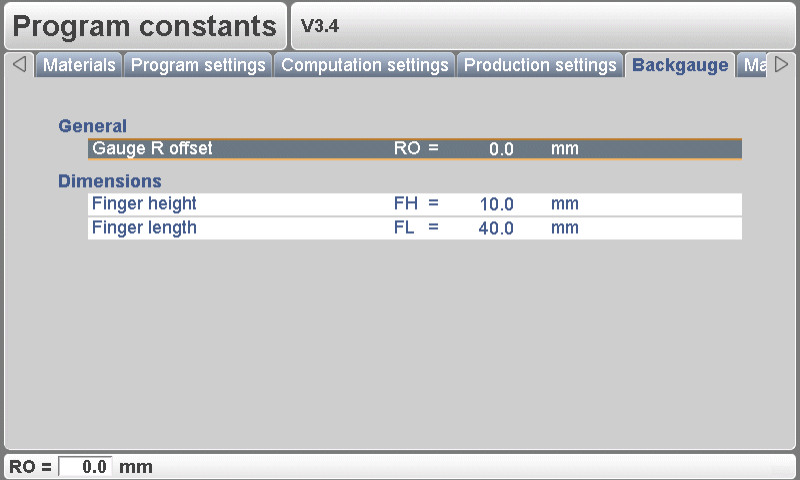
Correct backgauge configurations are vital for maintaining the accuracy and repeatability of bends.
Step 1: Measure Backgauge Dimensions
- Gauge R Offset (RO): Set the R-axis offset for scenarios where the X-axis is outside the die safety zone. This adjustment ensures lower backgauge positions at gauge position 0 for precise bends.

- Finger Height (FH): Adjust the default finger level height to correct the R-axis during lay-on situations, enhancing bending accuracy.
- Finger Length (FL): Correct the X-axis position with the first finger level length to maintain proper positioning during operations.
Step 2: Calibrate the Backgauge Mechanism
Conduct routine calibrations to ensure your backgauge maintains the programmed positions accurately, thereby enhancing the consistency of your bending operations.
By carefully configuring and calibrating these settings, you can significantly improve the reliability and performance of your DELEM DA-52S system.
Maintenance
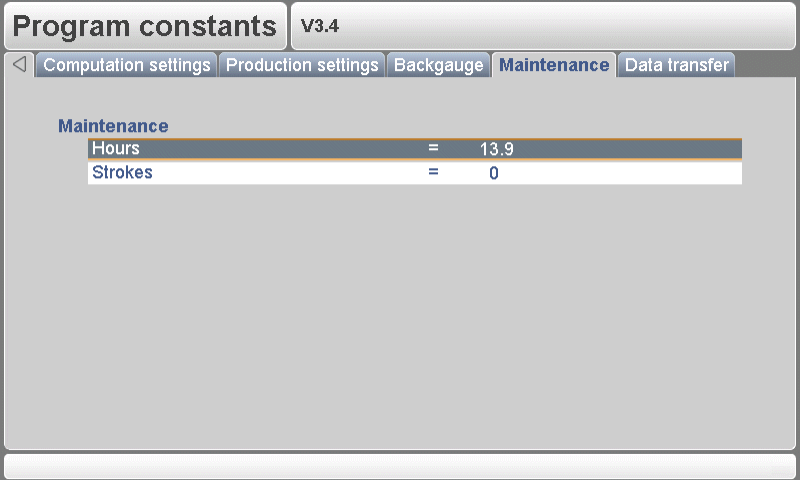
Maintaining the DELEM DA-52S ensures longevity and optimal performance.
Step 1: Regular Inspections
- Machine Hours: Track the operational hours to plan timely maintenance.
- Strokes Count: Monitor the number of strokes executed by the pressbeam to detect potential issues early.
Step 2: Lubrication Protocols
Ensure all moving parts are regularly lubricated to reduce friction and wear, following the manufacturer’s guidelines for lubricant types and schedules.
Data Transfer
Efficient and secure data transfer is crucial for managing DELEM DA-52S Program Constants, enabling seamless updates and sharing between machines and computers.
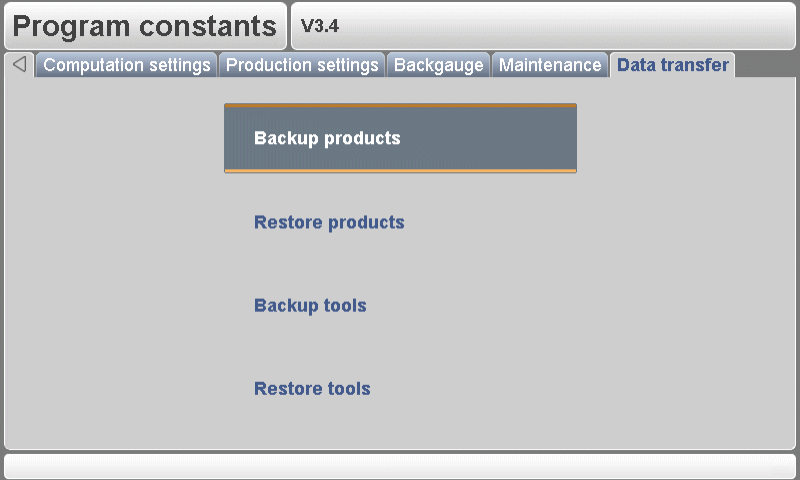
From this menu, all program data on the control can be stored on an external USB device or restored from such a device.
- Backup products: Copy all products from the control to the USB disk. Existing products on the USB disk with the same name are replaced.
- Restore products: Copy all products present on the USB disk to the control. Existing products on the control with the same name are replaced.
- Backup tools: Copy all tools from the control to the USB disk. Existing tools on the USB disk with the same name are replaced. Beside the tools, also the program constants are stored.
- Restore tools: Copy all tools present on the USB disk to the control. Existing tools on the control with the same name are replaced.
Frequently Asked Questions(FAQ)
What are the recommended initial settings for DELEM DA-52S program constants?
Initial settings for DELEM DA-52S program constants should reflect your specific press brake operations and material handling requirements. Standard defaults can be used as a starting point, then adjust according to the precise needs of your production process and material specifications.
What should I do if changes in DELEM DA-52S program constants do not apply during operations?
If changes to the DELEM DA-52S program constants are not reflecting, ensure that the settings have been correctly saved and activated. It might be necessary to restart the controller to apply new settings. Ensure there are no active errors or overrides that might prevent changes from being applied.
Conclusion
In summary, configuring the DELEM DA-52S program constants involves a series of crucial steps that ensure precision and efficiency in your press brake operations. By understanding and setting the material attributes, program settings, computation parameters, and production configurations, you can significantly enhance the performance and accuracy of your machine. Regular maintenance and secure data handling further contribute to the system’s longevity and reliability.
Proper setup and maintenance are critical to ensuring the sustained performance of your DELEM DA-52S equipped press brake. By adhering to these guidelines and routinely servicing your machine, you can reduce downtime and boost production efficiency.
For more detailed support or any further inquiries, we invite you to contact our experts at HARSLE. Additionally, feel free to explore our documentation section for more comprehensive guides and resources related to press brake operations.


