


The CybTouch 8 TouchProfile Mode allows operators to create bending programs by drawing the workpiece profile directly on the controller screen. Instead of entering bend angles and flange lengths one by one, users can simply sketch the desired part shape, and the controller automatically generates the corresponding bending sequence. This graphical programming method makes program creation faster, more intuitive, and easier for both new and experienced operators. In this guide, I will explain how to use CybTouch 8 TouchProfile Mode, draw part profiles, edit segments, apply special bending tools, and prepare programs for bend sequencing efficiently.
Understanding CybTouch 8 TouchProfile Mode
The CybTouch 8 TouchProfile Mode is a graphical programming mode that enables operators to create a bending program by drawing the part profile directly on the controller screen. Instead of entering individual bend angles and flange lengths manually, users can build the workpiece shape segment by segment, allowing the controller to interpret the geometry and prepare it for bend sequencing.
Compared with Numerical Mode, which requires manual entry of bending data, CybTouch 8 TouchProfile Mode offers a more intuitive workflow. It is particularly suitable for operators who prefer visual programming or frequently manufacture parts with multiple bends and complex profiles.
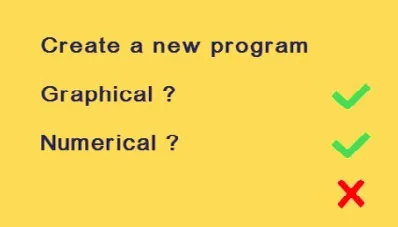
Before creating a new program, make sure the machine has already been configured correctly. Materials, punches, dies, and machine parameters should be available in the controller so the generated program can use accurate bending calculations.
Creating a New Program
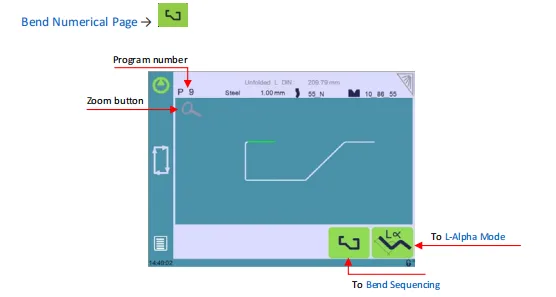
To begin programming in CybTouch 8 TouchProfile Mode, create a new part program from the Bend Numerical Page.
After creating a new program, configure the basic production information before drawing the profile.
This typically includes:
- Program number
- Material type
- Material thickness
- Punch selection
- Die selection
Selecting the correct material and tooling before drawing the profile is important because these values are used later to calculate bend positions, bending force, and tooling clearances automatically.
Once these settings have been completed, the controller is ready for graphical profile creation.
Drawing the Part Profile
The main advantage of CybTouch 8 TouchProfile Mode is the ability to draw the workpiece directly on the touchscreen.
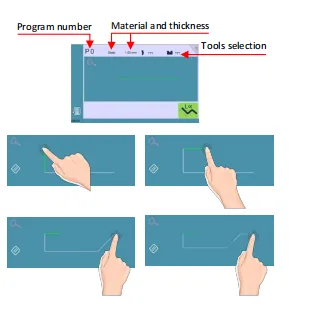
Each touch on the drawing area creates a new profile segment, allowing operators to gradually build the complete part geometry.
During profile creation, users can:
- Add new profile segments.
- Modify an existing segment.
- Delete the last segment.
- Zoom in for greater accuracy.
- Zoom out to view the complete profile.
This graphical approach significantly reduces programming time because operators can immediately visualize the finished workpiece while creating the program.
For simple components, only a few touches are required to complete the entire profile.
Editing Profile Dimensions
After the basic profile has been created, individual segments can be edited to match the required dimensions.
Selecting the center of a segment allows its value to be modified using the numerical keypad.
Depending on the selected segment, operators can edit:
- Segment length
- Bend angle
- Radius
- Individual segment dimensions
This makes it easy to fine-tune the workpiece without redrawing the entire profile.
If mistakes are made during programming, the previous segment can be removed and recreated without affecting the remaining geometry.
Using this editing method provides greater flexibility when creating prototypes or modifying existing programs.
Using Special Bending Functions
The CybTouch 8 TouchProfile Mode also supports several advanced programming functions for complex bending applications.
Through the More menu, operators can activate additional bending options such as:
- Special tools
- Step bending
- Large radius bending
- Maximum distance control
- Number of step bends
These functions allow the controller to generate more advanced bending cycles that cannot be achieved using standard programming alone.
For example, large-radius bends can be produced through multiple incremental bends instead of a single bending operation. The controller automatically distributes the programmed radius across several bending steps to achieve a smoother finished profile.
Special tools can also be assigned to individual bends whenever additional tooling is required during production.
Improving Programming Accuracy
Several tools are available within CybTouch 8 TouchProfile Mode to improve programming precision.
The Zoom function allows operators to enlarge a specific area of the drawing, making it easier to edit small profile segments or closely spaced bends.
The controller also provides visual feedback while programming, helping users identify each segment before continuing with the next one.
When complex parts are being programmed, it is recommended to review each bend individually before proceeding to the next stage. Verifying profile dimensions early helps reduce programming errors and minimizes the need for later corrections.
For highly detailed workpieces, editing each segment individually often produces more accurate bending results than entering all values at once.
Preparing the Program for Bend Sequencing
Once the complete profile has been drawn and all dimensions have been verified, the next step is to prepare the program for bend sequencing.
The controller converts the graphical profile into a sequence of bending operations that can later be optimized according to the selected tooling and machine configuration.
Before leaving CybTouch 8 TouchProfile Mode, operators should confirm that:
- All profile segments have been completed.
- Bend angles are correct.
- Segment lengths have been verified.
- Material and tooling selections are correct.
- Any special bending functions have been configured.
After confirmation, the program can be transferred directly to the Bend Sequencing page, where the controller determines the optimal bending order and prepares the part for production.
Best Practices for Using CybTouch 8 TouchProfile Mode
To achieve the best programming results, operators should follow several recommended practices when working in CybTouch 8 TouchProfile Mode.
Recommended practices include:
- Select the correct material and tooling before drawing the profile.
- Draw the complete part carefully before adjusting individual dimensions.
- Use the Zoom function when programming complex profiles.
- Review every bend angle and segment length before proceeding.
- Enable special bending functions only when required.
- Save the program after completing the profile to avoid losing programming work.
- Verify the generated profile before moving to Bend Sequencing.
Following these practices helps improve programming efficiency, reduces setup time, and ensures that the generated bending program accurately reflects the intended workpiece geometry.
Frequently Asked Questions(FAQ)
When should I use TouchProfile Mode instead of Numerical Mode?
CybTouch 8 TouchProfile Mode is ideal for creating parts with multiple bends or complex geometries because operators can visualize the complete workpiece while programming. Numerical Mode is generally preferred when the bend angles and flange lengths are already known and can be entered directly.
What is the Zoom function used for?
The Zoom function enlarges a selected area of the workpiece profile, allowing operators to edit small segments or closely spaced bends more accurately. It is especially useful when programming complex parts.
Does TouchProfile Mode automatically calculate the bending sequence?
CybTouch 8 TouchProfile Mode creates the workpiece geometry, but the bending sequence is configured in the subsequent Bend Sequencing stage. Depending on the controller configuration, the sequence may be generated automatically or adjusted manually by the operator.
Conclusion
The CybTouch 8 TouchProfile Mode provides a fast and intuitive way to create press brake programs by allowing operators to draw the workpiece profile directly on the controller. Compared with traditional numerical programming, this graphical approach simplifies program creation, improves visualization, and reduces the likelihood of programming errors.
By understanding how to create profiles, edit individual segments, use advanced bending functions, and prepare the program for Bend Sequencing, operators can significantly improve programming efficiency while maintaining high bending accuracy. TouchProfile Mode is particularly valuable for complex parts, prototypes, and applications where visual programming offers a clear advantage.
After completing the profile, the next step is to configure the bending order using Bend Sequencing, where the controller determines the optimal sequence for efficient and accurate production. Mastering both functions enables users to take full advantage of the CybTouch 8 controller’s graphical programming capabilities.


