


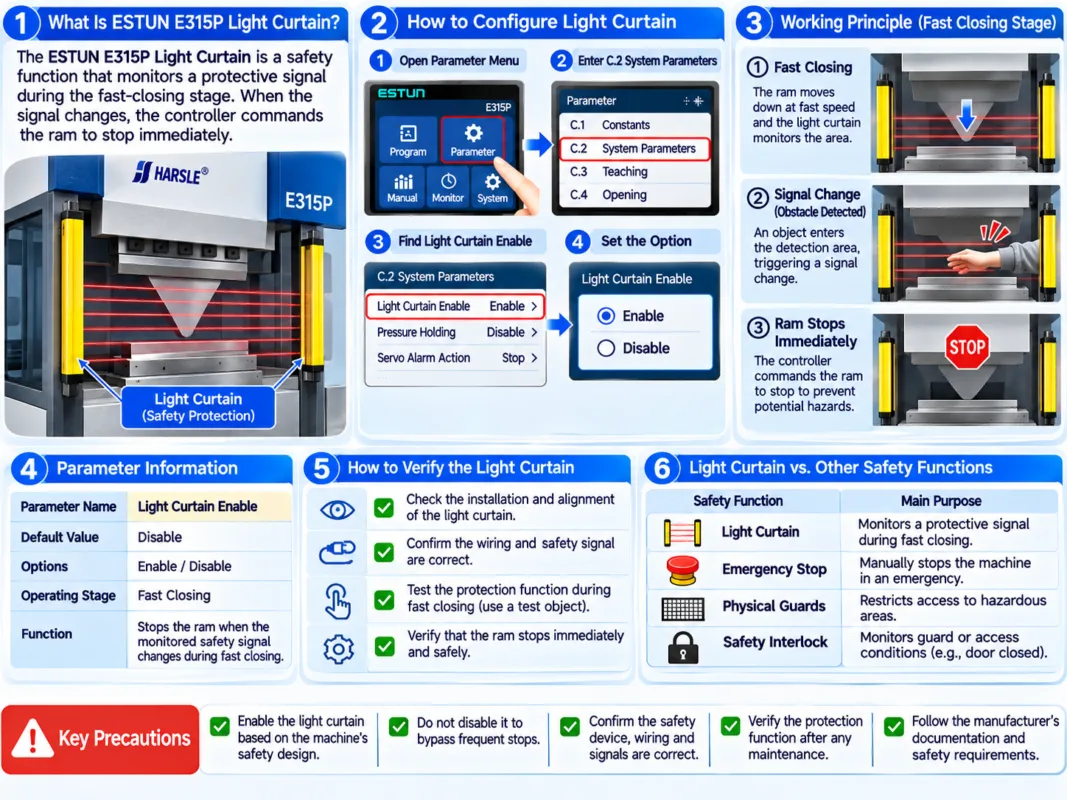
The ESTUN E315P Light Curtain is a safety-related controller function that monitors protective signals during the fast-closing stage of press brake operation. When the configured safety signal changes under the conditions described in the operating manual, the controller commands the ram to stop immediately.
Proper configuration is important for maintaining the intended protective response during bending operations. However, enabling a controller parameter alone does not guarantee that the complete machine safety system is correctly installed or functioning.
This guide explains the Light Curtain Enable parameter, its operating principle, configuration considerations, and the precautions required when verifying the protection system.
What Is ESTUN E315P Light Curtain?
The ESTUN E315P Light Curtain function is associated with the controller’s external protective signal monitoring.
In the ESTUN E315P operating manual, the relevant parameter is identified as Light Curtain Enable under the C.2 System Parameters section.
The manual provides the following information:
| Parameter | Specification |
|---|---|
| Parameter Name | Light Curtain Enable |
| Default Value | Disable |
| Available Options | Enable / Disable |
| Operating Stage | Fast Closing |
| Function | Stops the ram when the monitored safety signal changes during fast closing |
The default setting is Disable. This is a controller parameter default, not a recommendation to operate machinery without the required safety protection.
The appropriate configuration must correspond to the machine’s actual protective equipment, electrical design, and safety requirements.
How Does Light Curtain Protection Work?
The ESTUN E315P Light Curtain function monitors a safety-related signal during the fast-closing stage.
A typical press brake bending cycle includes fast closing, pressing, dwell, decompression, and opening.
According to the controller manual, when Light Curtain Enable is activated, a change in the relevant safety signal during fast closing causes the controller to command an immediate stop of the ram.
1. Fast Closing Begins
The ram moves downward toward the workpiece during the fast-closing stage.
The controller monitors the relevant protective signal when the function is enabled.
2. Protective Signal Changes
If the monitored safety signal changes during fast closing, the controller responds according to the configured protection logic.
In a properly designed safety system, the protective device and associated circuitry must be capable of detecting the specified hazardous condition.
3. Ram Stop Is Commanded
The controller commands the ram to stop in response to the signal change.
The actual stopping performance depends on the complete machine safety architecture, including the hydraulic system, control circuitry, and protective components.
The manual’s description should not be interpreted as proof that the same response applies to every operating stage or machine configuration.
How to Configure ESTUN E315P Light Curtain
Configuration should be performed only by qualified personnel familiar with the press brake’s electrical system and safety requirements.
Step 1: Access System Parameters
Open the controller’s parameter settings and locate the C.2 System Parameters section.
Find the parameter labeled Light Curtain Enable.
Step 2: Check the Existing Configuration
Review the current parameter value.
The manual lists Disable as the default setting.
Before changing the configuration, confirm the machine’s actual safety equipment and the manufacturer’s approved electrical design.
Step 3: Verify the Safety System
Before enabling the ESTUN E315P Light Curtain, qualified personnel should confirm that the protective device is correctly installed and connected to the intended safety circuitry.
The protective device must be compatible with the machine’s safety architecture.
Do not assume that changing the controller setting can replace missing safety components or correct defective wiring.
Step 4: Configure the Parameter
Select the setting required by the approved machine configuration.
Enable: Activates the controller’s documented monitoring response for the relevant safety signal during fast closing.
Disable: Deactivates this particular controller function. It must not be used as a workaround for a malfunctioning protective device.
Step 5: Perform Safety Verification
After configuration, the complete protective function must be checked using the machine manufacturer’s approved validation procedure.
The verification should confirm that the protective system responds as designed before the machine is released for production.
How to Verify Light Curtain Operation
Verification of the ESTUN E315P Light Curtain should be treated as a safety validation task rather than an ordinary production test.
Before testing, qualified personnel should review the electrical documentation, protective-device instructions, and machine-specific safety procedures.
The validation should address the following areas.
Protective Device Condition
Inspect the protective device for damage, contamination, incorrect mounting, or other conditions that could affect detection.
Signal and Control Response
Verify that the protective device, safety circuitry, and controller respond according to the approved electrical design.
Stopping Performance
Confirm that the complete machine achieves the required protective stopping performance.
This assessment must account for the actual machine response and the applicable safety requirements.
Operating Mode Coverage
Verify which operating modes and movement stages are covered by the installed protective system.
The E315P manual specifically describes the Light Curtain Enable response during fast closing. Other protective functions must be assessed separately.
Testing should never involve placing hands or other body parts in the hazardous area to trigger the protective device.
Light Curtain Protection vs. Other Safety Functions
The ESTUN E315P Light Curtain is only one part of the press brake’s overall safety arrangement.
| Safety Function | Main Purpose |
|---|---|
| Light Curtain Protection | Monitors the specified protective signal during fast closing |
| Emergency Stop | Provides an emergency stopping function through the machine’s designed safety system |
| Physical Guards | Restrict access to designated hazardous areas |
| Safety Interlocks | Monitor specified guard or access conditions |
These functions are not interchangeable.
A light curtain does not automatically replace physical guarding, emergency-stop provisions, or other protective measures required by the machine’s risk assessment.
Likewise, a controller parameter should not be treated as an independently certified safety function without verification of the complete system.
Common Light Curtain Problems and Precautions
Several issues should be considered when evaluating the ESTUN E315P Light Curtain configuration.
Incorrect Parameter Configuration
The selected setting may not match the installed protective equipment or approved machine design.
Qualified personnel should verify the configuration against the machine documentation.
Protective Device Misalignment
Incorrect installation or alignment may affect the operation of the protective device.
Inspection and adjustment should follow the protective-device manufacturer’s instructions.
Electrical or Signal Problems
Damaged cables, incorrect connections, or faulty safety components may prevent the system from responding as intended.
Electrical faults should be investigated using approved diagnostic procedures.
Unexpected Machine Stopping
If the ram stops unexpectedly, the cause may involve the protective system or other machine operating conditions.
Do not disable the light curtain simply to restore production.
Incomplete Safety Validation
A controller setting that appears correct does not establish that the complete protective function meets the required safety performance.
Formal verification remains necessary after relevant changes.
Practical Recommendations for Reliable Light Curtain Configuration
Before modifying the ESTUN E315P Light Curtain, review the machine’s electrical drawings, safety documentation, and installed protective equipment.
Record the original controller setting and confirm that the proposed configuration matches the approved machine design.
Any changes affecting protective functions should be performed by qualified personnel and followed by appropriate safety validation.
If the protective system behaves unexpectedly, stop using the machine until the condition has been investigated and corrected.
Do not bypass protective devices, modify safety wiring without authorization, or use parameter changes to suppress safety-related faults.
Reliable operation of the ESTUN E315P Light Curtain depends on correct controller configuration, properly installed protective equipment, and verification of the complete machine safety system.
Frequently Asked Questions(FAQ)
Does the Light Curtain Work During Every Bending Stage?
The ESTUN E315P manual specifically describes the light curtain signal response during the Fast Closing stage. It does not establish that this parameter provides identical protection during pressing, dwell, decompression, or opening. Operators should consult the machine’s electrical documentation to determine the complete scope of its protective functions.
Why Does the Ram Stop During Fast Closing?
When the Light Curtain Enable function is active, a change in the monitored protective signal during fast closing causes the controller to command the ram to stop. However, unexpected stopping may also result from other machine conditions. Qualified personnel should investigate the actual cause before restarting operation.
Conclusion
The ESTUN E315P Light Curtain is a safety-related controller function designed to monitor a protective signal during the fast-closing stage of press brake operation. According to the ESTUN E315P operating manual, the Light Curtain Enable parameter provides Enable and Disable options, with Disable listed as the default setting.
Reliable protection requires more than selecting the correct controller parameter. The installed protective device, safety circuitry, machine stopping performance, and operating conditions must all be considered.
Operators should never bypass a required protective function to resolve unexpected machine stops. Any configuration changes or safety-related faults should be handled by qualified personnel and followed by appropriate verification.
By configuring the ESTUN E315P Light Curtain according to the approved machine design and validating the complete protective system, manufacturers can support safer, more reliable press brake operation.


