


If you’re delving into metalworking and need precise calculations for your bending operations, understanding the ESA S640 DIN Formula Stretch Calculation is essential. This tool is pivotal for accurately determining the material stretch during the bending process, ensuring precision and quality in your final product. In this article, I’ll guide you through the core aspects of using the ESA S640 DIN formula, making it easier for you to achieve the exact specifications required for your project. Whether you’re fine-tuning your bending techniques or just beginning your journey in metalworking, this guide will provide the insights you need to effectively use this calculation method.
Understanding the ESA S640 System
The ESA S640 system is renowned for its precision and flexibility, making it ideal for complex bending tasks. It offers enhanced control and user-friendly interfaces, allowing for detailed stretch calculations.
Utilizing the DIN formula is critical in accurate stretch calculations, providing precise measurement adjustments for diverse bending applications.
Setting Up the ESA S640 for Stretch Calculation
Step 1: Configuring System Parameters for DIN Formula
To select the standard DIN formula for stretch calculations, adjust the generic Stretching Formula parameter to ‘1’. This setting can be modified via the 4>> User Parameters page.
It is crucial to ensure that the operator has access to this page and understands the implications of adjusting parameters. Accurately configuring the system parameters helps to optimize the bending process by ensuring that the stretch calculations are consistent with industry standards. By setting the parameter to ‘1’, you align your machine’s operations with the universal DIN standards, facilitating more precise and predictable bending performance. Make sure to document any changes for future reference and troubleshooting. Training operators on these settings will also reduce the risk of calculation errors and improve overall operational efficiency.
Step 2: Ensuring Accurate System Calibration
Proper calibration is essential to achieve optimal results when applying the DIN formula. Make sure all bending tools and back gauges are precisely calibrated.
Calibration involves a series of methodical checks and adjustments to ensure each component of the ESA S640 system performs accurately. Begin by inspecting the bending tools for any signs of wear or damage, as these can significantly influence stretch calculations and result in deviations from expected outcomes. Similarly, back gauges must be meticulously aligned; even minor inaccuracies can lead to substantial errors in the final product. It’s recommended to utilize precision measuring tools during this process to verify accuracy.
Regular calibration not only enhances the precision of your stretch calculations but also extends the lifespan of the machinery, minimizing downtime due to unexpected maintenance issues. Incorporating these routine checks into your maintenance schedule will support the sustained accuracy of your setup, reinforcing the reliability of your bending operations.
Performing Stretch Calculation with ESA S640
Initiating the Calculation Sequence

Start by pressing the START button to position the axes correctly.
The system will automatically verify the program, displaying any errors if present. Ensuring the correct positioning of the axes is crucial for accurate stretch calculations. Before starting, it’s advisable to double-check that all tools are properly aligned and that the material is securely in place.
This initial setup helps in minimizing errors during the calculation process. The automatic verification by the system is designed to catch any discrepancies in real time, allowing operators to make necessary adjustments before proceeding. If an error is detected, the system will alert you with a message, and it is crucial to address these warnings promptly to maintain operational efficiency.
Utilizing the Self-Teach Cycle for Bend Optimization
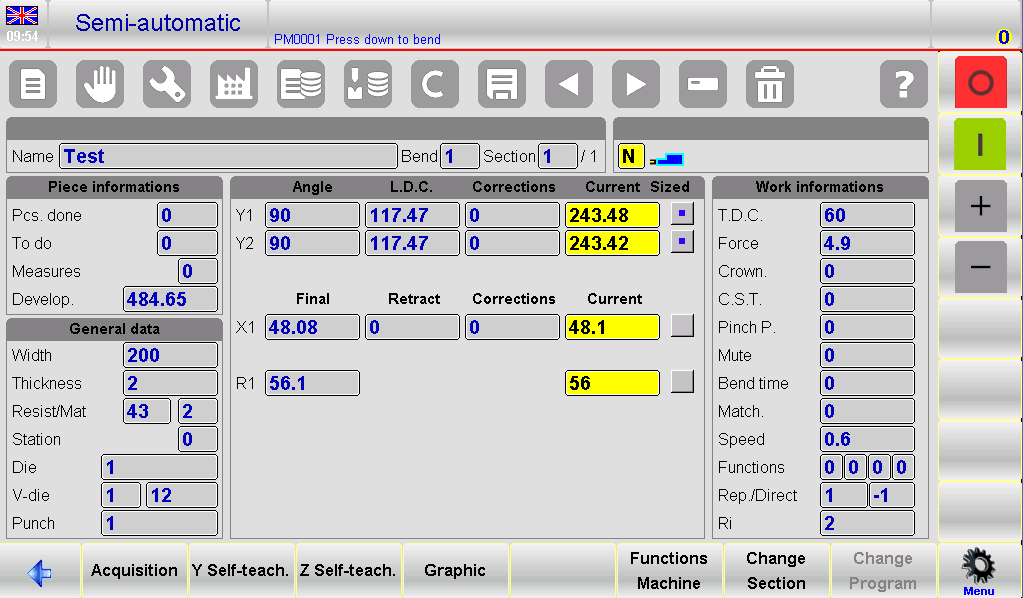
- Activate the Self-Teach Cycle:
- Navigate to the SEMIAUTOMATIC page on your controller.
- Initiate the process by pressing the required activation button for the self-teach cycle.
- Position the Back Gauges:
- Press the START button to position the back gauges (Axes).
- Execute the Bend:
- Step on the Down pedal to perform the bend.
- Determine the Desired End Point:
- If the new quota is greater than the calculated end of the bend:
- Use the up pedal to search for the new quota.
- If the new quota is lower than the calculated end of the bend:
- Enable Re-ascent to TDC with ascent enabling input.
- Without releasing the down pedal at the quota of the end of the bend, press the Start button to descend in increments of a tenth or hundredth of a millimeter.
- If the new quota is greater than the calculated end of the bend:
- Confirm the Desired Height:
- Once you reach the desired end of the bend height, press [Y self-teach].
- Finalize the Adjustment:
- Press the up pedal to register the confirmed height.
- Repeat for All Bends:
- Repeat steps 3-6 for each bend in your program.
- Use the designated navigation buttons to move between different bends.
- Complete the Process:
- Once self-teaching is completed for all bends, press the execution button to run the program from the first bend, verifying each adjusted parameter.
By following these steps, operators can ensure precise execution of bends using the self-teaching cycle within the ESA S640 DIN Formula Stretch Calculation framework.
Advanced Techniques and Tips
Adapting to Special Bending Situations
For specific bend types that don’t align with standard calculations, manually adjust using the up pedal or self-teach functions to reach the precise L.D.C. point. Certain scenarios, such as rounded punches or coining bends, pose unique challenges that require tailored solutions. The ESA S640 DIN Formula Stretch Calculation allows operators to fine-tune bends by leveraging its advanced self-learning capabilities, ensuring that even non-standard bend requirements are met with accuracy and efficiency.
Troubleshooting Stretch Calculation Errors
If errors occur during the stretch calculation, review system settings and ensure all mechanical components are functioning correctly. Misalignments or inaccuracies in your ESA S640 DIN Formula Stretch Calculation often stem from overlooked system configurations or mechanical malfunctions. Regular diagnostics and checks ensure that the system operates smoothly, minimizing potential disruptions. By adhering to a systematic troubleshooting approach, operators can swiftly identify and rectify issues, maintaining the integrity of the stretch calculation process and enhancing overall productivity.
Consistent Maintenance for Optimal Performance
Routine inspections and recalibrations are crucial for maintaining the precision of your ESA S640 DIN Formula Stretch Calculation system. A structured maintenance schedule, focusing on calibration accuracy and component integrity, extends the operational lifespan of your equipment. Consistent oversight ensures that each aspect of the ESA S640 system performs optimally, facilitating precise stretch calculations and reducing errors over time.
Regular system upkeep, including software updates and physical maintenance, reduces errors and extends the lifespan of your equipment. Ensuring that the ESA S640 DIN Formula Stretch Calculation system is updated with the latest software and adequately maintained is vital for long-term efficiency. Routine checks and timely updates address potential software bugs and keep the system at the cutting edge of technology, allowing it to handle complex calculations with ease.
Frequently Asked Questions(FAQ)
What is the ESA S640 DIN Formula Stretch Calculation used for?
The ESA S640 DIN Formula Stretch Calculation is used to determine the correct stretching and bending parameters when working with metal sheets. This ensures precise and consistent results, minimizing material waste and enhancing production efficiency.
Is specialized training required to use the ESA S640 system for stretch calculations?
While the ESA S640 system is user-friendly, basic training on its interface and operation is recommended. This helps operators become proficient in using the DIN formula stretch calculation for optimal results.
Can I use ESA S640 DIN Formula Stretch Calculation with different materials?
Yes, the ESA S640 DIN Formula Stretch Calculation can be used with various materials including steel, aluminum, and copper. The system adjusts calculations based on the material’s characteristics to ensure appropriate stretching.
Conclusion
In summary, utilizing the ESA S640 DIN Formula Stretch Calculation requires careful attention to detail and a systematic approach. Key points include understanding the specific parameters of the ESA S640 system, precisely inputting material properties, and applying the DIN formula accurately to achieve optimal bending results. By mastering these steps, users can enhance their production efficiency and ensure quality outcomes in metalworking processes.
For further assistance or detailed inquiries about the ESA S640 DIN Formula, we encourage you to contact our expert team. Additionally, explore our extensive documentation library for more insights and guidance on related topics to maximize the effectiveness of your metalworking operations.


