


If you’re wondering how ET Series Compensation can enhance the accuracy of your full electric servo bending machine‘s numerical control system, you’re in the right place. In this article, I’ll explain how the ET Series Compensation works to improve precision during metal forming processes. Understanding this system is crucial for operators and engineers who aim to minimize errors and maximize efficiency in bending operations. Whether you’re looking to refine your current operations or gain a deeper insight into advanced bending technologies, this guide will provide you with the essential knowledge you need to get started.
Understanding ET Series Compensation in Bending Machines
ET Series Compensation is designed to correct machine deviations, ensuring precise bending results. By incorporating non-linear, depth, and dimension compensation, this system maintains the high accuracy required in modern manufacturing.
Non-linear Compensation Interface

Use the non-linear function key to access compensation settings.

This tool allows you to adjust for deviations between theoretical and actual measurements on the X, Y, and Z axes using encoder and laser feedback. Here’s how you can effectively manage these adjustments:
- Accessing the Compensation Interface: Click the non-linear function key to open the comprehensive compensation interface. This includes non-linear compensation as well as bending depth and size compensation.
- Non-Linear Compensation: This is crucial for correcting machine deviations. Use it to fine-tune your machine’s performance accurately.
- Operations and Adjustments: Within the interface, you can use sub-function keys to perform various operations like decoding, deleting, or inserting rows, and clearing columns, ensuring full control over your adjustments.
Utilize these features to ensure your machine operates smoothly, with accurate deviation management and adjustment capabilities.
X, Y, and Z Axis Measurements
Mastering coordinate measurements in the ET Series is essential for accuracy. Here’s a quick guide for effective compensation:

- Serial Numbers: Identify programs with numbers ranging from 0 to 99.
- X-Axis:
- Theory vs. Actual: Compare encoder (X Theory) and laser (X Actual) values for alignment.
- Y-Axis (Y1 & Y2):
- Theory vs. Actual: Align encoder values (Y1, Y2 Theory) with laser measurements (Y1, Y2 Actual).
- Z-Axis (Z1 & Z2):
- Theory vs. Actual: Match encoder readings (Z1, Z2 Theory) with laser data (Z1, Z2 Actual).
Utilize ET Series Compensation to bridge gaps between theoretical and actual data for enhanced precision.
Bending Depth and Dimension Compensation
Understanding and utilizing the ET Series Compensation features are vital for achieving precision and consistency in your bending operations. Here’s a brief overview of how you can effectively manage these settings:
Bending Depth Compensation Settings
Adjust the bending depth using the ET Series Compensation to align with the unique characteristics of different materials. By doing this, you ensure consistent bending results across various types of materials, enhancing the reliability and quality of your production processes.
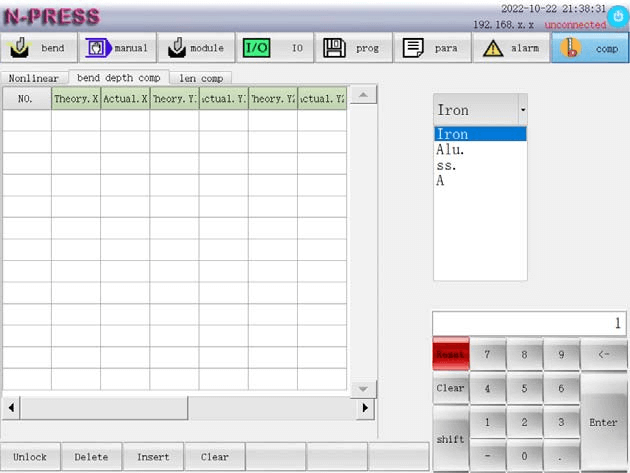
Dimension Compensation Techniques
Utilize size compensation within the ET Series Compensation to achieve exact product dimensions. These adjustments account for the specific properties of each material, thereby optimizing production output and ensuring that your products meet precise specifications.
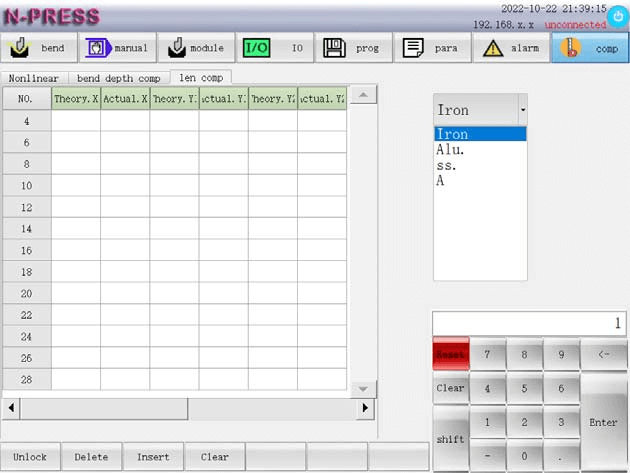
Implementing these compensation settings allows for more controlled and accurate bending, crucial for maintaining high standards in your manufacturing operations.
Utilizing Sub-Functions for Enhanced Control
Decoding is the first step in setting parameters. Use the sub-function keys to decode, ensuring all settings are correct before proceeding. Manage data efficiently by deleting, inserting, or clearing rows and columns as needed.
User Decoding Procedures
Decoding is your gateway to setting parameters. It involves:
- Accessing the Interface: Click the sub-function key ‘Unlock’ to open the decoding dialog box.

- Decoding the System: Input your customer code using the auxiliary keyboard and confirm by clicking “enter“. A successful decoding will prompt a “system decoding succeeded” message.
- Re-decoding Necessity: Each session requires fresh decoding. Successful decoding is also a prerequisite for parameter backup or recovery.

Efficient Data Management
Efficiently manage your data with the ET Series Compensation, optimizing your bending machine’s numerical control system for enhanced precision and efficiency:
Row and Column Management
- Delete Compensations: Streamline data organization by removing all compensations from a selected row. Simply select the desired row and click the “delete row” sub-function.
- Inserting Lines: Maintain precise data arrangement by inserting new lines before specific rows, such as before line 2. To do this, select the preceding row and use the “insert line” sub-function.
- Clearing Columns: Refresh your data inputs by clearing entire columns. Click on any content within the list and use the “empty column” option to remove all entries.
By mastering these ET Series Compensation processes, you gain precise control over your bending machine’s operations, ensuring improved data management and operational accuracy.
Frequently Asked Questions(FAQ)
Can ET Series Compensation handle varying material thicknesses effectively?
Yes, ET Series Compensation is designed to adapt to changes in material thickness automatically. By doing so, it optimizes the bending process and maintains high accuracy across different projects.
Do I need additional training to use ET Series Compensation on my bending machine?
While the system is user-friendly, it is recommended to have some training. Understanding the ET Series Compensation will help you maximize its benefits and improve the overall efficiency and accuracy of your bending operations.
How often should I recalibrate the ET Series Compensation system?
Regular calibration checks every few months can help maintain optimal performance. However, ET Series Compensation frequently self-adjusts to changes, minimizing the need for frequent manual recalibrations.
Conclusion
In conclusion, ET Series Compensation plays a pivotal role in enhancing the accuracy of full electric servo bending machines. By precisely adjusting for material and bending variables, this system minimizes errors and ensures consistent, high-quality results. Implementing ET Series Compensation effectively can significantly improve your production efficiency and output accuracy.
For further assistance or to explore more about how ET Series Compensation can benefit your operations, feel free to contact our experts. Additionally, you can browse our documentation for more insights into optimizing your bending machine’s performance.


