


When configuring a press brake control system, one of the most important steps is setting up the ESA S875 Database correctly. If you’re unsure how to input tool data, define material parameters, or ensure the system calculates bends accurately, this guide will walk you through it clearly. I’ll explain how to configure the ESA S875 Database step by step, so you can avoid programming errors, improve bending precision, and ensure stable daily production performance. Whether you’re setting up a new machine or optimizing an existing one, this article will help you get it right from the start.
Understanding the Purpose of the ESA S875 Database
The ESA S875 Database is designed to store and reuse correction values identified during bending operations. Instead of repeatedly adjusting the same parameters for similar bends, the ESA S875 Database allows previously saved corrections to be automatically recalled during programme creation.
When composing numeric programmes or filling graphic programmes, the Database searches for matching key values and inserts the corresponding correction data into the relevant fields. If an exact match is not available, the system can calculate a theoretical value using interpolation functions integrated within the Database.
This mechanism transforms accumulated bending experience into structured data, ensuring improved consistency, reduced setup time, and higher production stability.
Structure of the Database
Each ESA S875 Database consists of multiple tables. Every table corresponds to a specific material and contains all corrections related to that material.
Key structural characteristics of the ESA S875 Database include:
- Multiple databases can be managed within the control system
- Only one Database can be active at a time
- Each database is identified by a unique name
- Each table inside the Database inherits the same structural configuration
When configuring the Database, the structure must be defined carefully. Once the structure is confirmed, the number and type of fields cannot be changed.
Each field within the ESA S875 Database represents a sensitive numeric parameter of the bending programme, such as bend angle, sheet thickness, sheet width, tooling configuration, or machine height values.
Key Fields and Correction Fields
The ESA S875 Database divides its fields into two categories:
Key Fields
Key fields uniquely identify each record in the table. They determine how searches are performed inside the ESA S875 Database.
Typical key fields include:
- Bend angle
- Sheet metal width
- Sheet thickness
- Tooling configuration (die, cavity, punch)
These fields ensure that correction records are accurately matched during programme creation.
Correction Fields
Correction fields store the values associated with each key combination.
Examples include:
- Y-axis correction values
- X-axis correction values
Every key field in the Database has configurable properties:
- Arrangement index – Defines sorting priority
- Interpolation setting – Enables or disables interpolation
- Interpolation range – Defines the maximum allowable difference between upper and lower values for interpolation
These properties ensure precise control over how the Database retrieves or calculates correction values.
Example of an Database Structure
An example database, such as “METALLASER” may contain six fields:
Key fields:
- Bend angle
- Sheet width
- Sheet thickness
- Tooling
Correction fields:
- Y correction
- X correction
In this structure, the ESA S875 Database records corrections corresponding to specific material conditions. Each material table (numbered 1 to 99) stores corrections accumulated over time.
This organization allows the ESA S875 Database to gradually improve machine accuracy as more correction data is collected.
Enabling and Accessing the Database
To activate the ESA S875 Database, follow these steps:
- Enter the CORRECTIONS mask.
- Press the function key [Enable KVARADB] or [Disable KVARADB] to enable the database.
- Confirm activation when the icon appears on the display.
Once the Database is enabled, corrections can be acquired from:
- SETTINGS mask
- AUTOMATIC mask
- SEMIAUTOMATIC mask
- CORRECTIONS mask
To manage tables within the Database:
- Open the Corrections mask
- Select the database management function
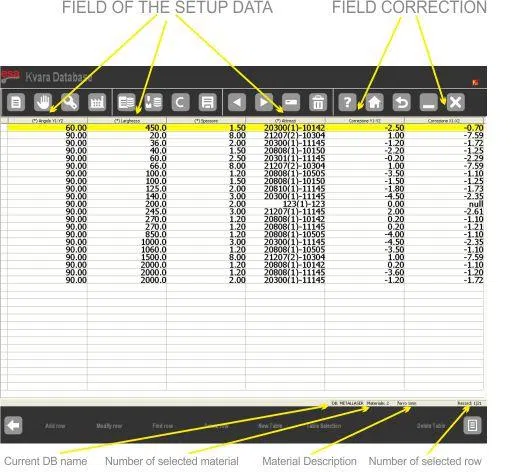
Available operations include:
- Add row
- Change row
- Search row
- Delete row
- Select table
- Modify table properties
- Rename table
- Save table as new material
The system menu also allows database-level operations such as creating a new Database, deleting a database, selecting the active database, or saving databases to a USB device.
Acquiring Correction Values
When the Database is active, correction values entered during bending can be stored for future reuse.
To manually store corrections:
- Enter correction values in Settings or Semiautomatic mask
- Press the learning function key
- Confirm storage in the corresponding material table
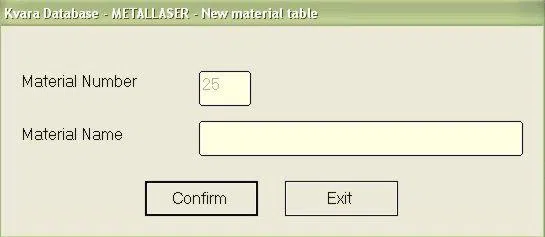
If the material table does not exist, the ESA S875 Database automatically prompts for table creation.
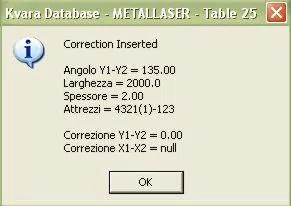
Should you try to re-enter an already existing value in the database, you will be asked to the confirm whether you wish to replace the existing value or not.
Self-Learning Mode
The self-learning mode in the ESA S875 Database is especially useful during the initial setup phase, when the database is still empty and no historical correction data has been accumulated.
To enable self-learning mode, enter the Corrections mask. If the ESA S875 Database is not yet active, first press the function key [ENABLE KVARADB] to enable it. Once activated, the system allows automatic acquisition of corrections without manually pressing the learning key [Learn KvaraDB].
Press the [Self-learning KDB] key: the icon for enabling the KvaraDB will be displayed in the top right hand corner:
KvaraDB enabled in normal mode

KvaraDB enabled in self-learning mode

This visual indication helps the operator clearly identify whether corrections are being stored automatically.
Interpolation and Thickness Tolerance
If an exact key match is not found, the Database performs linear interpolation between the nearest lower (INF) and higher (SUP) values.
Interpolation will only occur if:
- The difference between INF and SUP is within the defined range
- The interpolation property is enabled for the key field
If the interpolation range is set to 0, the ESA S875 Database always calculates interpolation.
Thickness Tolerance
Thickness tolerance allows correction reuse when thickness values vary slightly.
Example:
- Database contains correction for 2.0 mm thickness
- Programme uses 2.1 mm thickness
- If tolerance is set to 0.2 mm
→ The correction for 2.0 mm is applied
This feature increases flexibility and ensures the ESA S875 Database remains effective under real production conditions.
Materials Table and Stretch Coefficient
The Materials Table inside the Database allows configuration of stretch coefficients.
To access the Materials Table mask follow the steps below:
– Enter the Corrections mask by pressing

– Press the [Materials Table] key
The mask appears as illustrated in the figure:
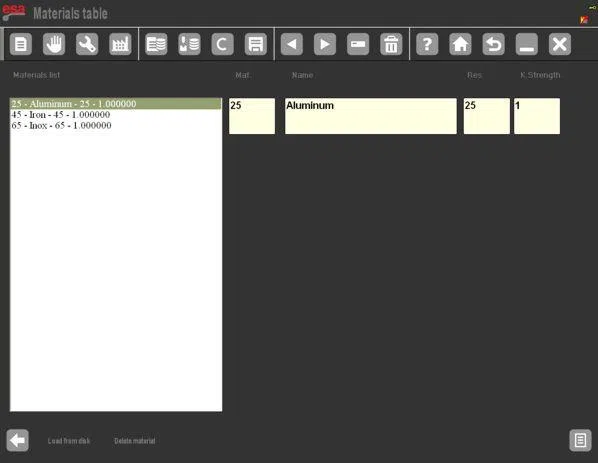
Default coefficient value: 1
- Value 2 → Double stretch
- Value 0.5 → Half stretch
- Value 0 → Disable stretch calculation
If stretch calculation is disabled:
- X corrections are no longer calculated
- Graphic development equals the exact sum of segments
The Database saves and loads coefficient data via USB or system configuration functions, ensuring consistent behavior across machines.
Frequently Asked Questions(FAQ)
Can multiple ESA S875 Databases be created?
Yes. The system can manage multiple ESA S875 Database configurations, but only one database can be active at a time. Each database can have its own structure and material tables, depending on production requirements.
How does interpolation work in the ESA S875 Database?
If an exact correction record is not found, the ESA S875 Database performs linear interpolation between the nearest lower and higher key values. Interpolation is only calculated if it is enabled for the key field and the value difference is within the defined interpolation range.
How are X-axis corrections handled in the ESA S875 Database?
For the X-axis, the ESA S875 Database does not directly store the displayed correction value. Instead, it saves the difference between the user-entered value and the calculated stretch value. This ensures accurate stretch interpolation and consistent behaviour across numeric and graphic programmes.
Conclusion
The ESA S875 Database is a powerful tool for transforming bending experience into structured and reusable correction data. By storing corrections per material, supporting interpolation, enabling self-learning, and managing stretch calculations intelligently, the ESA S875 Database significantly improves bending accuracy, reduces setup time, and ensures production consistency. Proper configuration and systematic use of the ESA S875 Database allow press brake operators to maintain stable performance while continuously refining machine precision over time.


