


In the realm of precision metalworking, ensuring maximum accuracy is paramount, and that’s where the DELEM DA-53T Machine Mode steps in. If you’re exploring how this advanced feature enhances the precision of your operations, you’ve come to the right place.
In this article, I’ll delve into the ways the DELEM DA-53T Machine Mode can refine accuracy in your press brake processes. This guide will provide you with the insights needed to understand how leveraging this technology can elevate your production quality, ensuring you achieve consistent and precise results. Whether you’re already using DELEM systems or considering an upgrade, the information here will help illuminate the benefits of incorporating DELEM DA-53T Machine Mode into your workflow.
Introduction
By tapping the navigation button Machine the control is switched to Machine mode.
The DELEM DA-53T Machine Mode, easily accessible through the navigation panel, allows you to configure machine settings and characteristics that impact calculations and behavior.

These settings are organized into several tabs for easy navigation. To adjust any item, simply tap the desired tab. If more tabs exist than can be displayed at once, you can drag horizontally to view and select all available options.
Optimized Backgauge Functionality
The DELEM DA-53T enhances precision in backgauge settings by considering dimensions like backgauge finger size, R-axis, and X-axis movements. Through DELEM DA-53T Machine Mode, it calculates potential workpiece-backgauge collisions and allows R-axis offset adjustments for optimal positioning outside the die safety zone.

Strategies for Maximizing Backgauge Accuracy with the DELEM DA-53T:
Gauge R offset: An offset value for the R-axis can be set if the backgauge is positioned against the sheet edge and the X-axis position is outside the die safety zone. A negative value gives a lower backgauge position. This offset is only valid for gauge position 0.
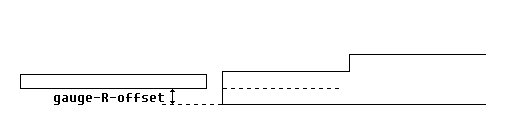
Finger Width: Use the Machine Mode to set precise finger dimensions, especially with an automatic Z-axis, for enhanced alignment and collision prevention.
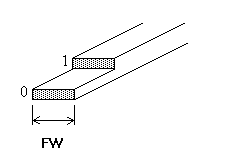
Tap “Edit Drawing” to display the backgauge drawing, allowing you to program the dimensions of the backgauge finger within the DELEM DA-53T Machine Mode.

The parameters provided describe the dimensions and lay-on positions of the backgauge. The number of parameters required will depend on the gauge positions you program. As more gauge positions are set, additional parameters will be available, and the illustration at the bottom of the screen will update accordingly.
Gauge Positions: Utilize up to four customizable gauge positions, allowing the system to adapt finger geometry for each scenario.
Finger Parameters: Set finger height (FH), length (FL), and gauge height (H1) accurately to maintain precise lay-on positions.
The DELEM DA-53T Machine Mode significantly boosts backgauge accuracy and efficiency in sheet metal operations.
Advanced Position Corrections

The DELEM DA-53T controller offers tools for correcting positional errors when the actual mechanical axis position doesn’t match the displayed value. This is achieved by adjusting the position correction parameter:
- If the displayed value is 250 and the actual position is 252, set the correction to -2.
- If the displayed value is 250 and the actual position is 248, set the correction to +2.
Corrections apply to all auxiliary axes and should be used temporarily. In DELEM DA-53T Machine Mode, ensure normal corrections are zero to maintain precision.
Best Practices for High-Precision Operations:
- Regular Calibration: Calibrate frequently to minimize the need for corrections.
- Temporary Corrections: Use position corrections as a short-term fix. Persistent issues may require service.
- Zeroing Corrections: Aim to keep corrections at zero during normal operation.
- Documentation: Record and monitor corrections to identify patterns or maintenance needs.
By following these guidelines, you can optimize machine precision and performance.
Proactive Maintenance and System Monitoring
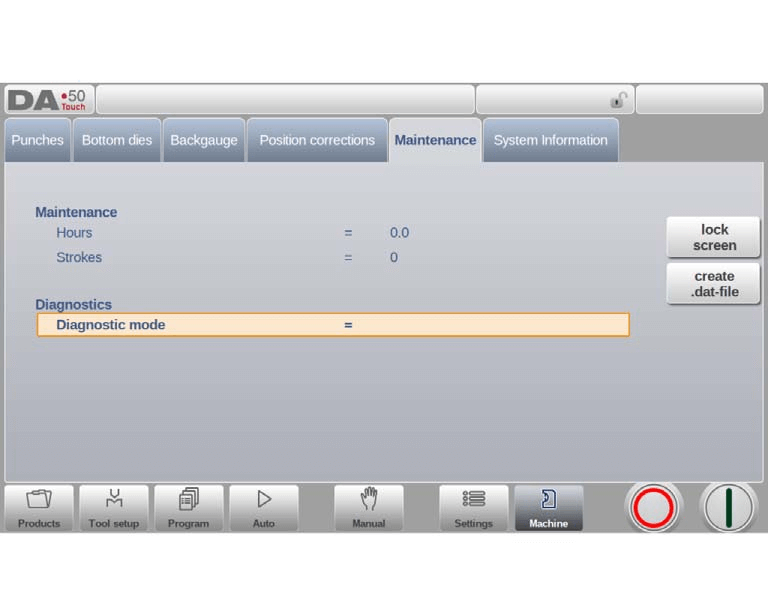
The DELEM DA-53T Machine Mode streamlines maintenance management with critical tools like the machine hour counter and stroke counter for monitoring usage.
These features guide regular maintenance schedules and prevent unexpected breakdowns. The diagnostic mode, which can be activated for in-depth troubleshooting, is available through a special code provided by the manufacturer.
Additionally, the Lock Screen function aids maintenance without altering settings, and the system can create a .dat-file to store important data for service support.
System Information and Troubleshooting
In the realm of enhanced problem-solving, utilizing system information is crucial. On the DELEM DA-53T Machine Mode, system information can be accessed for a comprehensive overview of the control system, including version details of the software and the IDs of installed modules. Additionally, information about OEM-specific files can also be obtained, which is invaluable for service and maintenance purposes.
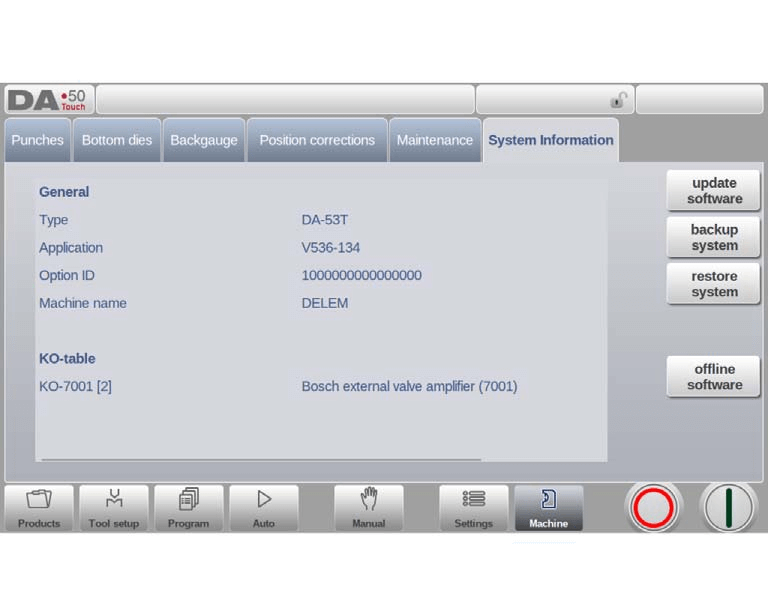
This screen shows detailed information about the control system. This information is useful for service purposes.
Application: The version of the current application
Option ID: The unique option ID of the control
Sequencer: The version number of the running sequencer
Delem.def: The version number of the running delem.def file
Update software
For improved machine accuracy, keeping software updated is essential. Within the DELEM DA-53T Machine Mode, users can find software update functionalities that enable the installation of update sets directly from a USB stick.
Backup system and Restore system
Moreover, the machine mode also offers options for backup and restoration. Users can create a complete system backup that includes Delem software, OEM-specific data, and user files, which is saved as a uniquely timestamped file on a USB stick.
Additionally, the offline software function facilitates the generation of an offline software setup file, promoting optimal compatibility with the control software and enhancing overall machine performance.
Frequently Asked Questions(FAQ)
How can I ensure the highest accuracy in my press brake operations using the DELEM DA-53T Machine Mode?
To achieve the highest accuracy, regularly update your DELEM DA-53T software to access the latest features and improvements. Utilize the system information to monitor version details and perform periodic backups to maintain operational integrity.
How does system information in DELEM DA-53T Machine Mode assist in problem-solving?
By providing detailed control system data including software and module version information, DELEM DA-53T Machine Mode helps troubleshoot issues quickly, enhancing problem-solving efficiency.
How often should the DELEM DA-53T Machine Mode software be backed up?
It’s recommended to back up your software regularly, especially after major updates or configuration changes. This ensures that all critical data is preserved and can be easily restored if needed.
Conclusion
In summary, the DELEM DA-53T Machine Mode significantly enhances accuracy in press brake operations by providing precise system information, facilitating regular software updates, and offering robust data backup and restoration capabilities. These features work in tandem to ensure optimal machine performance and minimal operational disruptions.
To explore more about how the DELEM DA-53T can benefit your press brake operations or to seek expert guidance, we invite you to reach out to our team. Proper setup and maintenance are crucial for maximizing the longevity and efficiency of your press brake machine. By adhering to recommended guidelines and performing routine maintenance, you can reduce downtime and boost productivity. For personalized support or further inquiries, please contact us or browse our additional resources and documentation.


