


ESA S875 Automatic Programme Execution provides an efficient and precise way to carry out bending programmes on press brakes. For those looking to execute programmes in automatic mode, this guide explains the key functions, steps, and corrections available, ensuring accurate bends and smooth operation. By following the instructions, operators can monitor the process, apply necessary adjustments, and complete the programme efficiently, whether using a graphic or numeric setup.
Enabling ESA S875 Automatic Programme Execution
After setting a numeric programme or calculating a graphic programme, ESA S875 Automatic Programme Execution can be activated to carry out the bending process automatically. This mode allows the operator to execute the full programme without manually stepping through each bend.
Automatic mode is enabled by pressing the designated automatic key on the control panel.

Once activated, ESA S875 Automatic Programme Execution manages axis positioning, bend sequencing, and step transitions according to the programmed data.
This function is available for both:
- Calculated graphic programmes
- Pre-set numeric programmes
The workflow differs slightly depending on the programme type selected.
Automatic Graphic Mask
For programmes created in graphic mode, the automatic graphic mask provides a visual representation of the bending process. It consists of three main windows:
- Main window – Displays the upper and lower parts of the press brake, the punch and die entered in the programme, the piece before and after the bend, and the stop position.
- Orientation window – Shows how the piece should be oriented for each bend, including clinching or rotation relative to previous bends.
- Bend data window – Contains information about the bend in progress and the piece counter. Final and actual heights of the axes are highlighted in yellow for quick reference.
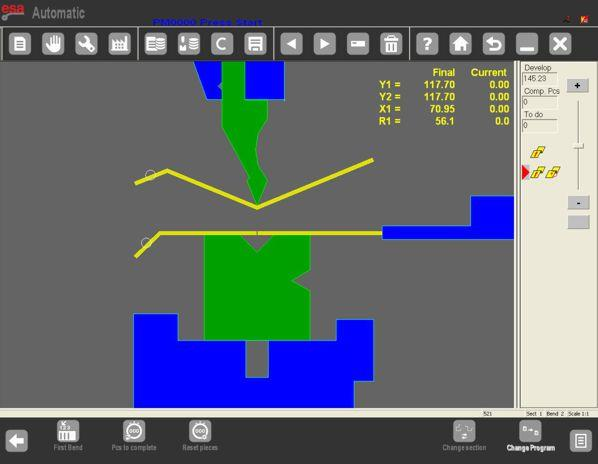
These windows help the operator visualize the complete bending process and anticipate any potential issues before execution.
Automatic Numeric Mask
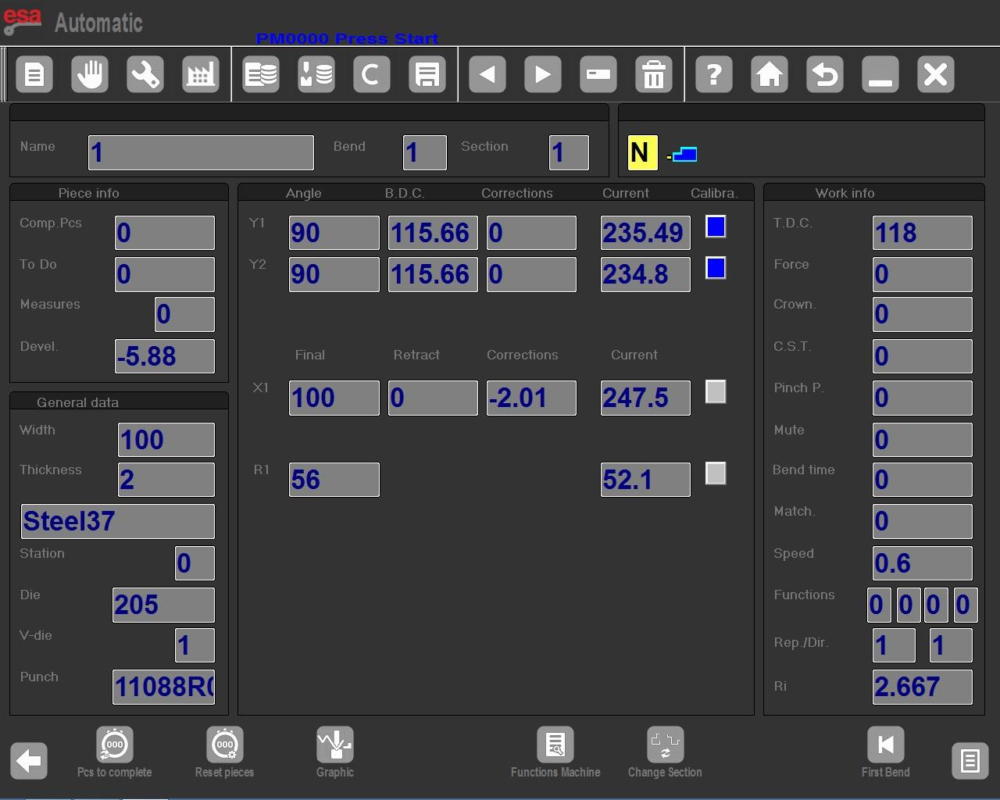
For numeric programmes, the automatic numeric mask adds the current heights of the axes to the programme settings. While programme data cannot be changed in automatic mode, the mask still provides guidance on piece orientation for each bend, enabling the operator to monitor the execution effectively.
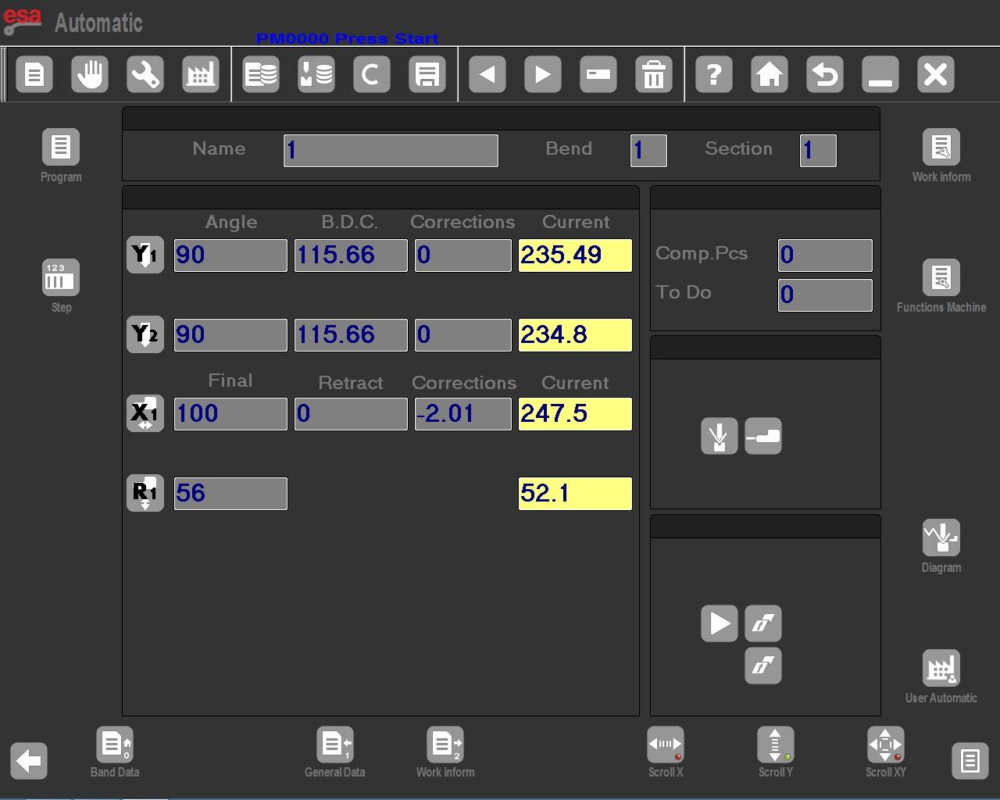
– To have available the double size mask as Kvara S 675 PC and S 875W models, press
– To return to the mask with single size characters press it again.
Carrying Out the Automatic Cycle
To start ESA S875 Automatic Programme Execution, press the START key.
The process follows this sequence:
- Stop axes position automatically
- Press the lowering pedal to lower the ram
- The bend is performed
- The ram returns automatically
- Stop axes reposition for the next bend
After completing the last bend, ESA S875 Automatic Programme Execution automatically restarts from the first bend, enabling continuous production.
The [First Bend] function allows the operator to preview the first bending step when required.
First Bend and Sample Piece Execution
The first bend function allows operators to review the initial bend before executing the full programme. Due to variations in sheet metal, theoretical calculations may need adjustments. To simplify corrections, the SEMI-AUTOMATIC mask can be used to perform a sample piece:
- Execute the bend step-by-step, measuring length and angle.
- If adjustments are required, enter correction values in millimeters for stop axis positions and degrees for bend angles.
- Corrections can be applied globally to all bends, by section, or to individual bends as needed.
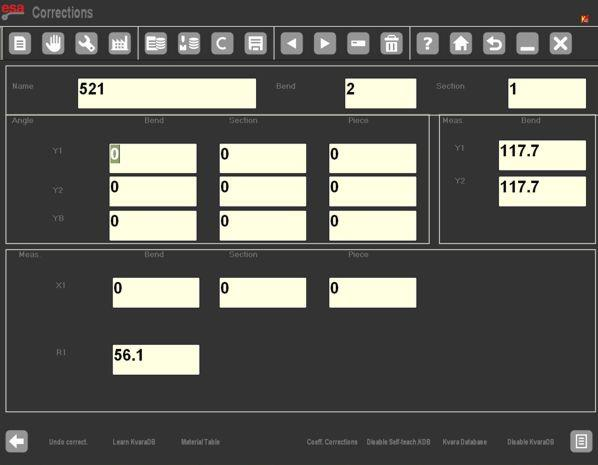
For example, if a bend is closed by 2° more than desired, a +2° correction is entered. If it is under-bent by 2°, a -2° correction is entered. Multiple corrections to the same bend are cumulative. During pitch corrections, angles can be adjusted separately per cylinder, or equally for both cylinders in general corrections.
Setting Correction Data
In ESA S875 Automatic Programme Execution, corrections can be applied at three levels:
- Piece level
- Section level
- Bend level
Correction Units:
- Axis position: mm
- Bend angle: degrees
Angle Correction Example:
- If bend is closed by 2° → enter +2.0°
- If bend is open by 2° → enter -2.0°
Length Correction Example:
- If bend length is short → enter positive value in Corr. X1
- If bend length is long → enter negative value
If multiple corrections are entered, the latest value is added to previous corrections.
Pitch correction allows separate correction for:
- Y1 cylinder
- Y2 cylinder
In general correction mode, both cylinders are corrected equally.
After entering corrections during ESA S875 Automatic Programme Execution:
- Confirm the data
- Reposition stop axes
- Repeat the bend
- Verify results
Once all bends are corrected, the automatic cycle resumes from the selected bend.
Deleting Correction Data
To discard all manual corrections and restore original programme values:
- Press [Ignore corrections].
- The programme reverts to the initial data, ensuring that any unintended changes can be safely removed without affecting overall operation.
Frequently Asked Questions(FAQ)
Why can’t programme data be modified in automatic mode?
During ESA S875 Automatic Programme Execution, programme parameters are locked to prevent accidental changes that could affect bend accuracy or machine safety. If adjustments are needed, the operator must exit automatic mode and modify the programme in the appropriate editing interface.
What happens if the last bend is completed?
After the final bend is executed, ESA S875 Automatic Programme Execution automatically restarts from the first bend. This enables continuous batch production without manually resetting the cycle.
Is it possible to modify programme data during ESA S875 Automatic Programme Execution?
No. During ESA S875 Automatic Programme Execution, programme parameters cannot be modified. Operators can monitor axis heights and bend orientation, but data editing must be performed outside automatic mode.
Conclusion
ESA S875 Automatic Programme Execution provides a reliable and efficient way to run press brake programmes in fully automatic mode. By combining automatic axis positioning, bend sequencing, real-time monitoring, and flexible correction functions, the system ensures accurate and repeatable bending results. When properly configured and verified through the sample piece procedure, ESA S875 Automatic Programme Execution significantly improves workflow efficiency and production consistency in daily operations.


