


If you’re looking to understand how to apply quick and precise adjustments during bending operations, ESA S875 Semiautomatic Corrections is the feature you need to know. When angle deviations or backgauge positioning errors occur during production, operators often need a fast way to correct them without returning to the full Settings menu. Semiautomatic Corrections allows direct modification of Y1, Y2, X, and R axis values from the semiautomatic mask while the machine is in STOP status. In this article, I will explain how ESA S875 Semiautomatic Corrections works, how to apply corrections to a single bend or multiple bends with the same angle, and how to ensure stable and consistent bending results using this function.
Introduction
The ESA S875 Semiautomatic Corrections function allows operators to directly modify bending parameters from the semiautomatic mask without returning to the Settings interface. This feature is designed to improve efficiency during production adjustment and reduce downtime between trial bends. By using Semiautomatic Corrections, operators can quickly compensate for angle deviation or backgauge positioning errors while remaining inside the working screen.
When the machine status is STOP, the semiautomatic mask becomes editable. This is the main operating condition required for Semiautomatic Corrections to function properly. The mask provides access to real-time correction of axis values, allowing precise adjustment of bending results.
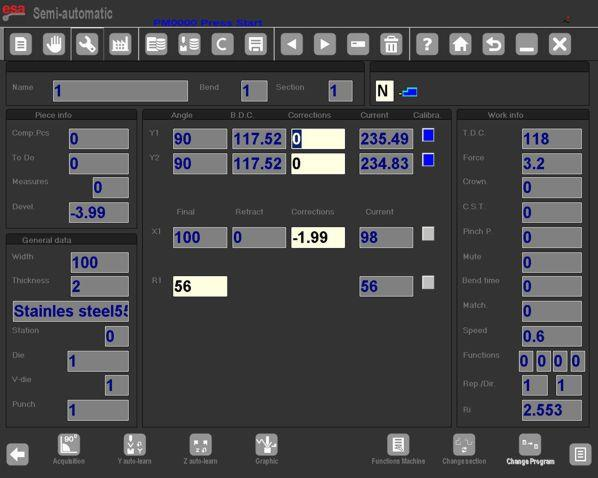
Editable Parameters in ESA S875 Semiautomatic Corrections
Within the ESA S875 Semiautomatic Corrections mask, the operator can directly edit:
- Y1 axis correction
- Y2 axis correction
- X axis correction
- R axis height correction
These values can be adjusted without entering the full Settings mask. Semiautomatic Corrections therefore streamline the correction workflow and reduce unnecessary navigation steps.
When the machine is switched to START enabled status, Semiautomatic Corrections remain visible but become read-only. This ensures safety and prevents unintended changes while the machine is active. Editing is only permitted when the system returns to STOP mode.
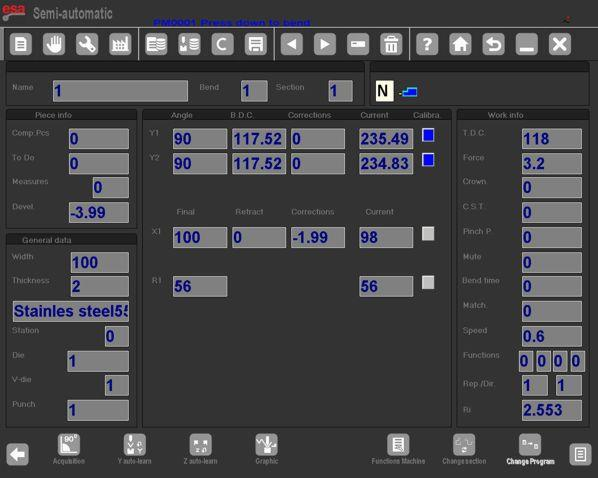
Applying Semiautomatic Corrections to the Current Bend
When a correction is entered inside the ESA S875 Semiautomatic Corrections mask, it is applied directly to the current bend. The system immediately updates the working value.
Once a parameter is changed:
- The edited value appears with reversed colours
- The operator receives visual confirmation
- The modification affects only the active bend by default
This design ensures clarity and control during production adjustment. Semiautomatic Corrections allow the operator to test modifications step by step before applying them to a wider range of bends.
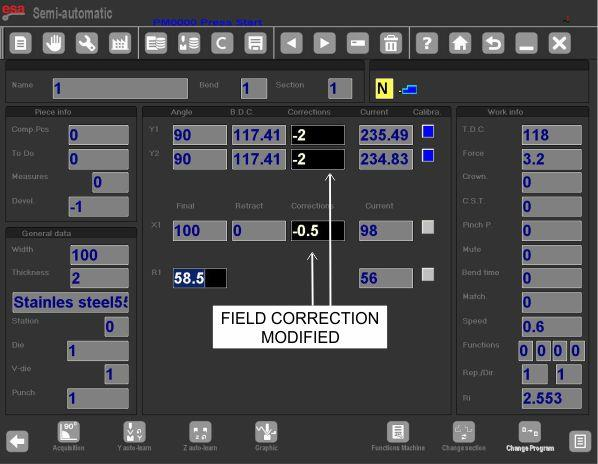
Apply to Same Section with Same Angle
If multiple bends within the same section share the same angle, the correction can be extended:
- Enter the required correction
- Press the key to access the secondary menu
- Select [Conf. Same. Sect.Ang.]
This function applies Semiautomatic Corrections to all bends in the current section that have the same angle value as the active bend.
Apply to Entire Piece with Same Angle
To extend ESA S875 Semiautomatic Corrections to all bends across the entire workpiece that share the same angle:
- Enter the correction
- Access the secondary menu
- Select [Conf.Pr. Same.Ang]
This ensures uniform correction for identical angles throughout the programme. The flexibility of ESA S875 Semiautomatic Corrections makes it suitable for repetitive production with multiple identical bends.
Internal Radius in Semiautomatic Corrections
The internal radius of the bend can be displayed in the Settings mask and is always calculated by the controller. The calculation method may be:
- Graphic
- Numeric
The selected method is defined in the generic parameters.
In ESA S875 Semiautomatic Corrections, changes to the internal radius influence stretch calculations only when the programme is numeric. If the programme is generated graphically, modifying the internal radius will not automatically recalculate the stretch.
Therefore, when applying ESA S875 Semiautomatic Corrections in numeric programmes, operators must verify the impact of internal radius adjustments on developed length values.
Operational Guidelines for Semiautomatic Corrections
To ensure stable performance when using ESA S875 Semiautomatic Corrections:
- Perform edits only when the machine is in STOP status
- Apply small incremental corrections
- Confirm changes using reversed-colour indicators
- Extend corrections carefully to sections or entire pieces
- Verify internal radius settings in numeric programmes
The ESA S875 Semiautomatic Corrections feature is designed to optimize production accuracy while maintaining operator control. By allowing direct axis correction inside the working mask, ESA S875 Semiautomatic Corrections improve efficiency, reduce correction cycles, and ensure consistent bending quality.
Proper understanding and structured application of Semiautomatic Corrections support precise angle control, accurate backgauge positioning, and stable repeatability across production batches.
Frequently Asked Questions(FAQ)
Does internal radius affect ESA S875 Semiautomatic Corrections?
Yes, but only under specific conditions.
If the programme is numeric, changes to the internal radius will influence stretch calculations. If the programme is graphic-based, modifying the internal radius will not trigger automatic recalculation of stretching values within ESA S875 Semiautomatic Corrections.
When can ESA S875 Semiautomatic Corrections be edited?
ESA S875 Semiautomatic Corrections can only be edited when the machine is in STOP status.
If START is enabled, the semiautomatic mask remains visible but becomes read-only to ensure operational safety and prevent unintended parameter changes.
What is ESA S875 Semiautomatic Corrections?
ESA S875 Semiautomatic Corrections is a function that allows operators to directly enter angle and axis corrections from the semiautomatic mask. It enables real-time adjustment of bending parameters without returning to the Settings interface.
Conclusion
ESA S875 Semiautomatic Corrections provides a direct and efficient way to adjust Y1, Y2, X, and R axis values from the semiautomatic mask when the machine is in STOP status. By allowing corrections to be applied to a single bend, an entire section with the same angle, or the whole workpiece, ESA S875 Semiautomatic Corrections helps maintain angle consistency and improve production efficiency. Understanding when edits are permitted, how to extend corrections properly, and how internal radius settings affect stretch calculations is essential for stable and accurate bending results.
If you need further technical guidance on ESA S875 programming, parameter configuration, or troubleshooting, contact our technical team for professional support. You can also refer to the machine parameter manual for more detailed configuration instructions.


