


If you’re looking to master ET Series Programming Management in the context of full electric servo bending machines, you’ve come to the right place. In this guide, I’ll walk you through the essential aspects of ET Series Programming Management, providing you with a clear understanding of how to optimize and control your bending operations efficiently. By the end of this article, you’ll be equipped with the knowledge to enhance your programming skills and streamline your metal bending processes. Whether you’re looking to improve accuracy, reduce downtime, or simply get a better handle on your machine’s capabilities, this guide is designed to meet your needs.
Understanding the ET Series Programming Management

Before you dive into programming, familiarize yourself with the program interface by clicking the function key.
Navigating the Program List Interface

Maximize your programming efficiency with the ET Series Programming Management, allowing you to organize and control up to 99 programs. Follow these steps:
- Serial Numbering: Assign serial numbers from No.1 to No.99 for easy program identification.
- Program Naming: Use a mix of numbers and letters for program names to reflect each multi-step bending task, while extensions remain hidden.
- Material Sync: Ensure material data aligns with the selected material number in the programming interface for consistency.
- Plate Thickness Sync: Match plate thickness data with programming settings to ensure precise operations.
- Navigation: View 12 programs per page, using the up and down keys to move the cursor and turn pages, while maintaining your current selection.
Utilize these steps to optimize your ET Series program management for better organization and efficiency.
Step-by-Step Guide to Mastering Programming Management
Step 1: Reading Existing Programs
- Select the program, such as “TEST”.
- Click the sub-function key ‘Read‘ to read the selected program, with confirmation displayed as “program reading succeeded”.

Enter the processing interface, and the displayed program content is the program “TEST”.

Step 2: Deleting Unwanted Programs
- Choose the program file, like “N003”, for deletion.
- Engage the sub-function key ‘Delete‘ to prompt a dialog box.
- Click ‘Yes‘ to confirm the deletion or click ‘No‘ to cancel the deletion. The system will automatically clear the prompt information.

Click ‘Yes‘ to confirm the deletion, and the system will prompt “File deletion succeeded!”.
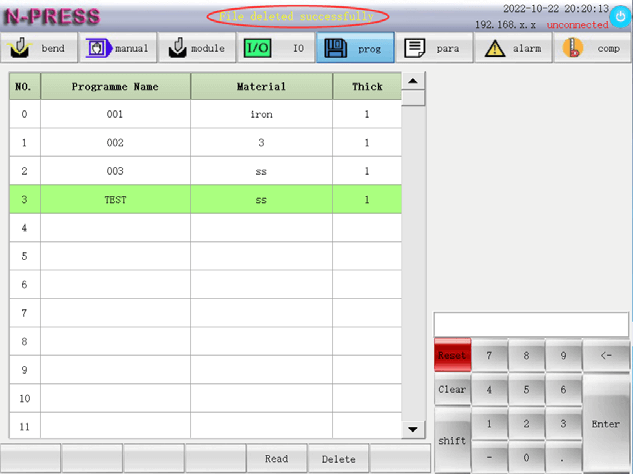
Step 3: Managing Program Lists
Learn to navigate the program pages: 12 programs display per page, and navigation is done via up and down keys. This allows keeping the cursor bar position in the selected line, crucial for effective ET Series programming list management.
Address Common Issues Effectively
Troubleshooting Program Interface Issues
Identify Issues: If you encounter unresponsive keys or receive errors while reading or deleting programs, start by identifying any patterns or recent changes that might have triggered these issues. Consistently monitor for ET Series programming interface issues to quickly address disruptions.
Reset the System: Begin the troubleshooting process by resetting the system, which often resolves minor glitches and refreshes the program interface. Ensure all unsaved work is backed up before proceeding.
Re-test Functionality: After resetting, test each function key to ensure that the interface responds correctly. This step is crucial in confirming the resolution of ET Series programming interface issues.
Ensuring Accurate Program Execution
Verify Data Synchronization: Check that the material type and plate thickness settings are correctly synchronized within the programming interface. Incorrect data can lead to execution errors.
Test Run Programs: Conduct test runs to validate that programs execute as expected. Pay particular attention to the precision and accuracy of bends, ensuring that material data is correctly applied.
Resolve Precision Issues: If discrepancies occur, double-check all input data and settings. This step is essential in resolving precision issues, ensuring optimal ET Series programming management.
Enhancing Performance with Regular Maintenance
Routine Checks: Schedule regular inspections of the ET Series system to identify wear or potential failures in advance. Incorporate these checks into your standard maintenance protocol to prevent sudden downtimes.
System Updates: Keep the software and firmware of the ET Series system updated to benefit from the latest improvements and bug fixes that enhance system performance.
Efficiency Improvements: Regularly clean and lubricate all moving parts to maintain optimum function, which reduces strain on the system components, enhancing efficiency and prolonging machine life.
Frequently Asked Questions(FAQ)
How can I effectively troubleshoot my ET Series Programming Management interface issues?
To troubleshoot the ET Series Programming Management interface efficiently, start by resetting the system if you encounter unresponsive keys or errors. This often resolves minor glitches. Ensure you back up any unsaved work prior to performing the reset. Once reset, test the functionality of each key to confirm the issue is resolved.
What steps should I take to ensure accurate program execution in my ET Series system?
To ensure accurate program execution within your ET Series Programming Management, verify that your material type and plate thickness settings are properly synchronized. Conduct a test run to validate program execution, focusing on the precision of bends. This helps identify any discrepancies that need correction.
How do I improve my ET Series Programming Management system’s performance?
To improve your ET Series Programming Management system’s performance, routinely update the software and firmware. These updates include improvements and bug fixes that enhance system functionality. Regular cleaning and lubrication also help maintain optimal performance.
Conclusion
Mastering ET Series Programming Management involves understanding the fundamental steps of troubleshooting program interface issues, ensuring accurate program execution, and enhancing system performance through regular maintenance. By following these clear and structured guidelines, you can effectively manage your machine’s programming, minimize errors, and boost overall efficiency.
For a deeper understanding or personalized assistance, we encourage you to contact our team. Additionally, explore our documentation for more insights into optimizing your full electric servo bending machine’s numerical control system.


