


If you’re looking to understand how to access the DELEM DA-41T diagnostics mode, you’re in the right place. By utilizing the DELEM DA-41T diagnostics, you can easily troubleshoot and optimize your press brake’s performance. This guide will walk you through the steps to enter the diagnostic mode, providing you with valuable insights into your machine’s state and helping ensure its efficient operation. Whether you’re a service engineer or simply keen on enhancing your machine’s performance, knowing how to navigate the DELEM DA-41T diagnostics is essential.
Introduction
The DELEM DA-41T is a versatile and efficient controller designed specifically for press brakes, offering precision and user-friendly operation. Known for its reliable performance and straightforward interface, the DA-41T allows operators to easily program, adjust, and execute various bending operations. This advanced controller not only helps in enhancing productivity by reducing setup times but also ensures high precision in the bending process.
With features like performance optimization and diagnostic capabilities, the DELEM DA-41T is essential for maintaining the seamless operation of your machinery. Understanding its functionalities, including the diagnostic mode, can empower you to efficiently manage and troubleshoot your press brake, ensuring its longevity and optimal performance.
Entering the DELEM DA-41T Diagnostics Mode
Step 1: Switching to Diagnostic Mode
To access the DELEM DA-41T diagnostics mode, ensure that your machine is either in Automatic mode or Manual mode. Press the service row for 2 seconds to enter the diagnostic mode. This is crucial for monitoring the condition of your machine accurately.
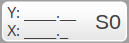
The diagnostic mode can be switched off by tapping the service row again. These diagnostic screens are intended to be used on request of a service engineer from the machine manufacturer.
Step 2: Understanding Axis State

Once in diagnostic mode, you can view the programmed position, actual position, and control state for the X-axis and Y-axis.
Mentioned below are the possible machine states:
• S0 -> Stopped
• S1 -> Positioning
• S2 -> Wait for Retract
• S3 -> Wait for LDP
• S4 -> Opening
• S5 -> Wait for STEP
• S6 -> Wait for X-delay
Step 3: Exiting Diagnostic Mode
To switch off the diagnostic mode, simply tap the service row again. This seamless transition ensures that the machine resumes its normal operations without any hitches.
Utilizing Diagnostic Details
Inputs and Outputs Overview
In diagnostic mode, you can view the status of all inputs, outputs, and encoders. This information is vital for troubleshooting potential signal issues within the machine’s operations.

By regularly checking these inputs and outputs, you can quickly identify any mismatches between the expected and actual signals, which can help prevent operational interruptions. A thorough understanding of the encoder feedback can also aid in precise calibrations, allowing the machine to perform at its optimum capacity. Regularly monitoring and adjusting based on this data not only helps maintain machine health but also contributes to consistent production quality.
Monitoring Signals
The mode also displays the status of all digital input and output signals. Keeping an eye on these signals can provide early warning signs of any potential discrepancies or malfunctions.

A proactive approach to signal monitoring enables you to address issues before they escalate into significant problems, thereby minimizing downtime. By integrating this practice into your regular maintenance routine, you ensure that the machine operates smoothly and efficiently. This attention to signal detail can lead to long-term cost savings by reducing the need for extensive repairs and replacements.
Frequently Asked Questions(FAQ)
What can I monitor in the DELEM DA-41T diagnostics mode?
The DELEM DA-41T diagnostics mode allows you to monitor the programmed and actual positions of the X-axis and Y-axis, as well as the control state. Additionally, you can view the status of all inputs, outputs, and digital signals.
Why is the DELEM DA-41T diagnostics mode important for maintenance?
The DELEM DA-41T diagnostics mode provides crucial insights into your machine’s operational state, helping identify potential issues before they lead to significant problems. This ensures efficient and reliable machine performance.
Can I utilize the DELEM DA-41T diagnostics mode without a service engineer?
While the DELEM DA-41T diagnostics mode provides valuable information, it’s intended to be used in collaboration with a service engineer who can interpret the data accurately and provide necessary adjustments or repairs.
Conclusion
Accessing the diagnostics mode of the DELEM DA-41T is a straightforward process that involves switching to either Automatic or Manual mode and pressing the service row for two seconds. Once in diagnostic mode, you can assess crucial data such as axis states, inputs, outputs, and signal statuses. This allows you to effectively troubleshoot and optimize your press brake’s performance, extending its life and decreasing downtime.
For further assistance or detailed information, feel free to contact our support team. Additionally, you can explore other documentation on our website for more insights into optimizing your machine’s operations.


