


When configuring the ESA S640 User Parameters, it’s essential to understand how these settings can dramatically enhance the operation of your press brake. If you’re curious about setting these parameters effectively, you’re in the right place. In this article, I’ll guide you through the process of configuring ESA S640 User Parameters, which are crucial for optimizing the precision and efficiency of your bending projects. By delving into these configurations, you can ensure your machinery functions at its best, whether you’re aiming to improve workflow efficiency or achieve consistent results across various bending tasks. Whether you’re a novice user or seeking to refine your setup, this guide will equip you with the knowledge to make informed adjustments.
Understanding the ESA S640 User Parameters
Introduction to User Parameters
The user parameters setting in the ESA S640 provides non-password-protected access to several vital machine configurations, ensuring ease of use. This setting allows users to make quick adjustments without compromising the machine’s core parameters, thus preventing unauthorized changes while still offering flexibility.
How to Configure ESA S640 User Parameters
Accessing the User Parameters Page
To begin configuration, navigate to the settings page of your ESA S640 and press the button to open the menu. Next, select the item labeled 4>> User Parameters. This action will open a window where various configurations can be made.

Adjusting Axis Reference Parameters
Step 1: Understanding the Correction Process
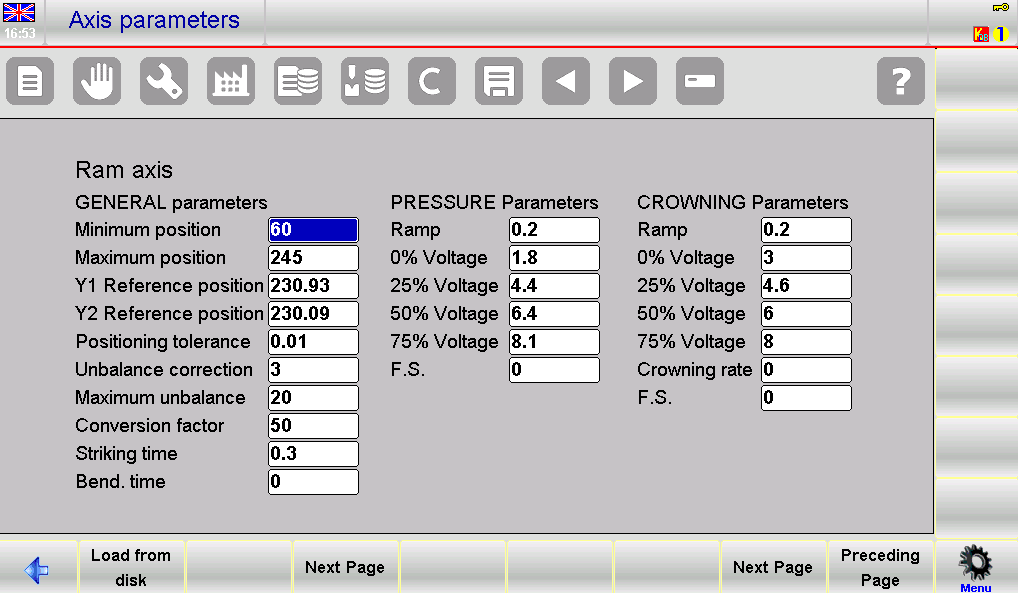
In the ESA S640, it is common to require adjustments to the axis reference values due to mechanical wear and tear. For instance, the factory setting for the ram axes reference values is 230.93 mm for Y1 and 230.09 mm for Y2
Step 2: Implementing Corrections
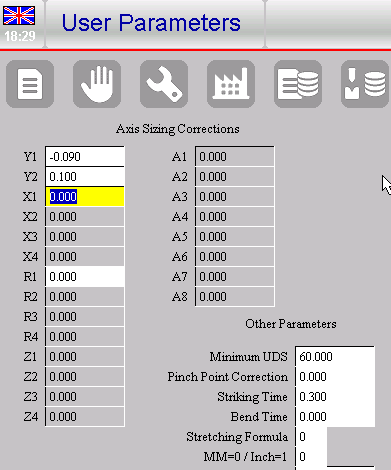
Suppose it becomes necessary to adjust these values to improve accuracy, perhaps due to wear over time. If Y1 requires a correction of -0.09 mm and Y2 needs a +0.1 mm adjustment, these can be made directly on the “PARAMETERS USER” page. Input these values in the corresponding fields, guiding Y1 to calibrate at 230.84 mm and Y2 at 230.19 mm post calibration.
Step 3: Saving Adjustments
After implementing these corrections, save the updated parameters. This can be done by pressing the save button to store them in an external memory file, such as UserTara.par, ensuring that the changes are documented and easily retrievable.
Handling Parameter Resets
If there are new factory parameter changes from the manufacturer, the system will alert users with a display message.
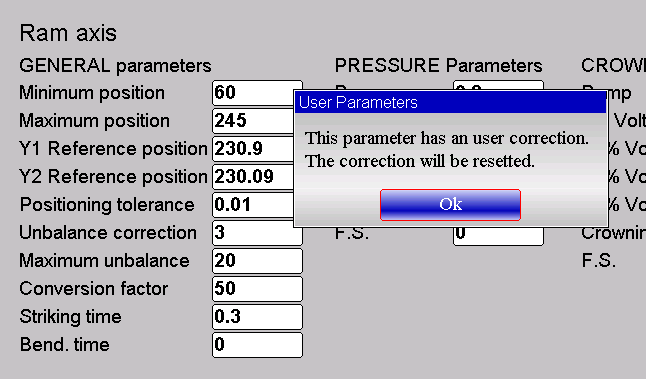
The relative correction of the User Parameter page will be automatically reset and the reference value will return to being that of the ram axis parameters:

This automatic reset ensures that any previous corrections are overridden, safeguarding the machine’s integrity by restoring baseline settings.
Exploring Additional User Parameter Options
The other parameters of the User Parameters page are the same as the MACHINE PARAMETERS, like explained before they are available without using the access password, and have the following meanings:


Frequently Asked Questions(FAQ)
Can adjusting my ESA S640 User Parameters affect production speed?
Yes, carefully configuring ESA S640 User Parameters can optimize production speed by reducing setup times and ensuring consistent bending operations. Proper adjustments enhance both workflow efficiency and output quality.
What is the process to reset ESA S640 User Parameters to default?
To reset ESA S640 User Parameters to their default settings, go to the system settings menu and select the reset option. Ensure to back up any custom settings before proceeding to avoid data loss.
What should I do if I encounter issues with ESA S640 User Parameters configuration?
If you encounter any issues, double-check the parameter settings against your machine specifications. Consult the user manual for detailed instructions or contact customer support for further assistance.
Conclusion
In conclusion, configuring ESA S640 User Parameters is a pivotal step in optimizing your press brake operations. By following the outlined steps, users can ensure accurate settings for enhanced performance and reliability. Key points include understanding each parameter’s function, utilizing the machine’s interface effectively, and conducting regular checks to maintain optimal settings. These steps not only maximize the efficiency of your ESA S640 but also contribute to precise bending processes.
For further assistance and detailed information, we encourage you to contact our team. Our experts are available to provide personalized support and answer any questions you may have. Additionally, explore our documentation section to find more related guides and materials that can help you make the most of your ESA S640 system.


