


ESA S929 Automatic Mode is designed to streamline press brake production by allowing operators to execute programmed bending sequences automatically with high precision and repeatability. If you want to improve production efficiency and understand how to run bending programs safely in automatic mode, this guide is for you. In this article, I will explain how to use ESA S929 Automatic Mode step by step, including selecting a program, starting automatic execution, monitoring the bending process, and understanding key operating functions. Whether you are new to the ESA S929 controller or looking to optimize your daily workflow, mastering ESA S929 Automatic Mode will help you achieve faster setup times and more consistent bending results.
Accessing ESA S929 Automatic Mode
After creating and saving an ESA S929 Numeric Program, the next step is to execute it using ESA S929 Automatic Mode. This operating mode enables the controller to perform the programmed bending sequence automatically, improving production efficiency and ensuring consistent bending quality.
To enter ESA S929 Automatic Mode, open the Editor page and press the Automatic Mode icon.

The controller will switch to the automatic operation interface, where operators can monitor machine status and execute the selected bending program.
The automatic screen displays the current bend information, programmed values, tooling data, and axis positions in real time, allowing operators to verify the setup before starting production.
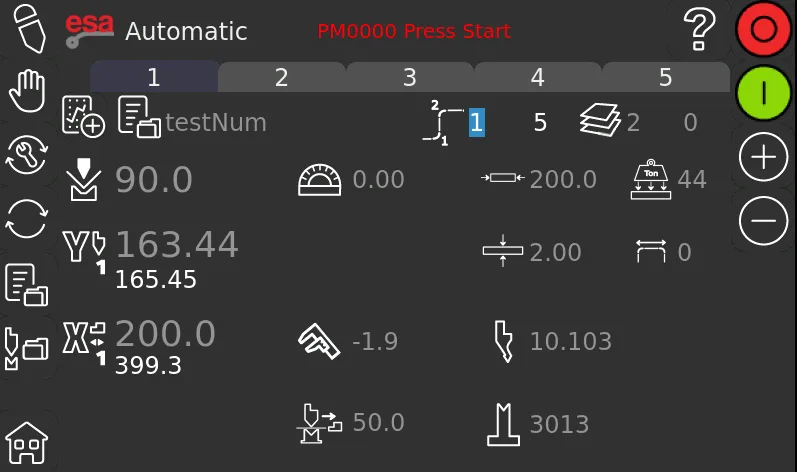
Understanding the ESA S929 Automatic Mode Interface
The ESA S929 Automatic Mode screen provides essential information for monitoring the bending process.
Current Program Information
At the top of the interface, the controller displays the active bending step within the selected program. Operators can easily identify which bend is currently being executed and monitor the overall production sequence.
Axis Position Display
The left side of the screen shows the real-time positions of the machine axes. These values allow operators to compare the programmed targets with the actual machine positions before and during execution.
Material and Tooling Data
The interface also displays key production parameters, including:
- Bend angle
- Material thickness
- Material width
- Material resistance
- Selected punch
- Selected die
Before starting automatic operation, verify that all displayed values match the production requirements.
Preparing to Run ESA S929 Automatic Mode
Before executing a program, several checks should be completed to ensure safe and accurate operation.
Verify Program Data
Confirm that the correct bending program has been loaded and that all bend steps have been programmed correctly.
Check Tooling Configuration
Ensure that the installed punch and die correspond to the tooling specified in the program. Incorrect tooling may lead to inaccurate bends or machine interference.
Confirm Axis Positions
The current axis positions are automatically added to the numerical entry data when entering ESA S929 Automatic Mode. If necessary, operators can modify the program data directly from the automatic interface before starting the cycle.
Completing these checks helps minimize setup errors and improves production reliability.
How to Start Automatic Cycle Execution
Once all preparations have been completed, the bending cycle can begin.
Step 1: Press the Start Button
Press the green Start button located on the automatic operation screen.

After the command is issued, the backgauge axes automatically move to their programmed positions.
Step 2: Operate the Foot Pedal
When the backgauges reach the target position, press the down foot pedal to lower the ram and perform the bending operation.
The controller executes the programmed bend according to the parameters stored in the ESA S929 Numeric Program.
Step 3: Automatic Return
After the bend is completed, the ram automatically returns to its upper position.
At the same time, the backgauge axes reposition themselves for the next programmed bend without requiring manual intervention.
Continuous Program Execution in ESA S929 Automatic Mode
ESA S929 Automatic Mode is designed to execute complete multi-bend programs automatically.
After one bend is completed:
- The ram returns automatically.
- The backgauge moves to the next programmed position.
- The controller prepares the following bend step.
Operators only need to reposition the workpiece and activate the foot pedal when appropriate, allowing production to continue efficiently through the entire program.
Automatic Restart After the Final Bend
When the final bend in the program has been completed, the ESA S929 controller automatically returns to the first bend of the program.
This feature is particularly useful for batch production because it allows repeated manufacturing of identical parts without reloading the program.
Monitoring Program Execution
During automatic operation, operators should continuously observe the machine status and displayed parameters.
Pay particular attention to:
- Current bend number
- Axis positions
- Tooling information
- Material settings
- Program progress
Monitoring these values helps identify potential setup issues before they affect production quality.
Best Practices for Using ESA S929 Automatic Mode
For maximum efficiency and safety, always verify the program data before entering ESA S929 Automatic Mode. Confirm that the correct punch and die are installed, ensure material specifications match the programmed values, and check that the backgauge reaches its target position before initiating each bend.
When running batch production, periodically inspect finished parts to verify bending accuracy and make corrections if necessary. Combining proper program preparation with careful monitoring allows operators to take full advantage of ESA S929 Automatic Mode while maintaining consistent and reliable production performance.
Frequently Asked Questions(FAQ)
What should I check before starting ESA S929 Automatic Mode?
Before starting, verify that the correct bending program is loaded, the installed punch and die match the program settings, the material parameters are correct, and the backgauge positions are appropriate for the selected bend.
What happens after one bend is completed?
After the bending operation finishes, the ram automatically returns to its upper position, and the backgauge axes move to the next programmed location. The controller then prepares the following bend for execution.
Can I modify program data while using ESA S929 Automatic Mode?
Yes. The current axis targets are added to the numerical entry data when entering automatic mode, and certain program parameters can be modified directly from the automatic status interface if adjustments are required.
Conclusion
ESA S929 Automatic Mode provides an efficient and reliable way to execute bending programs by automating the movement of the ram and backgauge according to predefined program data. By understanding how to access the automatic interface, verify program settings, start the bending cycle, and monitor machine operation, operators can significantly improve production efficiency and maintain consistent bending quality.
Before every production run, it is recommended to confirm the selected program, tooling configuration, material parameters, and axis positions to minimize setup errors and ensure safe operation. Regular monitoring during automatic execution and routine inspection of finished parts can further enhance productivity and process stability.
If you need additional guidance on ESA S929 Automatic Mode, controller operation, or press brake programming, feel free to contact the HARSLE technical support team. You can also explore more HARSLE documentation and training resources to learn advanced programming techniques and optimize your bending workflow.


